VoxsteadA voice-triggered dispatch console that calls a list in order and shows every call leg.
Someone at the desk says “Connect the duty desk”. Voxstead calls an ordered list one destination at a time, plays an announcement to whoever answers, connects live two-way audio and switches an output when the call is answered. The console shows each call leg on its own, so the desk can see who answered and who is connected.
Voxstead is an Awan Forge product concept, designed and built by Awan Forge. The public workspace runs on a Simulated line in your browser. The kit software for Asterisk and a Raspberry Pi is part of the source, switched off by default.
Runs on the simulator in your browser. No account.
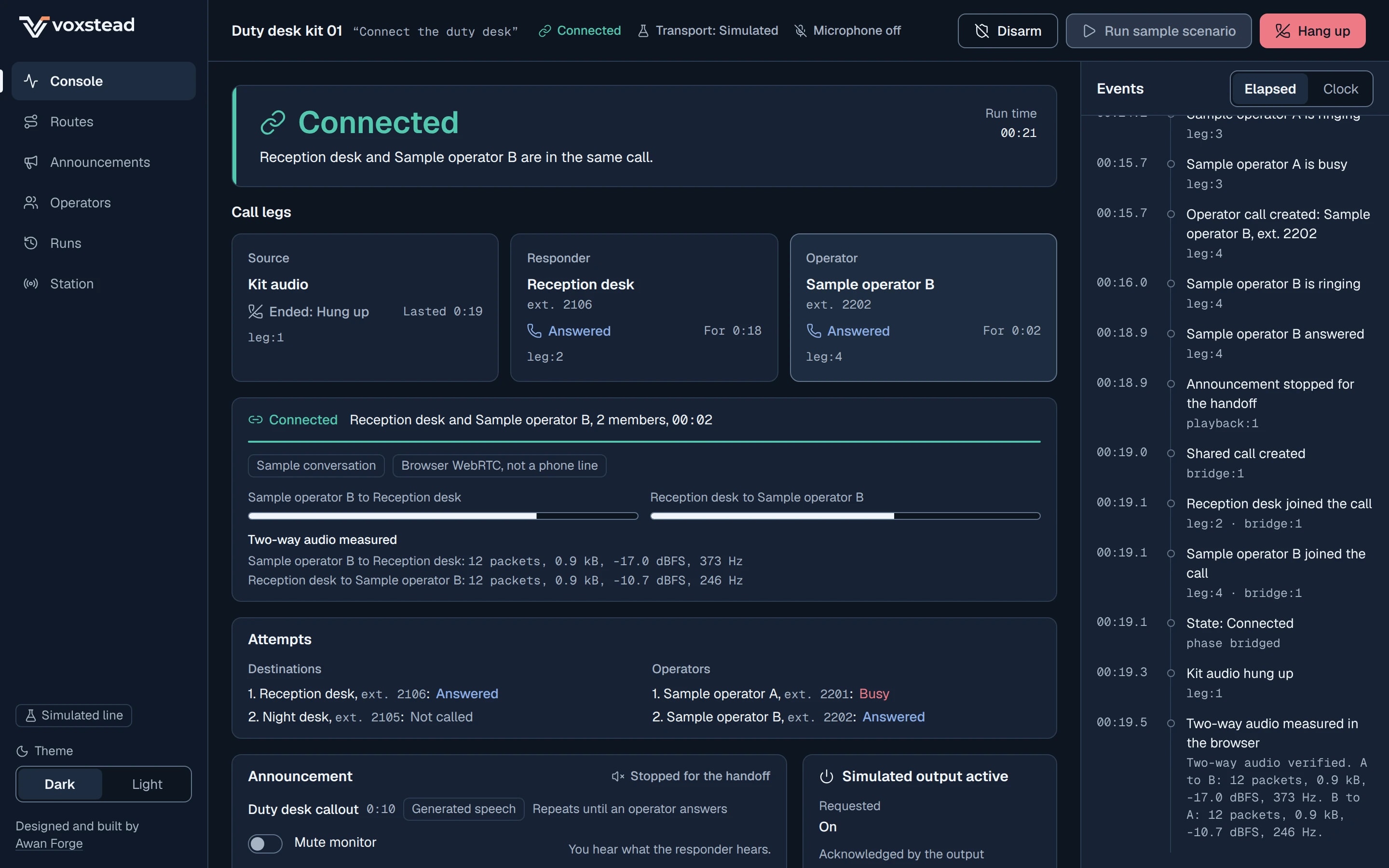
Console, operator handoff
- Type
- Awan Forge product concept
- Platforms
- Web app, Linux and Raspberry Pi agent
- Our work
- Research, interface design, run engine, simulator, web workspace, signaling service, edge agent, Asterisk configuration, testing, deployment
- Built with
- TypeScript, Next.js, Web Audio, WebRTC, Node.js, Python, Asterisk ARI
- Date
- November 2026
The requirement, and three parties on every call
The reference need was a self-contained kit for routine dispatch, facilities teams and staffed reception. We built Voxstead as our own product around it.
What the kit has to do
- Listen for a spoken trigger.
- Call a configured list over an existing SIP line.
- Play an editable prerecorded announcement.
- Connect live two-way audio with a person or a configured destination.
- Stop the announcement when the live handoff happens.
- Switch a solid-state relay when the outbound call is answered.
- Let people change the announcement and the list without help.
Two words that meant more than one thing
“Caller” and “transfer” each pointed at more than one party, so a single status could hide which call was in which state. Voxstead names three parties and shows each as its own call leg, from the engine to the event log to the screen.
An existing internet phone line means a SIP trunk or extension that the owner has configured, with the provider's permission to place outbound calls. Voxstead places new calls over it. It never joins a call already in progress elsewhere.
| Party | Who it is | Its call leg |
|---|---|---|
| Source | The kit's own microphone and speaker, or a SIP extension next to the kit. | One leg, started first. If it cannot be brought up, nobody outside is called. |
| Responder | The first destination in the ordered list that answers. | One leg per attempt, called one at a time. |
| Operator | An optional separate person the responder is handed to. | One leg per operator, called after the announcement has played once. |
| Mode | Who ends up talking | In what order |
|---|---|---|
| Direct connect | The source and the responder talk. | The announcement plays once to the responder, then the responder and the source are joined in one call. |
| Operator handoff | The responder and an operator talk. | The announcement repeats for the responder while operators are called in turn. When one answers, the announcement is stopped, the responder and operator are joined, and only then is the source released. If no operator answers, the route decides: connect the source to the responder, or end the run. |
SourceKit audio, kit-01
ResponderReception desk, ext. 2106
OperatorSample operator A, ext. 2201
OperatorSample operator B, ext. 2202
OutputSimulated relay output
- Ringing
- Source held in reserve
- Answered (network)
- Announcement playing
- Connected
- Busy
- Output on
What happens, in order
- 3.10 s: Reception desk answers. Output on is requested, and acknowledged at 3.25 s.
- 3.15 s: the announcement starts and repeats for the responder.
- 12.15 s: the first play ends and Sample operator A is called. Busy at 13.95 s.
- 17.15 s: Sample operator B answers.
- 17.35 s: the announcement stop is confirmed.
- 17.43 s: the shared call is created. 17.51 s: both members have joined, and the state is Connected.
- 17.63 s: the source leg is released.
- 37.51 s: the responder hangs up. The shared call is closed, the operator leg hung up and output off requested; acknowledged at 37.66 s.
Two directions for the console, and why Live Legs won
Before any interface code, the design research specified two directions for the console in writing, on the same frame: 216 px navigation, a 64 px header, a 376 px event panel and an 800 px stage at 1440 × 900. We drew the wireframes below for this case study from those written layouts, region by region.
Wireframe, direction A
Wireframe, direction B
What decided it
- Facts on one side, the order of events on the other
- The Aircall call timeline page we studied keeps call facts in one column and the timeline in another. Live Legs keeps that split. Route Line put a second ordered sequence beside the event panel.
- Answered and Connected never share a place
- A network answer is not a connection, so Live Legs gives the connection its own row. Route Line put Ringing and Answered on the same station.
- Every scenario changes words, not layout
- Direct connect, operator handoff, all unavailable, cancel and an interrupted line each change words in fixed positions. Route Line needed a different line shape for three of them.
- It stacks on a phone without a redesign
- Banner, legs, connection, attempts and media stack in that order, with Cancel run and Hang up kept in a bar at the bottom.
What stayed from Route Line
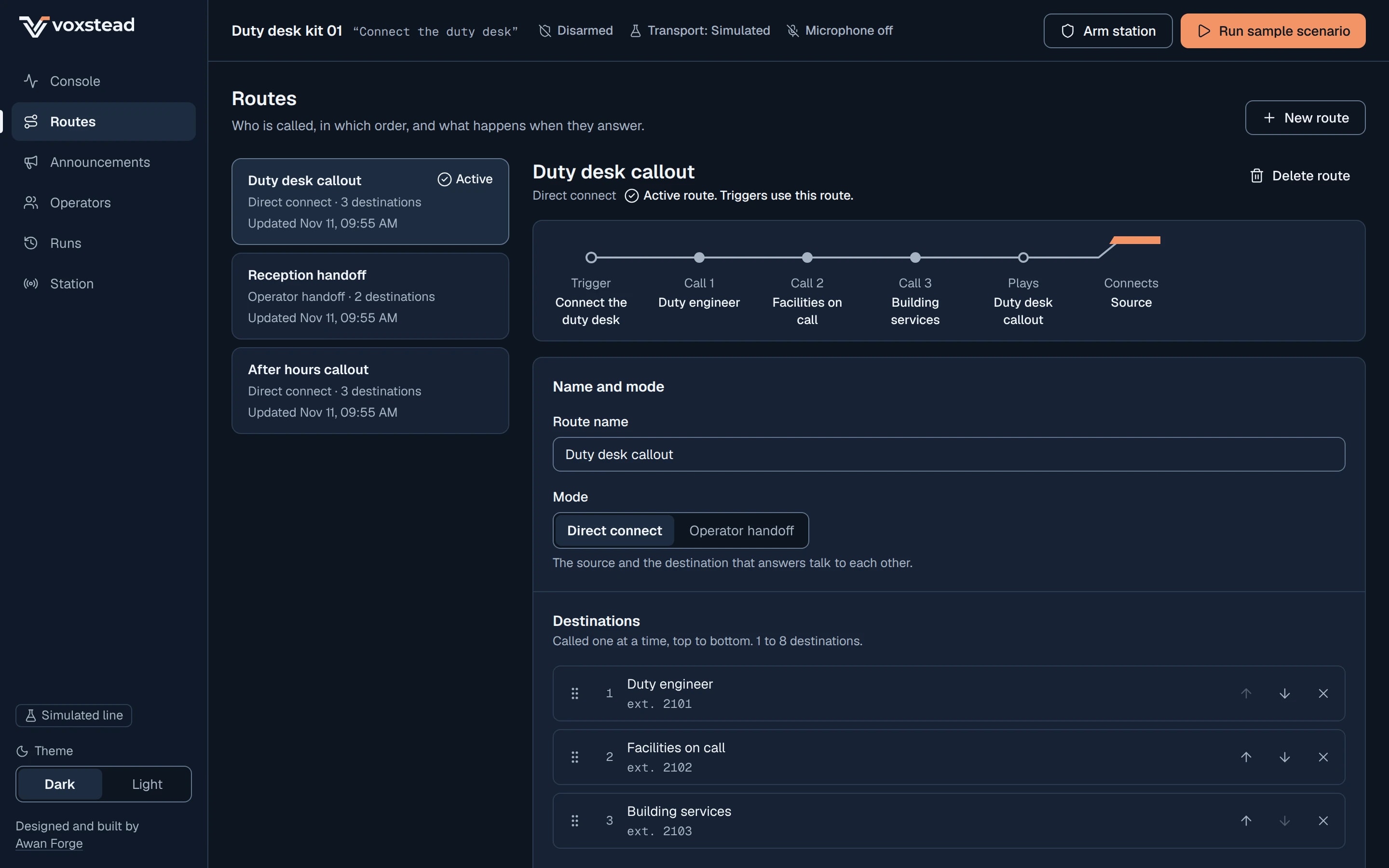
The Routes screen has a small static route preview in the shape of the logo's routing line. The live console has no diagram.
Three Behance call-centre projects were on the reading list. Each one was blocked in a real browser session, so nothing in the design rests on them.
Console, shipped
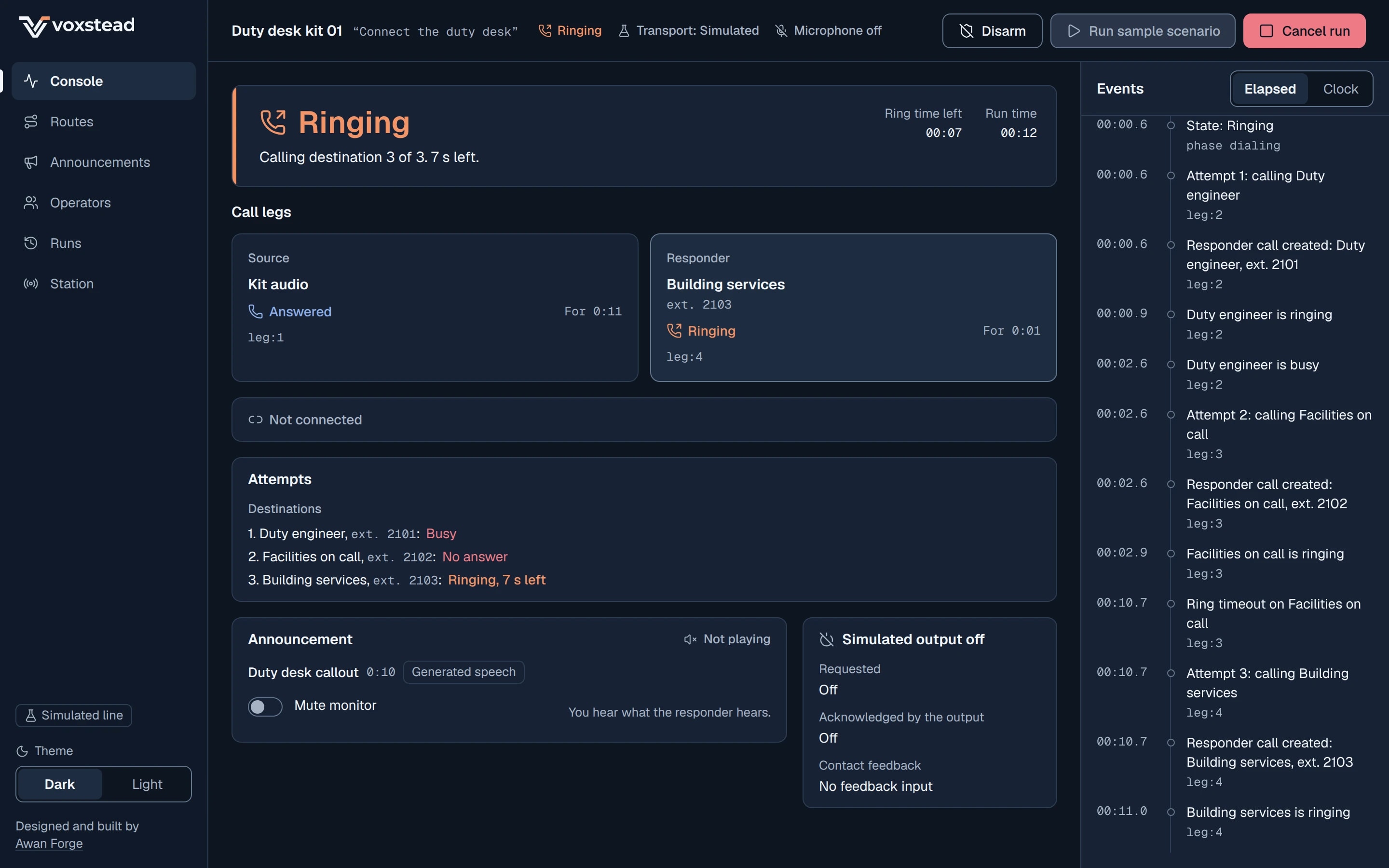
Route order, answer events and stopping the announcement
- One destination at a time
- The next attempt starts only after the current one has ended. A ring timeout asks for a hang up and records no answer, and the engine still waits for the end before it moves on. In “Third contact answers” the first destination is busy at 2.60 s and the second is called at 2.60 s; the second rings out at 10.72 s and the third is called at 10.72 s. Passes through the list stop at three.
- An answer is a network answer
- Voicemail, an auto attendant and call forwarding send the same answer signal as a person. The leg card says Answered, and the screen says Connected only when both intended parties have joined the shared call. The output switches on at the responder's answer, as the requirement asks, and the commissioning list tells the owner that an answer by voicemail looks the same.
- No one joins while the announcement plays
- The engine emits no add-to-call instruction while any playback of the run is requested, playing or blocked. In a handoff it asks for the announcement to stop and waits for the stop to be confirmed before it creates the shared call.
| Time | Event | What it means |
|---|---|---|
| 17.15 s | leg.answered | Sample operator B answers. |
| 17.35 s | playback.stopped | The announcement on the responder's leg is confirmed stopped, reason handoff. |
| 17.43 s | bridge.created | The shared call exists, with nobody in it. |
| 17.51 s | bridge.joined × 2 | Reception desk joins, then Sample operator B. |
| 17.51 s | run.phase | Connecting to bridged: the screen says Connected. |
| 17.63 s | leg.ended | The source leg is released. |
How the rule is tested
A simulator test replays everything that crosses the adapter boundary in all five sample scenarios and fails if any playback is still active at the moment a party is added to the call. An engine test checks that the shared call is created only after the stop is confirmed when the operator answers.
On Asterisk the agent deletes every tracked playback, waits up to about two seconds for each to finish, and checks that it is gone. If one still exists, the run fails and hangs up. It never adds a party with audio still playing.
Routes
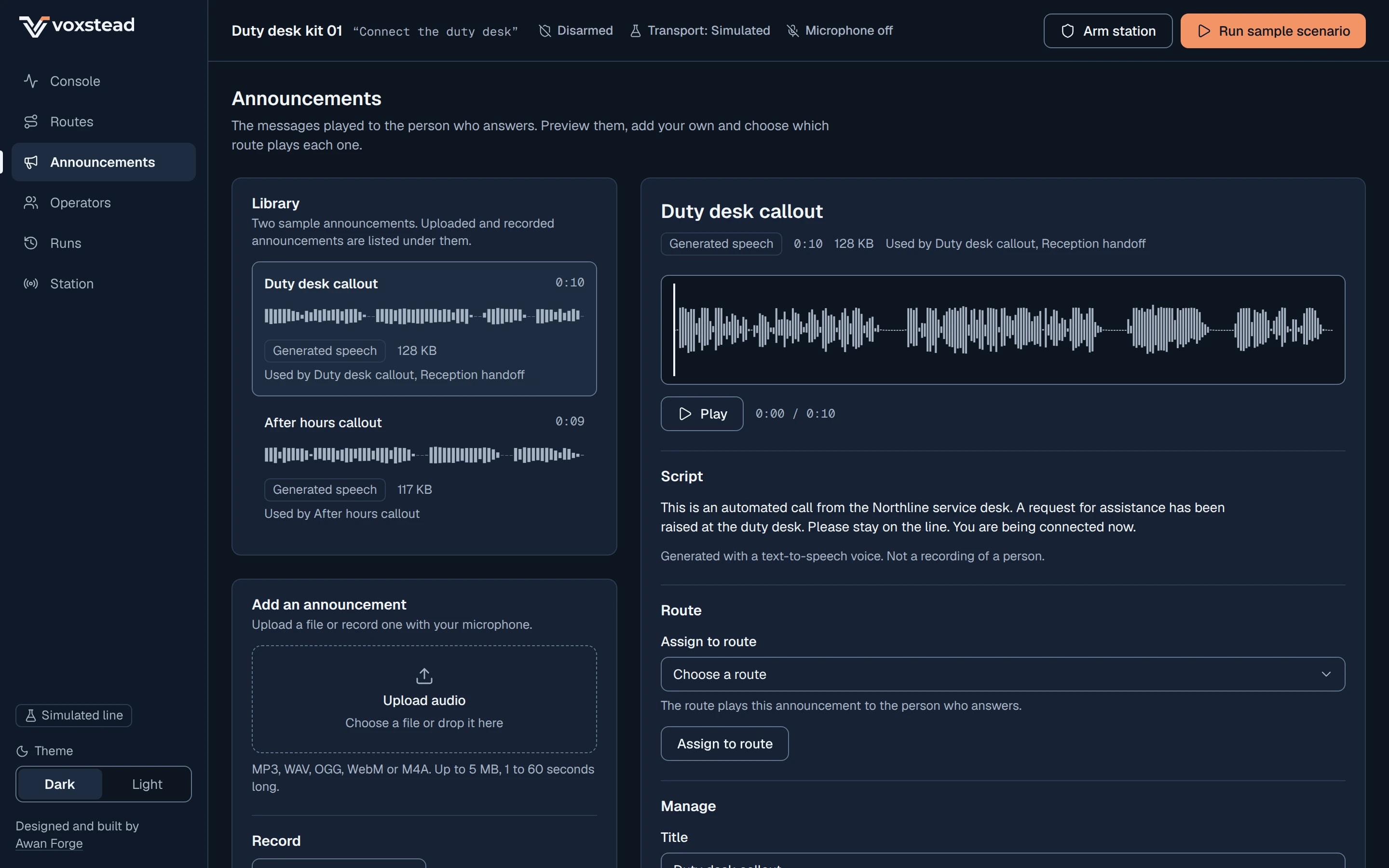
Announcements
One pure state machine, held to the same runs in two languages
The run engine is one function, step(state, input), that returns the next state, the events it appended and the effects to perform. It reads no clock, starts no timer and touches no audio: every input carries the time. Effects are instructions such as originate, play, stop playback, create the shared call, add to it, set the relay and start a timer.
A shell runs each effect against the adapters and turns what they report into the next input, one at a time from a queue. An accepted trigger freezes a copy of the configuration, and the run reads only that copy, so editing a route during a call changes nothing in it. An input for another run, an unknown leg or a transition already made is ignored and logged as a notice.
22
numbered rules in the architecture document, from trigger to ending
12
kinds of effect the engine can ask for
| Label | Engine phase | Sentence on the banner |
|---|---|---|
| Starting | triggered | Bringing up the source endpoint. |
| Ringing | dialing | Calling destination 2 of 3. 6 s left. |
| Answered | answered | Duty engineer answered. Not connected yet. |
| Announcing | announcing | Playing “Duty desk callout”. 0:04 of 0:09. |
| Connecting | connecting | Calling the operator. The announcement repeats for the responder. |
| Connected | bridged | Source and Duty engineer are in the same call. |
| Ended | completed, exhausted, cancelled or failed | The outcome and duration, for example “Connected for 00:42” or “No destination answered”. |
| Adapter | Public workspace | Edge kit |
|---|---|---|
| Telephony | Scripted simulator. Outcomes come from the chosen scenario. | Asterisk ARI over HTTP and one WebSocket. |
| Announcement player | Web Audio. Reports started only when the audio context is running, and blocked when the browser refuses. | ARI playback with explicit playback ids. |
| Relay output | Simulated. The screen says “Simulated output active”. | Linux GPIO through libgpiod, off at start. |
| Trigger | The browser's speech recognition where present, a button and a typed phrase. | Optional offline wake phrase (Vosk), or a typed or Enter-key trigger. |
| Storage | IndexedDB, in each visitor's own browser. | A JSON lines log file. |
TypeScript first, Python held to it
The engine is written once in TypeScript for the browser and ported rule for rule to Python for the Linux and Raspberry Pi agent. The simulator records five sample scenarios as fixtures, with every event and effect on a fixed clock, and a test fails if a fresh run differs from the committed file by one byte.
The Python agent has a parity test that replays the same five fixtures and must reproduce them exactly, and a test that compares its event names with the TypeScript list.
The five scenarios
- Third contact answers: busy, no answer, then answered and connected.
- Operator answers: the responder is handed to the second operator.
- All contacts unavailable: the run ends with no destination answered.
- Cancel during the announcement.
- Line transport interrupted during the run.
Two-way audio, measured, and every ending cleaned up
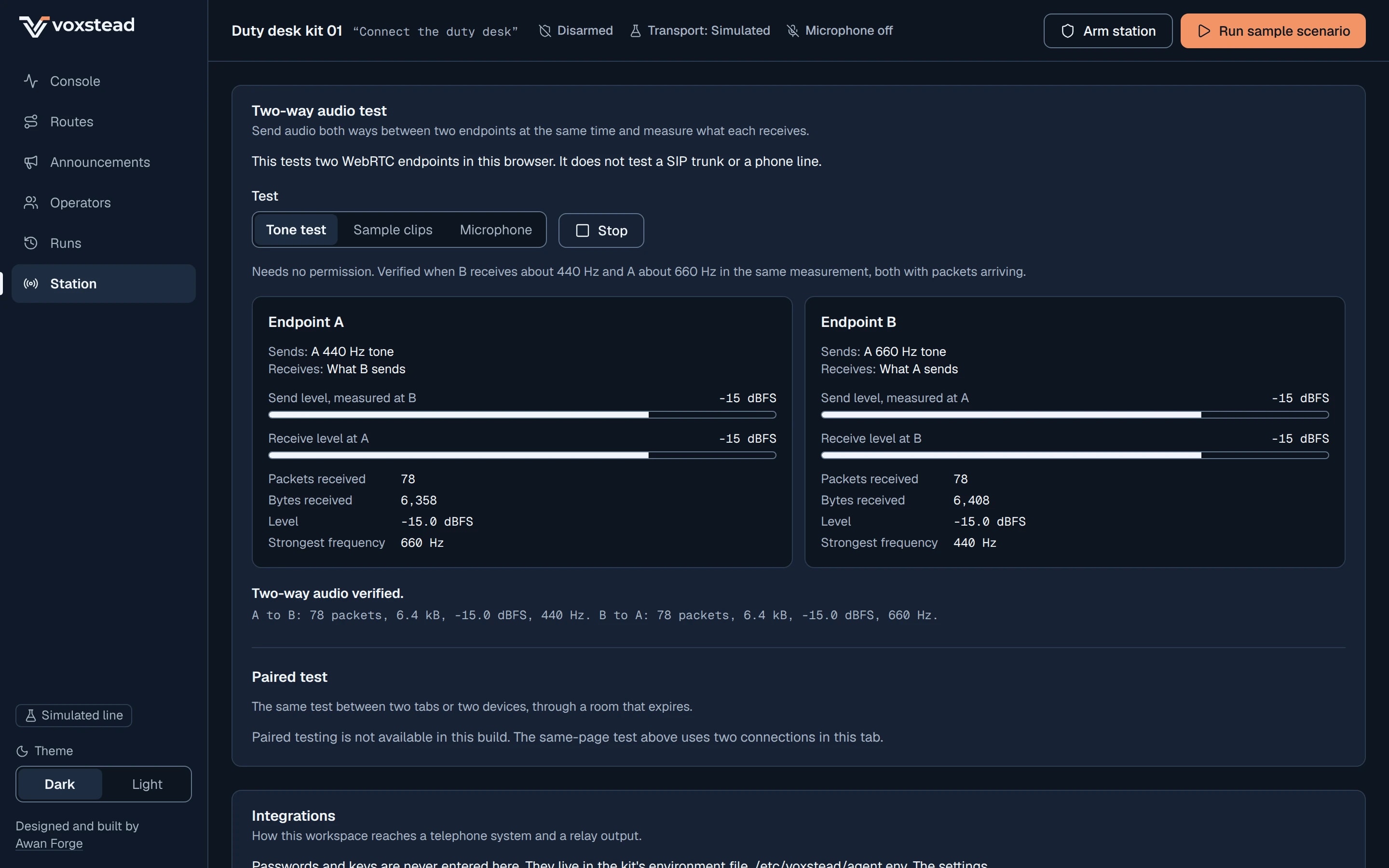
The live call in the public workspace is a real WebRTC session between two endpoints in the page. Each endpoint sends its own audio, and the page measures what each one receives: packets, bytes, level and the strongest frequency. These figures were measured on the live site in Chromium on 11 November 2026.
- Operator handoff on the live site
- Sample operator B to Reception desk: 12 packets, 1.0 kB, -14.0 dBFS. Reception desk to Sample operator B: 12 packets, 0.9 kB, -10.0 dBFS.
- Tone test
- A to B: 11 packets, 0.9 kB, -15.0 dBFS, 440 Hz. B to A: 11 packets, 0.9 kB, -15.0 dBFS, 660 Hz.
- Two tabs through the signaling service
- 130 packets, 10.6 kB, -15.0 dBFS, 660 Hz received, with the guest token carried in the URL fragment.
What this proves, and what it does not
It proves that two WebRTC endpoints in a browser send and receive audio at the same time, in both directions, and that the console reports it from measured counters. It says nothing about a SIP trunk or the public phone network, which is why the call is labelled “Browser WebRTC, not a phone line” and the whole workspace carries the Simulated line label.
When the browser refuses to play sound before a click, the leg stays Answered and the screen says the playback was blocked by the browser. The announcement starts after a click. Nothing pretends it is playing.
The handoff run ended with the output requested off and acknowledged off, and with no console errors.
Every ending takes the same path
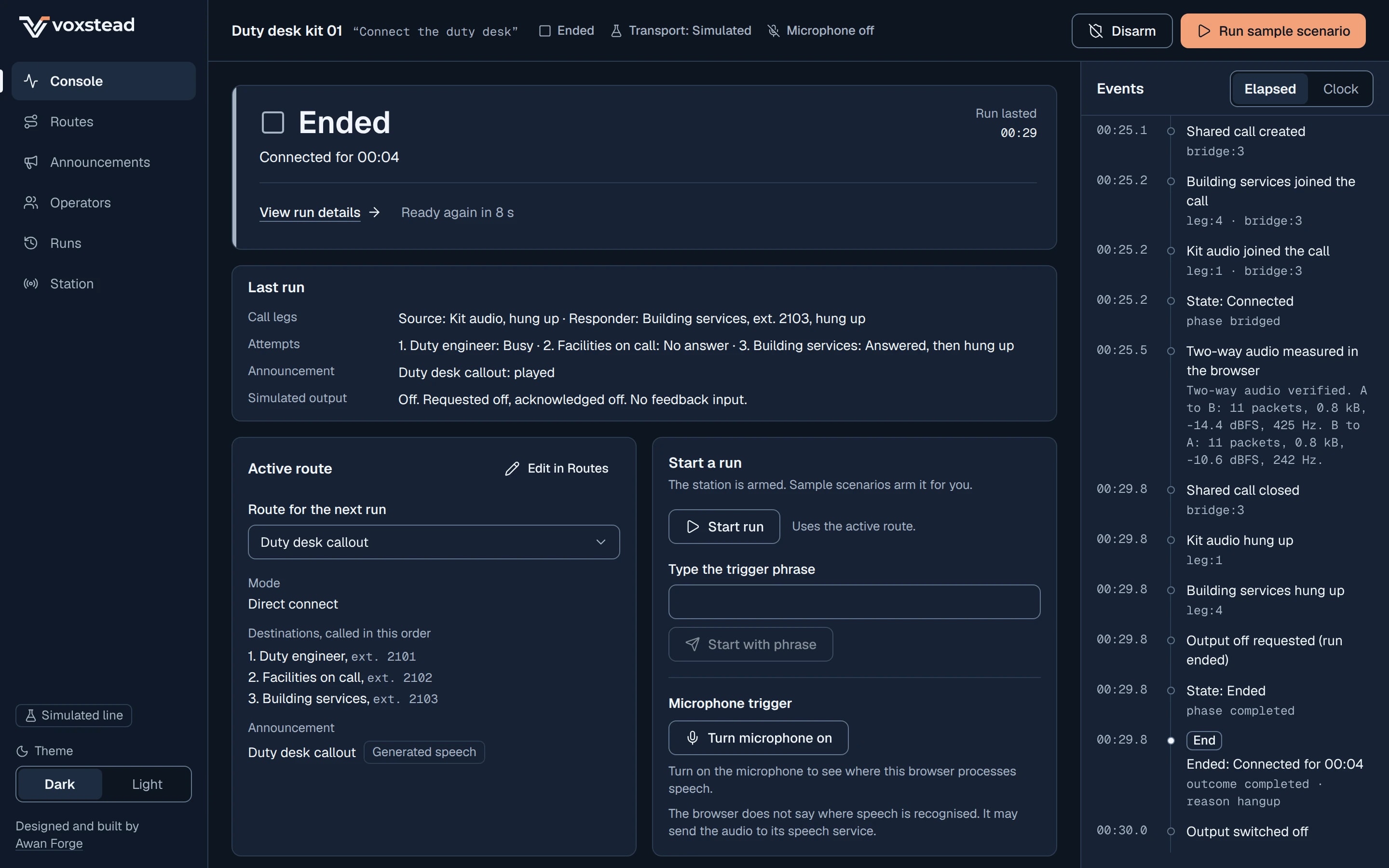
- Hang up, a remote hang up of either party, cancel, a lost line, the maximum run or call time and the event limit all take one path: stop every playback, close the shared call, hang up every live leg, switch the output off, cancel every timer, then record the end.
- A lost line ends the run as failed and refuses new triggers until the line is back. A run never resumes.
- A reload with a run still open ends that run as a lost line when the workspace starts, and the output is switched off first.
- After a run has ended, only the output's own reports are still accepted, so the log shows it actually switching off.
Station, two-way audio test
Console, run ended
The kit and the SIP line: delivered as code, switched off by default
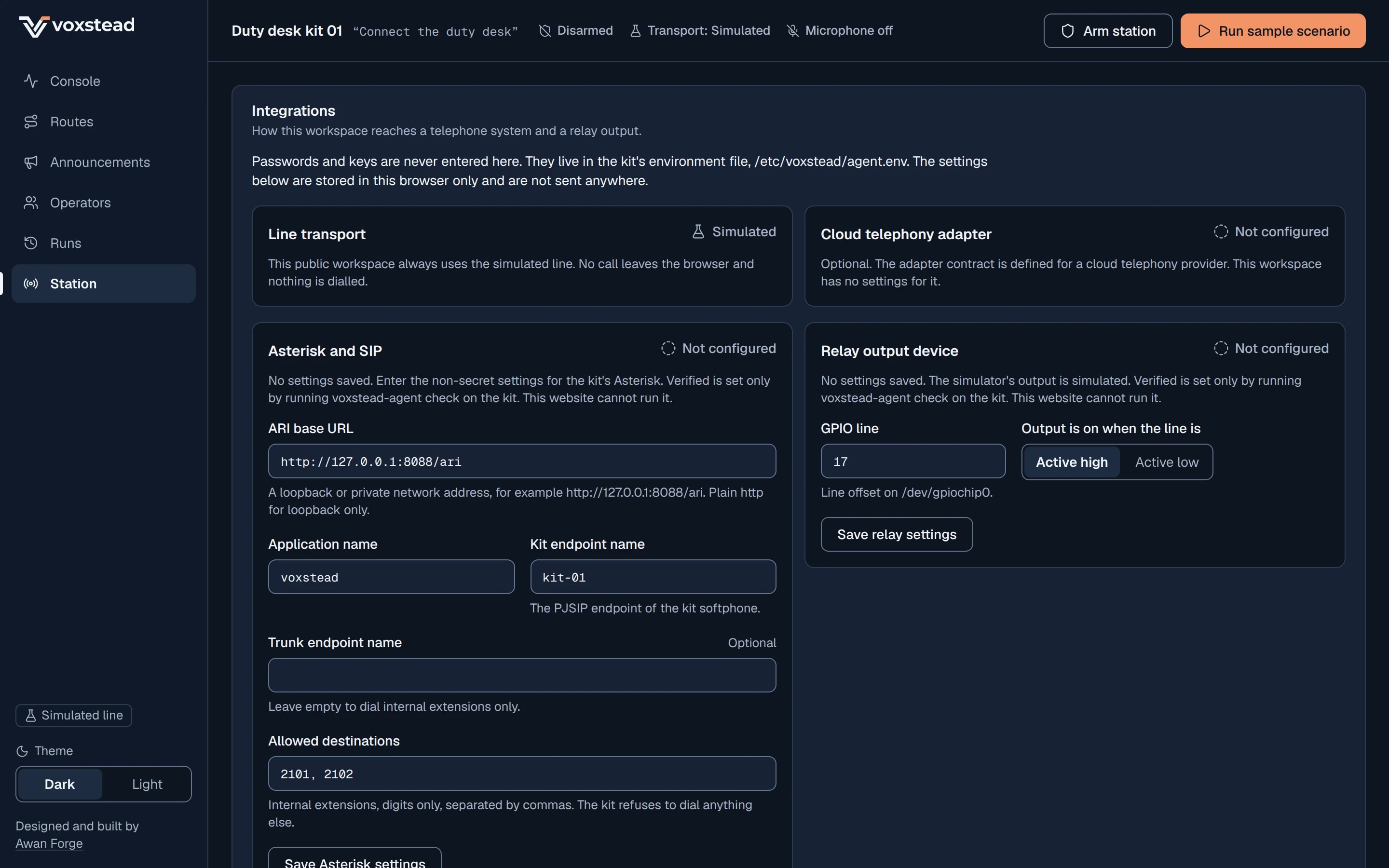
The kit is a Python agent for Linux and Raspberry Pi that runs the same engine against Asterisk and a GPIO output. It is delivered as code, configuration and a commissioning checklist. Out of the box it places no call and drives no pin: Asterisk mode starts only when real calls are switched on and every address it could dial is on an allow list, and the GPIO output has a switch of its own. None of it has been run against a real Asterisk, a SIP service or hardware.
- Asterisk 22 LTS, from 22.12.0
- Full support to 16 October 2028 and security fixes to 16 October 2029. Asterisk 24 LTS was six days old, with one release, when the choice was made, so it is left for a later move. Every ARI call used exists in 22.
- Answer, playback and the shared call over ARI
- Each leg is originated into the Voxstead application, and a leg counts as answered when it arrives there. Playbacks get explicit ids so they can be stopped, and every channel, playback and call carries a vx- id so it can be found and cleared after a restart.
- An output that is off when software cannot act
- The agent switches the output off at start, at stop, at every run end and on a lost line, and the service runs a relay-off step after the process has gone. A killed process or a power cut runs no code, so the output stage is wired to be off by default in hardware: active high with a pull-down.
| Part | Ratings used |
|---|---|
| Raspberry Pi 5, 4 GB | 5 V, 5 A over USB-C. 40-pin GPIO header at 3.3 V, not 5 V tolerant: 16 mA per pin, 50 mA for all pins together. |
| Omron G3VM-61A1 MOS FET relay | LED trigger current 3 mA maximum, recommended 5 to 25 mA. Load 60 V absolute maximum, 48 V recommended, 500 mA at 25 °C. 2500 Vrms between input and output. |
| Vishay SFH617A-3 optocoupler | Feedback input from the load. 5300 Vrms isolation. Current transfer ratio 100% to 200% at 10 mA. |
| Seeed ReSpeaker Mic Array v2.0 | USB, four microphones, echo cancellation on the device, no driver needed on Linux. |
A GPIO pin is a signal, not a power source for a relay. Through a 270 Ω resistor it drives the relay's LED at about 8 mA, inside the pin's 16 mA limit. The bench plan is for 5 V or 12 V DC loads only. Mains, door hardware and building systems need a qualified installer.
Station, integrations
Final screens, the walkthrough and what we ran
The walkthrough is one minute of the public workspace, recorded from the running app: three attempts, the announcement, a cancel, the real cooldown, then an operator handoff to Connected with two-way audio measured, and a hang up. The recording has no sound track.
Walkthrough, 59 seconds
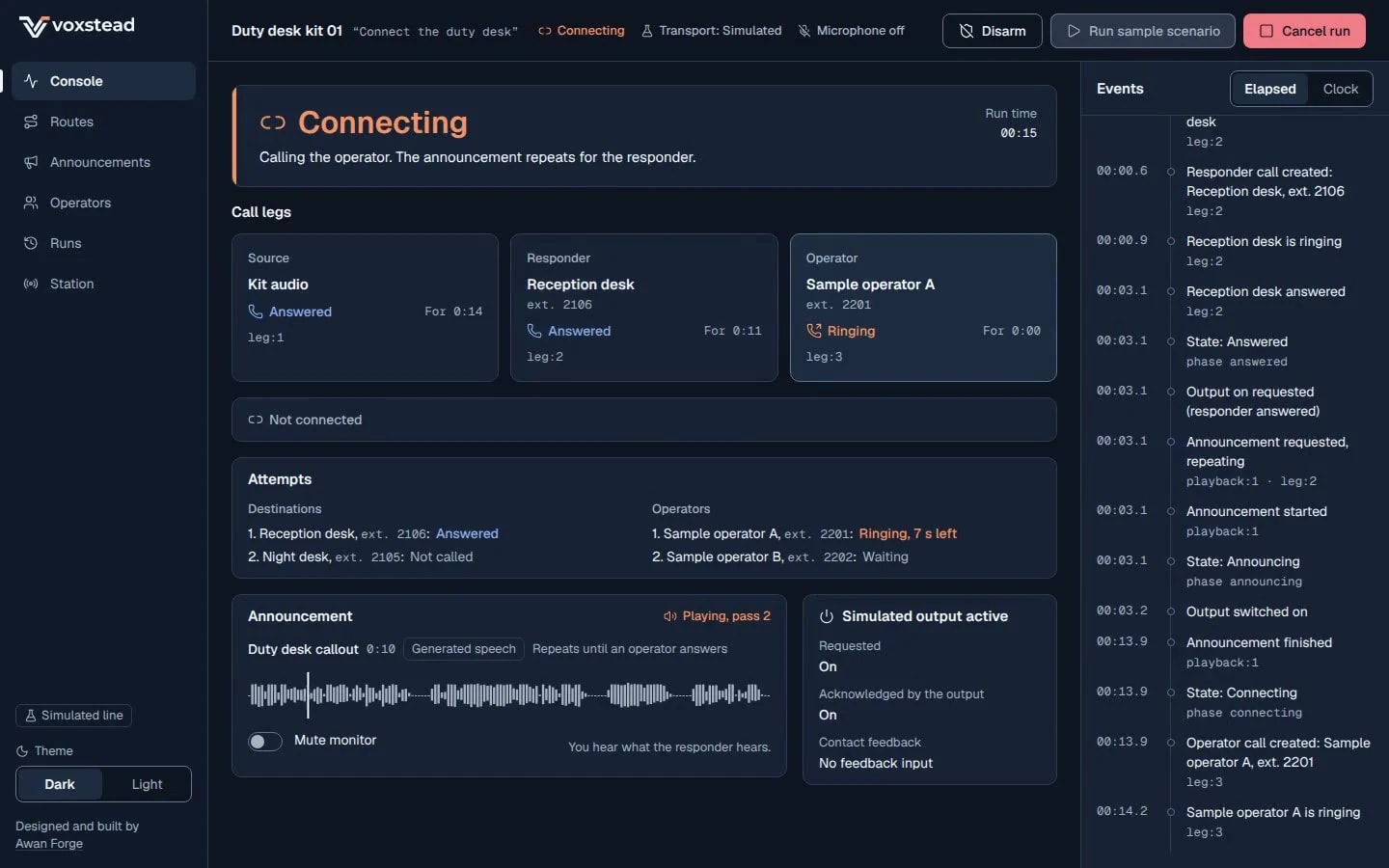
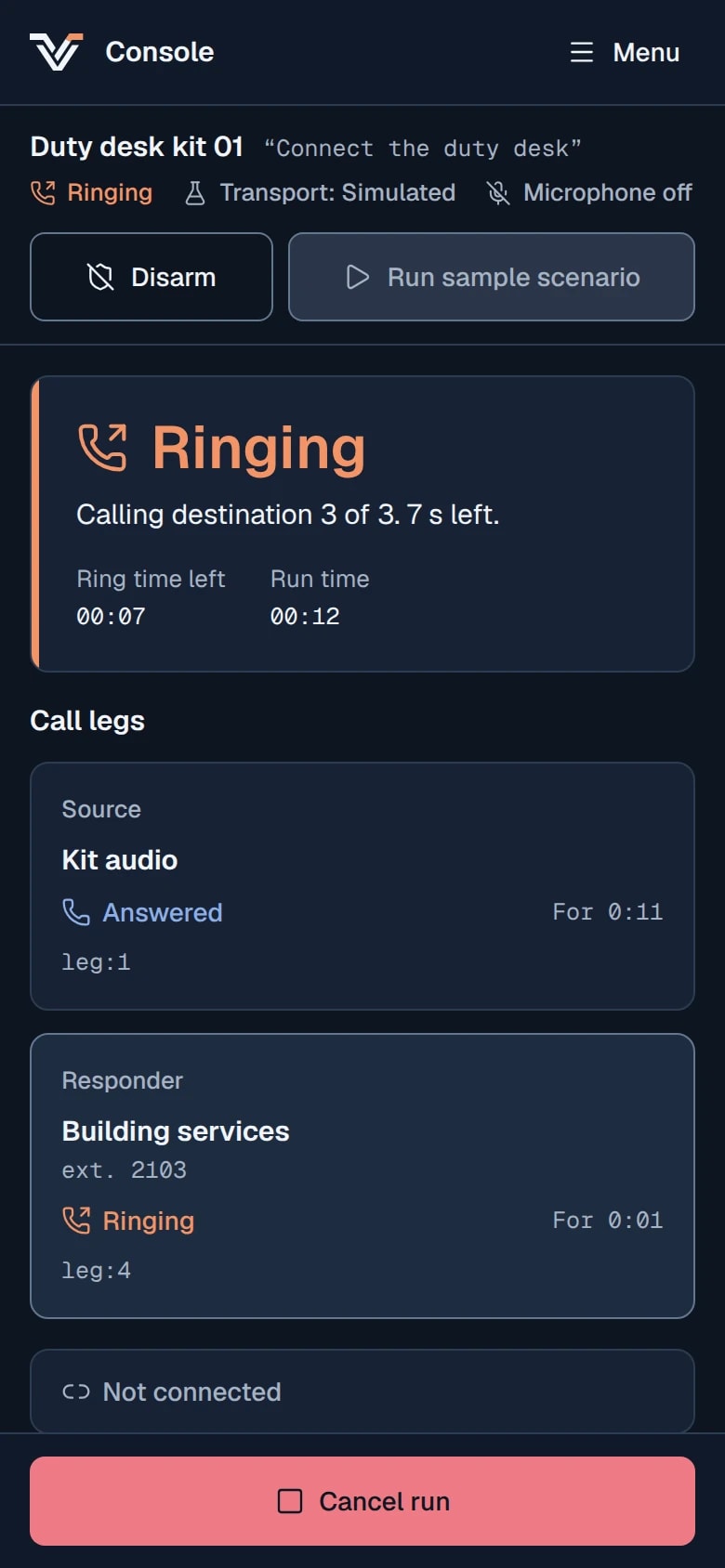
Console on a phone
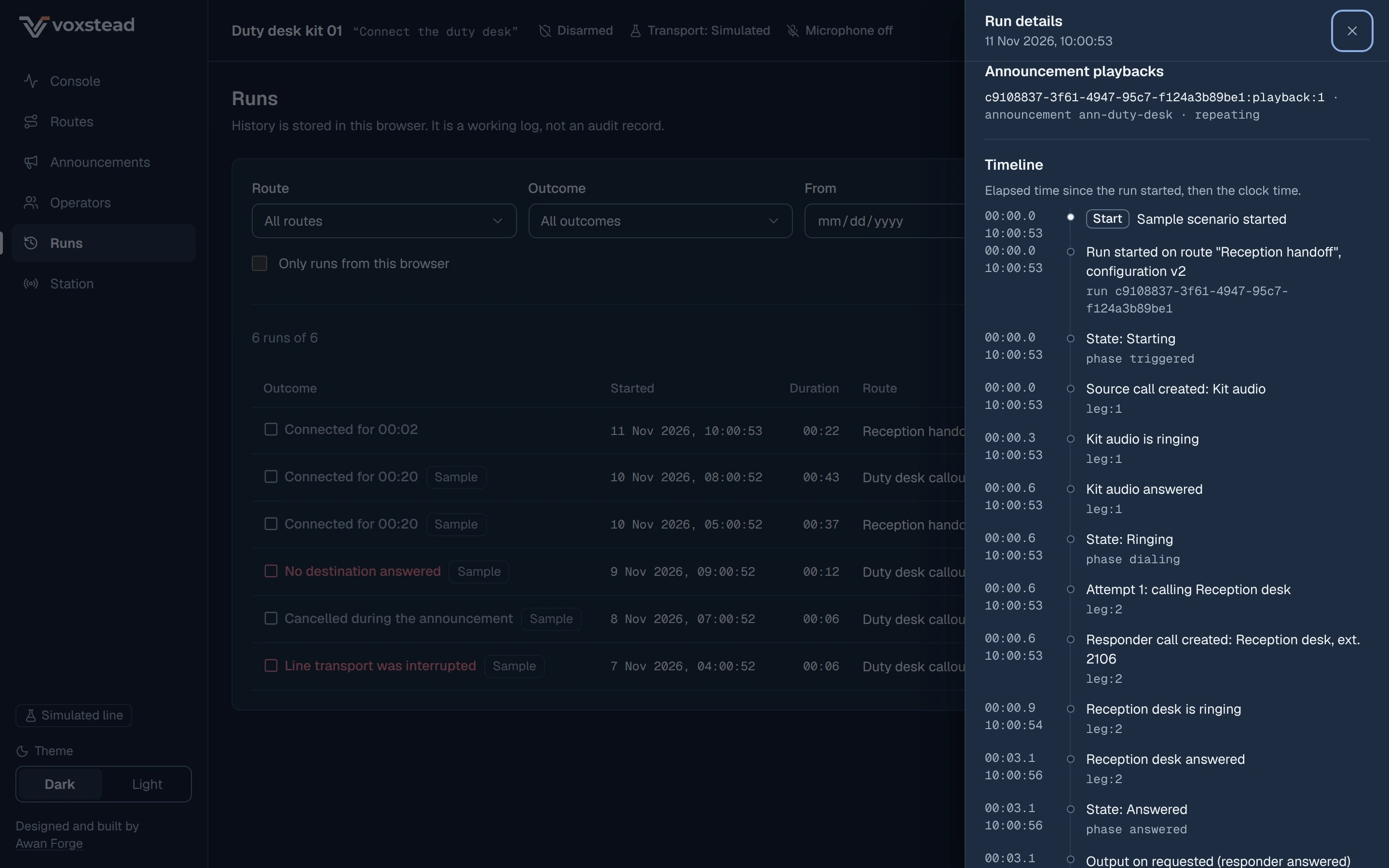
Runs, run details
| Check | What it covered | Result |
|---|---|---|
| Run engine | Dialing, trigger refusals, stale inputs, relay, operator handoff and the station shell. | 28 passed |
| Simulator | The five scenarios end as expected, the announcement rule holds at every add to the call, and each fixture equals a fresh run byte for byte. | 22 passed |
| Signaling service | Rooms, admission tokens, limits and the fixes from the security review. | 18 passed |
| Web workspace | Unit tests of the browser side. | 42 passed |
| Python agent | Engine, configuration, a fake ARI server and a fake GPIO line, and the parity test that reproduces the five TypeScript fixtures exactly. | 47 passed |
| Live site in Chromium | Operator handoff to Connected with two-way audio measured, then ended with the output off and no console errors. Tone test, and the paired test between two tabs. | Passed |
| Security reviews | Three independent reviews of the signaling service and the deployment. | 3 completed |
The finding that mattered
The first review found that a client which never reads could fill the signaling service's memory with pings, because the service answered every ping automatically. In the reviewer's local proof the service was killed at its 192 MB limit after 25 seconds.
Automatic pongs are now off, and a member whose unsent data passes 64 KB is disconnected. The same proof then held memory at about 67 MB. Refused connections are also closed by the server at once.
192 MB
memory limit reached after 25 s, before the fix
67 MB
memory under the same proof, after it
What has not been run
The public workspace runs on the simulator. These are the parts that need real systems.
- Commissioning on a real Asterisk 22 and SIP trunk. Of the checklist, only the first two items ran, the simulated run and the agent's unit tests; the calls, the announcement stop heard on real phones, the relay and the recovery items have not been run, and nothing has been dialled outside the browser.
- Hardware bench tests. The output stage, the feedback input and what the GPIO line does after the process is killed have not been wired or measured.
- The wake phrase on the device. Accept rate and false accepts per hour for “Connect the duty desk” on the target Pi and microphone have not been measured.
- Browser checks on real phones. The workspace was checked in desktop and phone sizes in Chromium only.
- A person listening to the announcements. They are generated speech; an offline recogniser matched all five scripts word for word, and no person has listened to them.
- Two accepted limits of the signaling service on a shared host: another process on the same server could choose its own address and bypass the per-address limits, and many addresses could hold all 200 rooms for their 10-minute lifetime. Its behaviour through nginx has not been load tested.
How we work
Voxstead shows the order we work in: the parties are named before a screen is drawn, the rules are written before the code, the tests check the order of events, and the page says which parts ran against real systems and which ran against the simulator.
Sample routes, announcements and scenarios on a Simulated line. Nothing is dialled.