TPR Mike OA one-page website for a keynote speaker on leadership and resilience
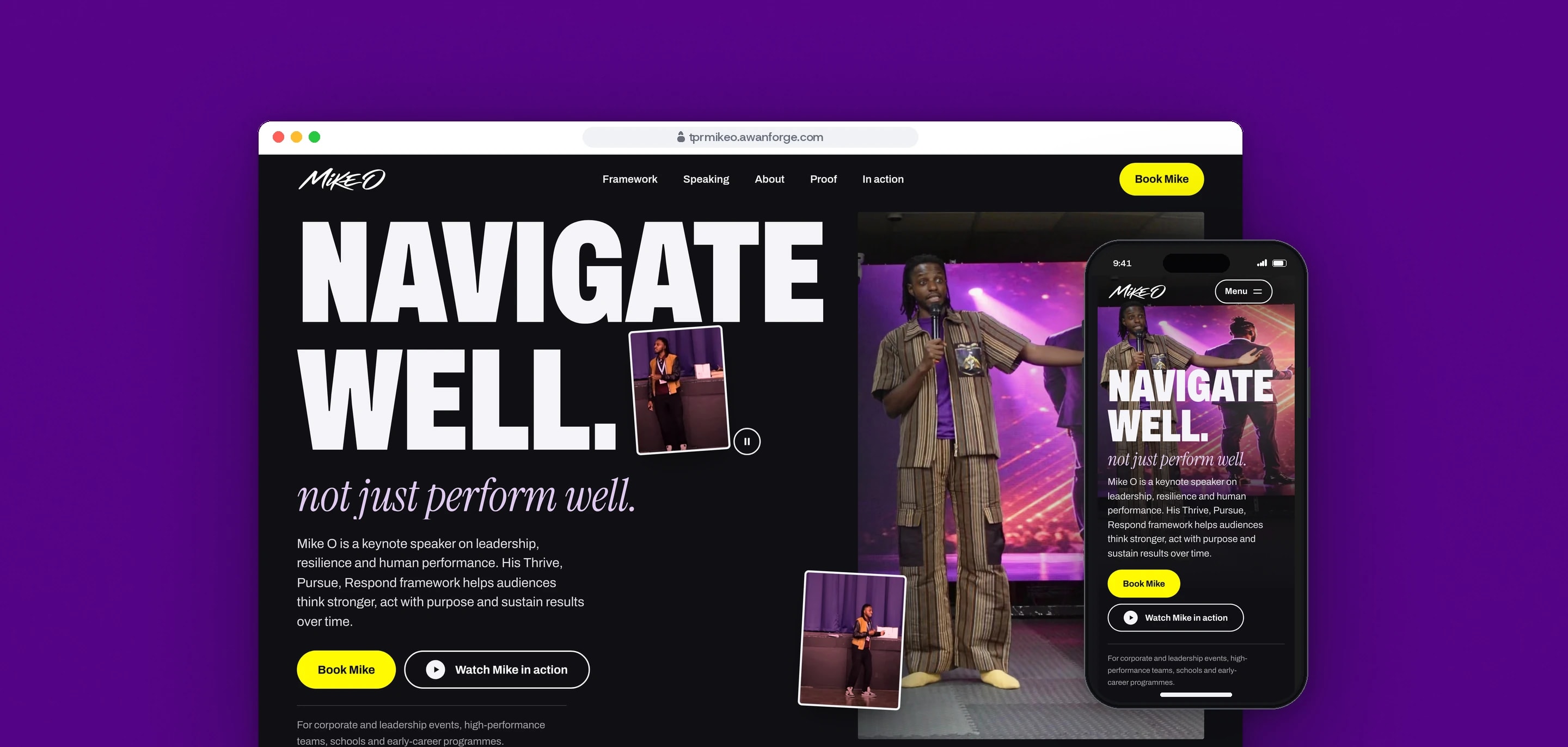
Our team redesigned the website of Mike O, a UK keynote speaker on leadership, resilience and human performance, as one page built around his Thrive, Pursue, Respond framework. It is live as a client preview at tprmikeo.awanforge.com.
- Client
- Mike O
- Sector
- Keynote speaking and leadership
- Year
- 2026
- Platforms
- Website
- Services
- Product and UX design, Web development, Brand and graphics
A website for Mike O, a keynote speaker on leadership, resilience and human performance, that shows an event organiser how he speaks and what an audience takes away, then takes them to his booking form. His Thrive, Pursue, Respond (TPR) framework, about helping people to navigate well, not just perform well, gives the page its structure.
Built for
- Event organisers, HR and learning teams deciding whether Mike suits their conference, away day or programme.
- Schools, colleges and early-career programmes looking for a speaker for young people.
- Mike and his team, who receive enquiries through the booking form they already use.
The problem
A speaker is booked on how he comes across in a room, so the site had to show Mike speaking before it asked for anything. The footage available was filmed from a fixed wide camera, with Mike small on a stage in front of a blue curtain.
The Thrive, Pursue, Respond framework is the core of every talk. It needed a form a visitor remembers after one scroll, on a phone as well as on a laptop.
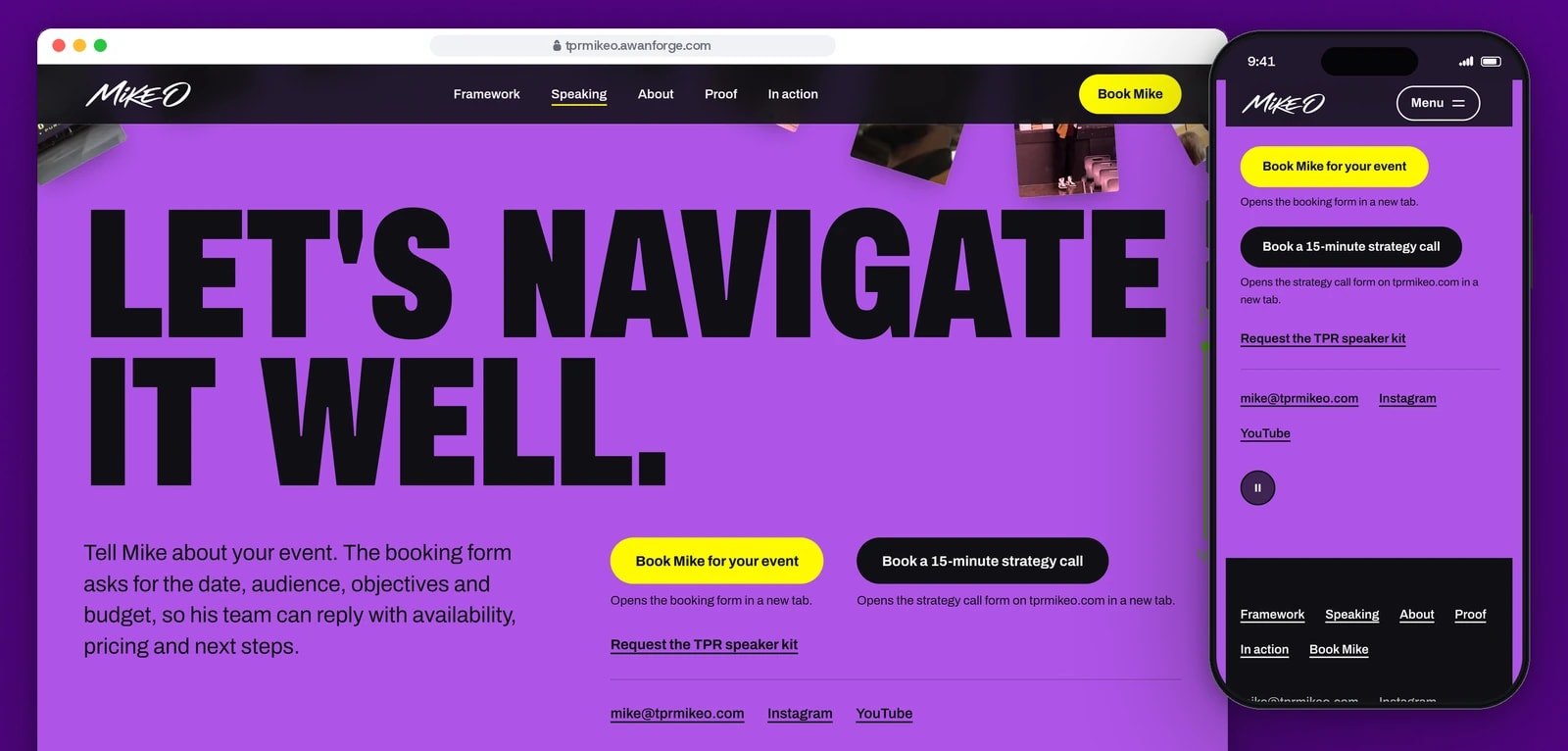
Bookings already ran through Mike’s own forms: a Google Form for event enquiries, and a strategy call and a speaker kit sign-up that exist only inside his current site. Every new button had to reach the right one.
Scroll scenes, video loops and a video player add weight and can trap keyboard users. The page had to stay fast on phones and work with a keyboard, with reduced motion and with JavaScript turned off.
Goals
- 01Show Mike speaking in the first screen, with his full talks one press away.
- 02Turn the three parts of the framework into one scene that reads on desktop and on a phone.
- 03Send every booking button to the destination Mike already uses, checked without submitting anything.
- 04Play his official videos only when asked, in one player that works with a keyboard and stops the sound when it closes.
- 05Keep every word and the booking link readable with reduced motion and with JavaScript turned off.
- 06Keep the preview out of search until Mike decides to publish it.
Our role
We redesigned the site from Mike’s own words, photographs and footage, then built, tested and deployed it as a client preview.
What we delivered
- A one-page site in eight sections: hero, showreel, framework, speaking audiences, biography, proof, media and booking, with a header, a phone menu and a footer
- Scroll scenes for the showreel, the framework climb, the biography and the booking photo ribbon, each with a still layout for reduced motion
- Footage selection, a colour grade and encoded silent loops for the showreel and the hero tiles
- One accessible video dialog for Mike’s official YouTube videos
- The hand-lettered Mike O wordmark traced into clean SVG files in colour, white and dark versions, with a favicon set
- Search metadata and structured data, ready to move to his own domain
- Accessibility and performance checks, and deployment to our server with an HTTPS certificate
How we worked
- 01
Start from his own words
The copy is adapted from Mike’s own words on his site and the official descriptions of his YouTube videos. No awards, client lists, audience sizes or prices were added.
- 02
Lead with the photograph
The stage footage shows Mike small in a wide shot, so the hero leads with a sharp keynote photograph and uses the footage as small moving tiles. Further down, the showreel frame grows to the full stage as the visitor scrolls.
- 03
Give the framework a shape
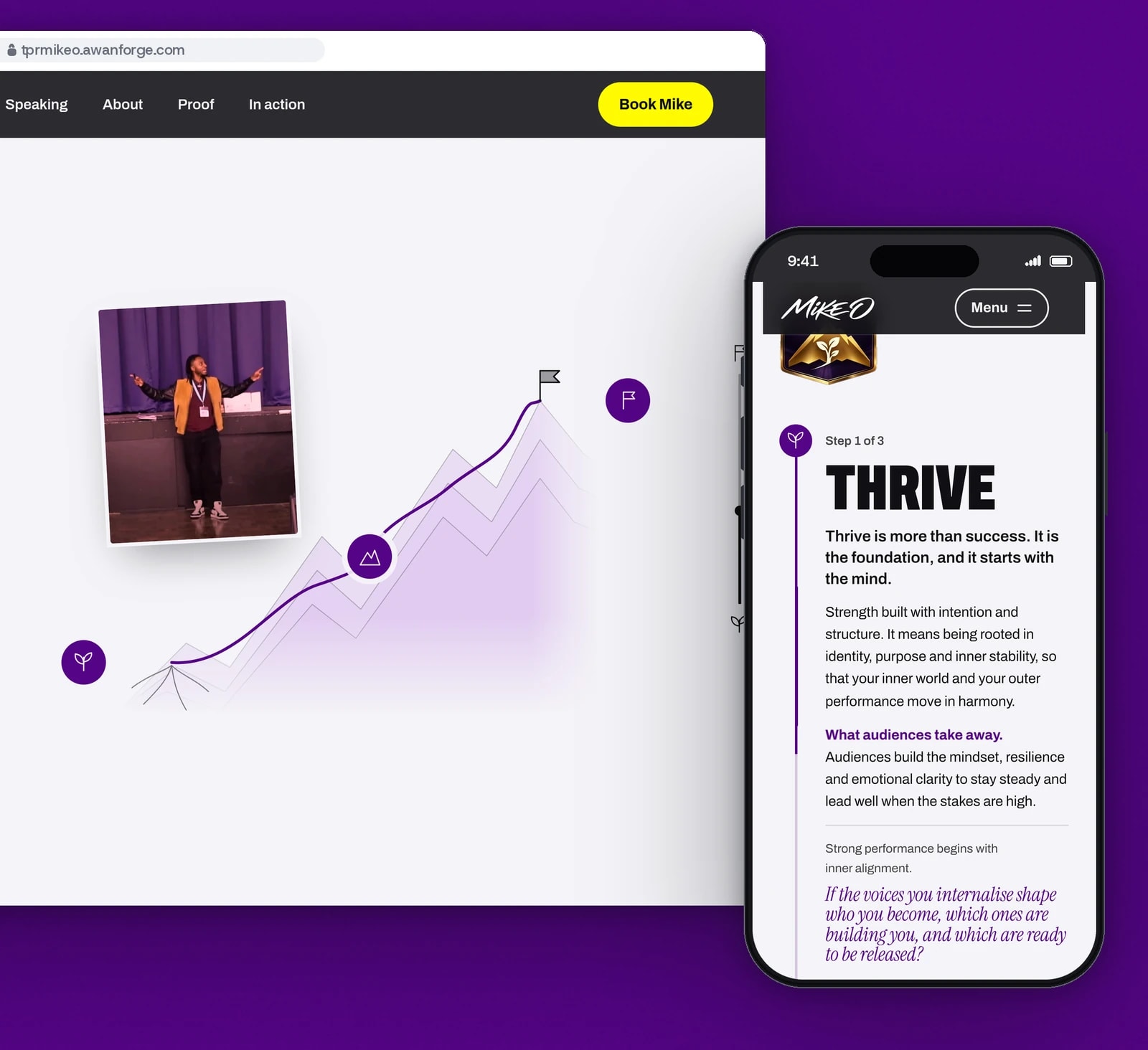
Thrive, Pursue and Respond became one climb: a route draws up a mountain to a summit flag and a photograph travels with it. On phones the three chapters stack along a line that draws as they are read.
- 04
One owner for each animation
GSAP runs the scroll scenes and Motion runs the dialog, menu and quote transitions, and no element is animated by both. If the animation script fails, the page falls back to its normal, fully readable layout.
- 05
Check every destination, send nothing
Each booking button was traced to its form and checked to answer, without sending an enquiry. The strategy call form has no address of its own, so its button opens the section of Mike’s current page that holds it.
Screens and features
The framework, drawn as a climb
A route draws up the mountain to the summit flag as the visitor scrolls, and one photograph travels with it. On phones the chapters follow a drawing line.
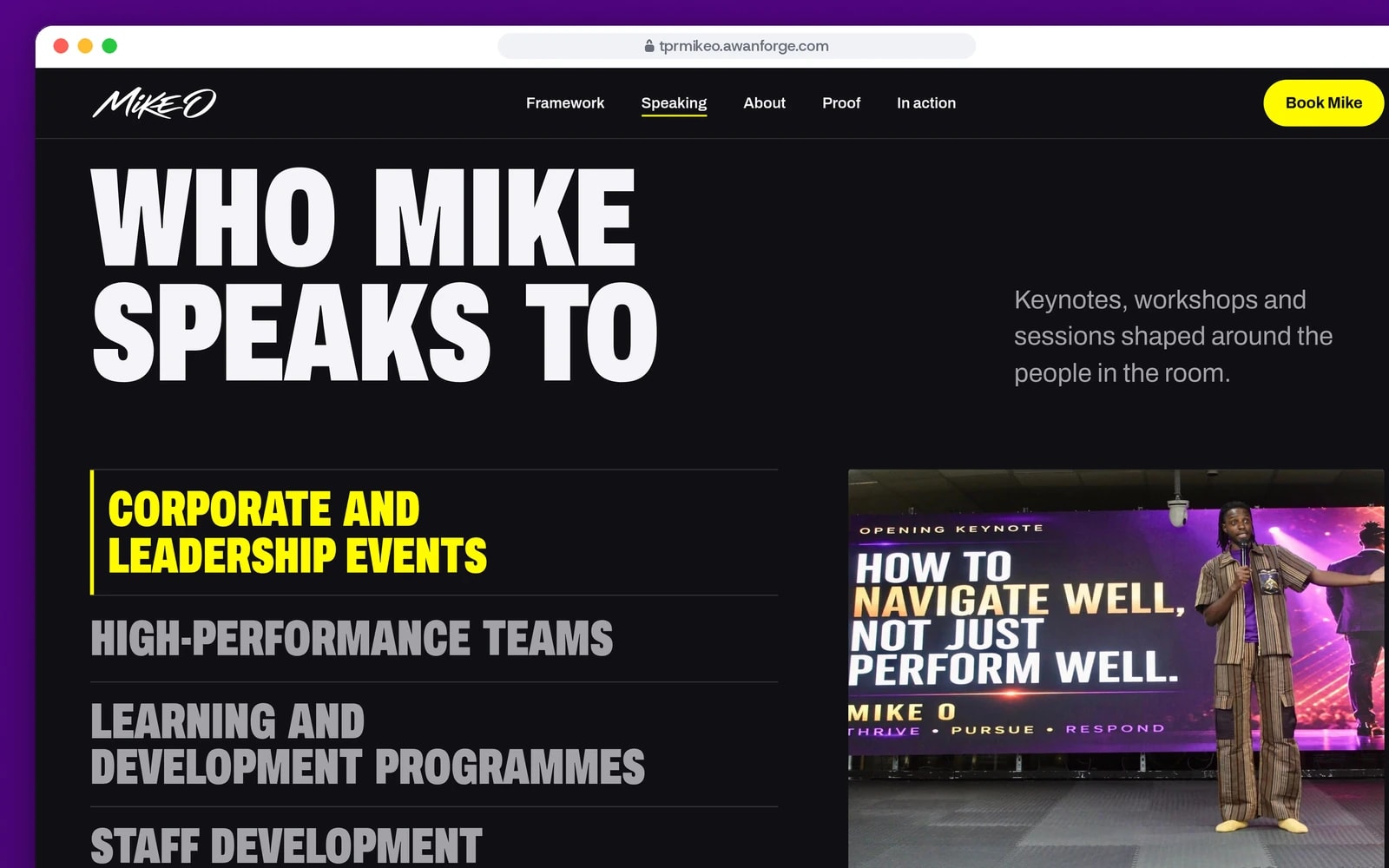
Six audiences, one at a time
Choosing an audience in the list shows its own photograph and a short description beside it.
Every booking button reaches a real form
Event enquiries open Mike’s booking form. The 15-minute call and the speaker kit open the forms on his current site.
Each section has its own phone layout
The showreel plays as a silent loop with a button for the full video, the audiences open as an accordion, and the menu fills the screen.
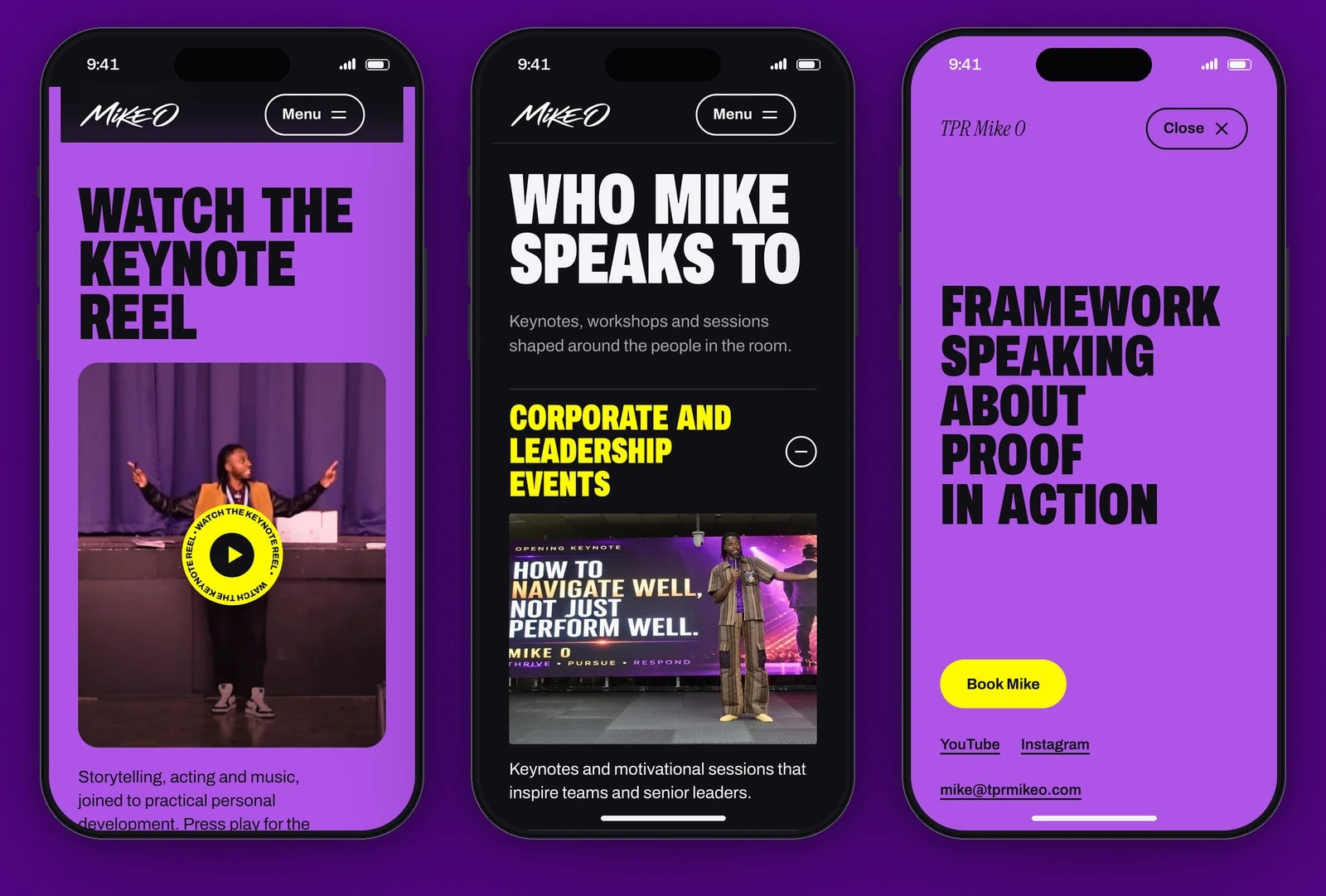


A showreel that opens up
The reel sits in a contained window and grows to fill the stage as the visitor scrolls. The preview loop is silent; one press plays the full reel with sound.
The framework as a climb
A route draws up the mountain through Thrive, Pursue and Respond to a summit flag, and one photograph travels with it from chapter to chapter.
Six audiences side by side
A two-panel selector: choosing an audience shows its photograph and description. On phones the same list becomes an accordion.
A biography that brightens as it is read
Each word brightens as the visitor scrolls past it, so the reader’s place is always visible, with photographs drifting around the text.
Quotes from his own videos
The proof section shows verified on-screen quotes from videos on Mike’s channel, one at a time, each linked to the moment it appears.
One video player for the whole page
A native dialog plays Mike’s official YouTube videos on demand. It keeps keyboard focus inside, closes with Escape or a visible Close button, returns focus to the button that opened it and removes the player, so the sound stops.
Media in a grid or a list
Visitors switch the video collection between a grid of thumbnails and a list with descriptions.
Motion that steps aside
Loops pause off screen, in a hidden tab and with the page’s pause control. With reduced motion or data saving they never autoplay, and every scene shows its finished layout.
Technical choices
What the product is built with, and why.
- Next.js 16 with the App Router and React 19
- The page arrives as server-rendered HTML, so the headline, the framework, the quotes and the booking link are readable before any script runs, and with JavaScript turned off.
- TypeScript and typed content files
- Every word, link and video reference lives in content files separate from the components, so a copy change never touches the layout.
- Tailwind CSS 4 with colour tokens
- Ink, paper, purple, deep purple, lavender and yellow are tokens with checked pairings. White on the bright purple fails contrast for small text, so text there is set in ink.
- GSAP 3.15 and Motion 14
- GSAP with ScrollTrigger runs the scroll scenes and Motion runs the dialog, menu and quote transitions. Scrolling stays native, with no smooth-scrolling library.
- Archivo and Instrument Serif, self-hosted
- Two open-source families: Archivo at its condensed width for headlines and Instrument Serif italic for the accent lines. Archivo is cut to the characters the design uses, 49 KB.
- A native dialog element
- The browser’s own dialog keeps the page behind it out of reach while a video plays, and the player uses YouTube’s privacy-enhanced embed.
- nginx and Let’s Encrypt on our server
- HTML always revalidates, build files are cached for a year, images are served as AVIF and video supports range requests. The preview is marked noindex in the page, its headers and robots.txt.
Outcomes
49 of 49 browser checks
Scripted checks against the live preview cover the video dialog and the menu with a keyboard, focus returning to the right button, sound stopping on close, phone widths without sideways scrolling, reduced motion, JavaScript turned off and every booking destination.
Evidence: the project’s browser check script, run against tprmikeo.awanforge.com, and its log.
Lighthouse 98 on mobile, 99 on desktop
On a simulated slow 4G phone the page scored 98 for performance, with a largest contentful paint of 1.4 s, no layout shift and a total weight of 435 KiB. On desktop it scored 99, with a largest contentful paint of 0.3 s. Accessibility and best practices scored 100 on both.
Evidence: Lighthouse lab runs against the live preview. These are lab measurements, not data from real visitors. Search scored 69 only because the preview is set to noindex.
No accessibility violations found
An automated accessibility audit of the rendered page found no violations on its default view. Safari, real phones and screen readers have not been tested yet.
Evidence: an automated accessibility audit of the production build, recorded in the project’s handoff.
TPR Mike O is a client preview set to noindex; it does not replace Mike’s site at tprmikeo.com. The photographs and video come from Mike’s own site, footage and YouTube channel, and the quotes on the page are on-screen text from videos on his channel. The figures above come from lab tools, not from real visitors.
Do people book you to speak or train?
We build websites that show you at work, load fast on a phone and send every enquiry to the form you already use. Tell us how your bookings arrive.