Skimvero Pool CareA pool care website where every service says what it covers and what it leaves out
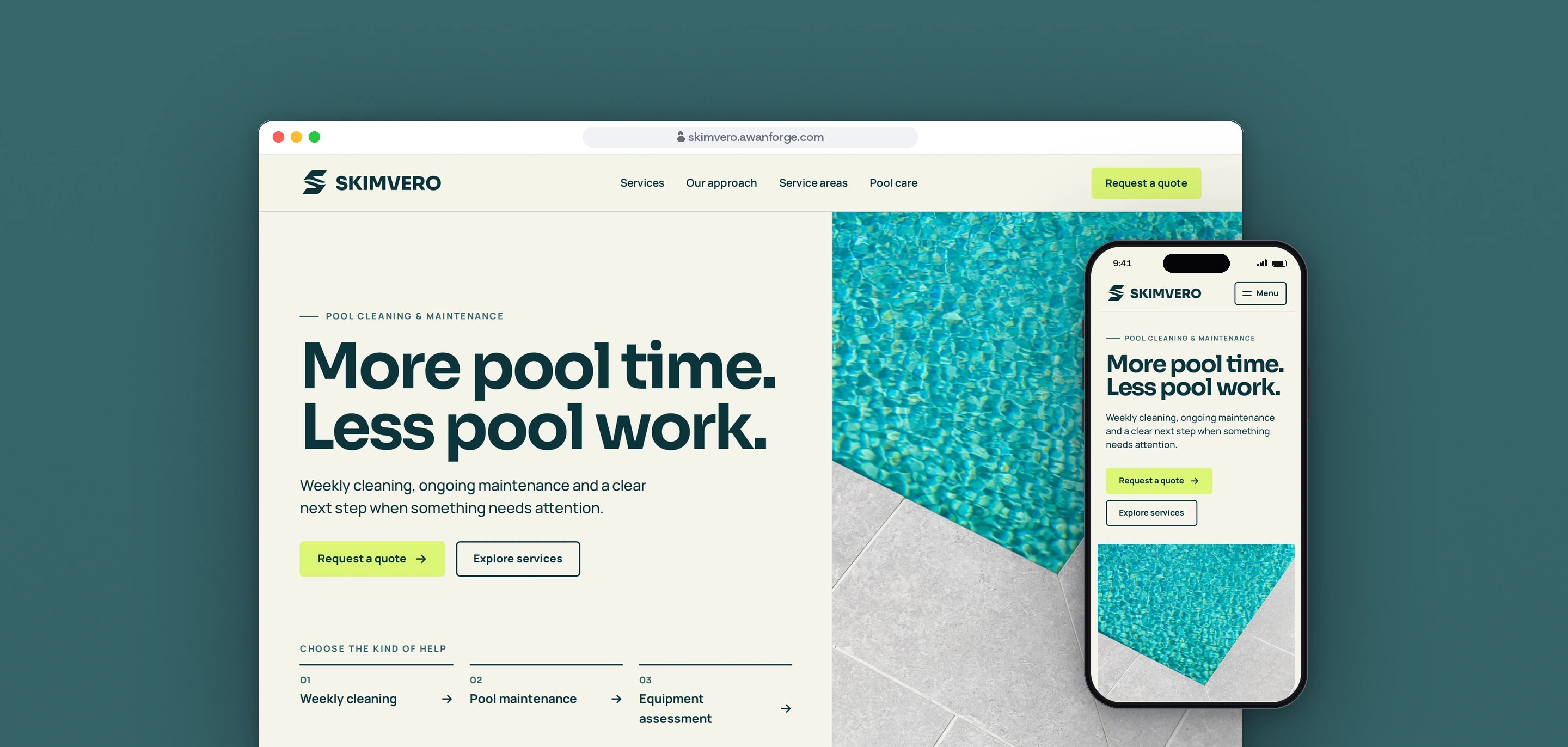
Skimvero Pool Care is a concept website our team designed and built for a home pool cleaning business: three services with their scope and exclusions, an area check and a quote form. Skimvero is not an operating company, so the form shows a preview on the visitor’s device and sends nothing, and the photographs are licensed stock from Pexels.
- Client
- Own project
- Sector
- Home services
- Year
- 2026
- Platforms
- Website
- Services
- Product and UX design, Web development
A website for a residential pool cleaning and maintenance business. It helps a pool owner pick the right kind of help, see what that help includes and leaves out, and prepare a short enquiry. We built it to show how a local service website can go live stating only facts that are confirmed.
Built for
- Pool owners who want the regular cleaning taken off their list.
- Owners who have noticed a change in their pool equipment and want to describe it before any repair is promised.
- Owners of a pool cleaning or other local service business who want to see how their own website could work.
The problem
Pool care is three different jobs. Weekly cleaning does not include repairs, a maintenance routine does not include replacement parts or electrical work, and an equipment problem needs an assessment before any repair can be promised. The site had to make those limits as clear as the services.
Skimvero is a concept, so it has no phone number, prices, service area, opening hours or customer reviews. The site had to read as a finished website without a single invented one.
A quote form on a concept site has nowhere to send an enquiry. It still had to work from the first question to the last, and tell the visitor plainly what happened to what they typed.
The site carries large photographs, a short film and motion. None of them could delay the quote button or slow the first screen on a phone.
Goals
- 01State what each service includes, where it starts and what is not automatically included.
- 02Publish no phone number, price, rating or coverage claim until a real one is supplied, and check every built page for them.
- 03Answer the area check truthfully: coverage needs confirmation until a real list of areas exists.
- 04Carry the visitor’s chosen service and location into the quote form.
- 05Show a preview that says nothing has been sent, and switch to real sending with one setting.
- 06Keep the quote action on the first screen on desktop and on a phone.
- 07Keep every page readable with JavaScript off and with reduced motion.
Our role
Working from a brief, a logo and a set of photographs, we designed and built the whole website: the page structure, the copy, the quote flow, the motion, the checks and the release on our own server.
What we delivered
- 15 pages and a 404 page: home, a services overview, three service pages, our approach, service areas, a pool care index with two notes, contact, the quote form, credits, terms and privacy
- A side-by-side table of the three services, regrouped by question on a phone
- An area check that carries the visitor’s city or ZIP code into the quote form
- A four-question quote form with an error summary, an editable preview and a copy button
- One typed settings file where every business fact is either configured or left off the page
- A copy check that reads every built page before a release
- A first-visit logo entrance, scroll reveals and a short water film, with a still version for visitors who reduce motion
- A phone layout with a full-screen menu and a sticky quote bar
- A credits page for nine photographs, one film and two typefaces
- Search metadata, a sitemap, a social preview image and a release script with rollback
How we worked
- 01
Only confirmed facts
Every business fact lives in one settings file as either configured or unconfigured. Pages read from it, so a phone link, an email link or a list of covered areas appears only when a real value has been set.
- 02
Scope and exclusions on every service
Each service page says what the work includes, where it starts and what is not automatically included. The copy is short, puts the conclusion first and leaves out sales language.
- 03
One quote journey
A button on a service page opens the quote form with that service chosen, and the area check passes on the location. The form keeps both through a reload and the browser’s back button.
- 04
Motion kept small
One logo entrance on the first visit, a headline that settles, one reveal per row and a film window that widens on desktop. The quote button is never hidden or delayed by any of it.
- 05
Tested, reviewed, then released
A browser test suite ran against the built site. A separate review of a frozen build reported five findings, among them sideways scrolling on two pages and the film stalling after a fast scroll, and each was checked again on the final build. The release script repeats the copy check before anything is uploaded.
Screens and features
Three services, side by side
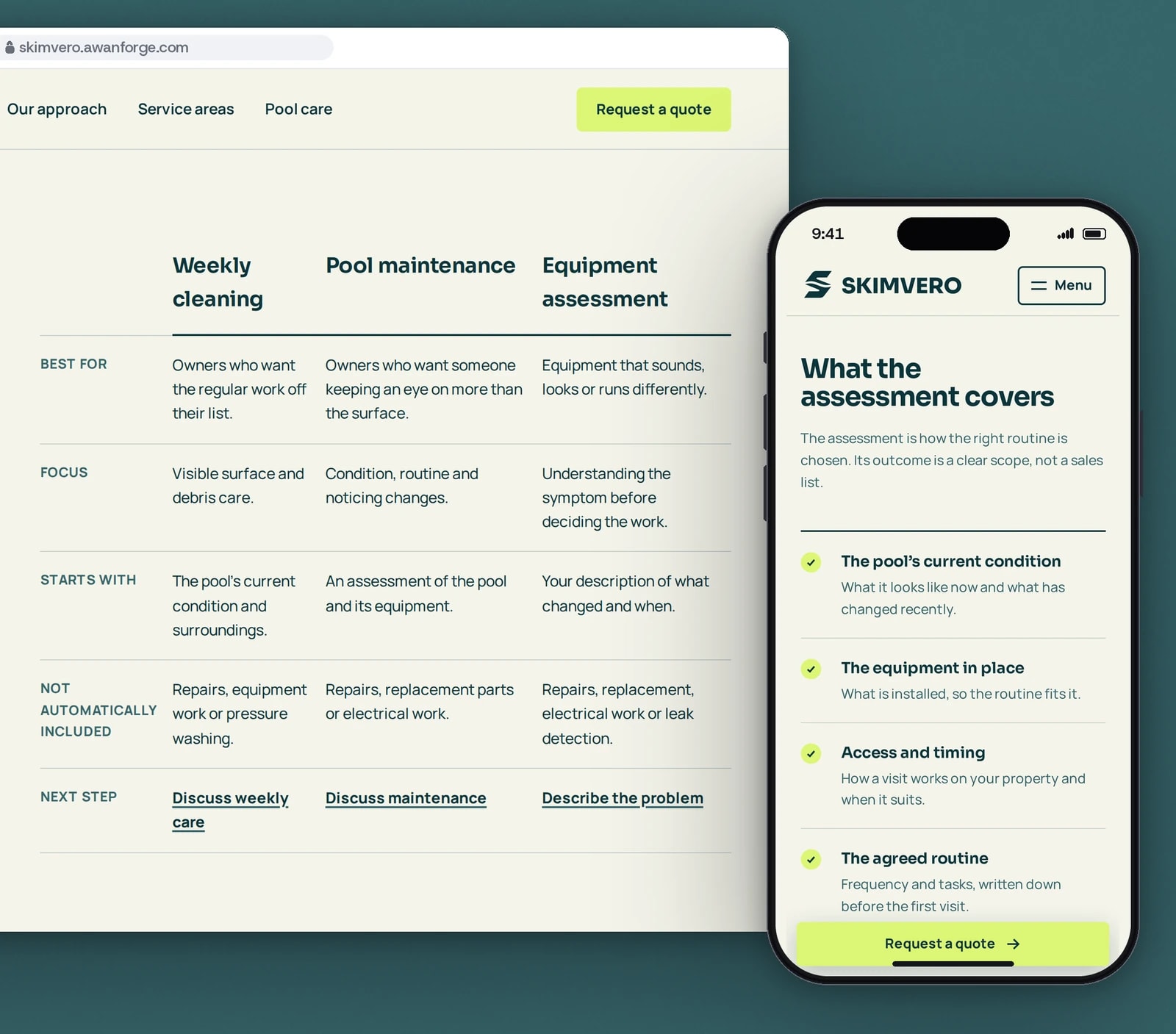
One table shows who each service suits, where it starts and what is left out. On a phone, a quote bar stays at the bottom of the screen.
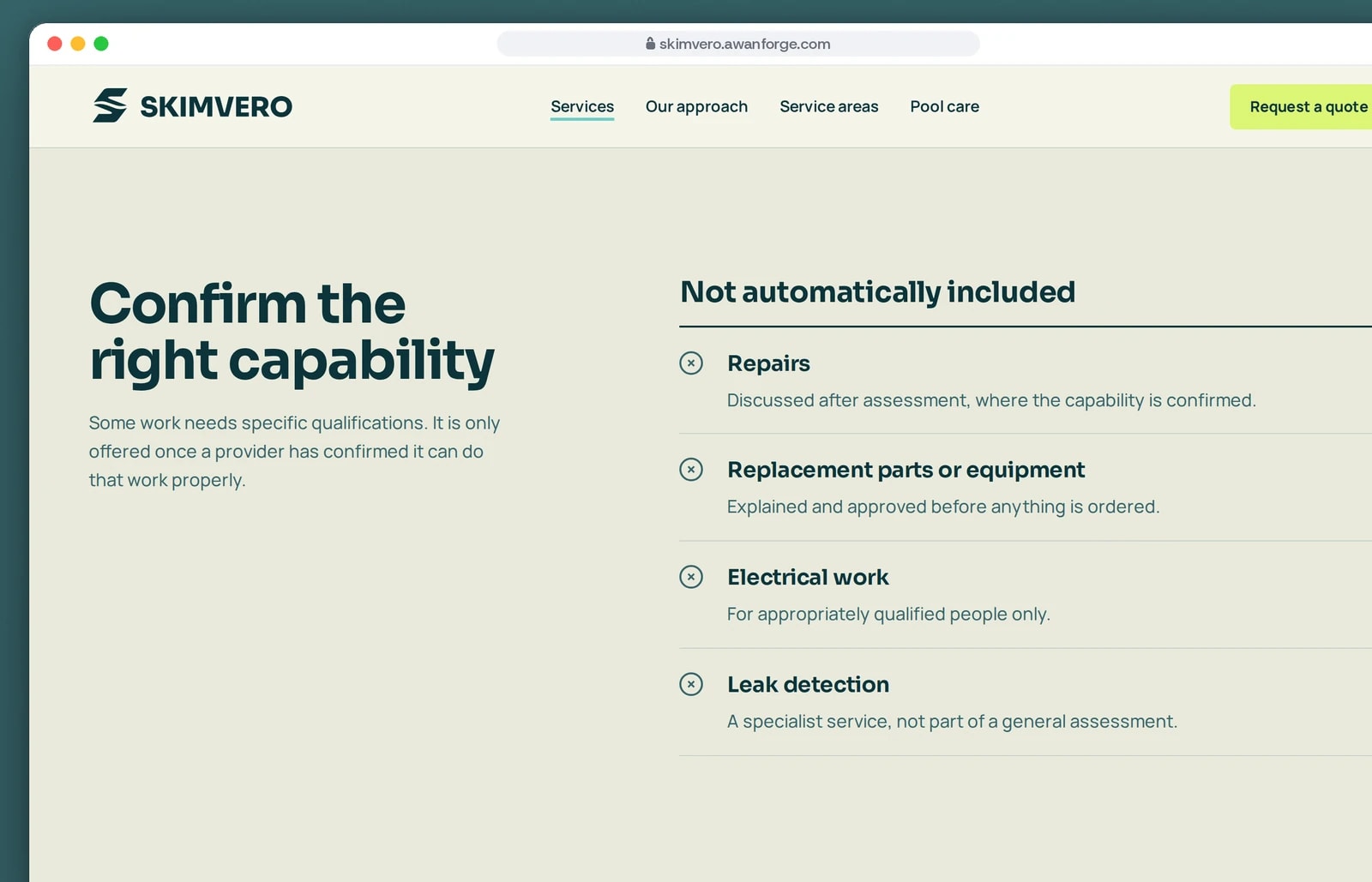
Every service says what it leaves out
Repairs, replacement parts, electrical work and leak detection are listed as not automatically included, each with its condition.
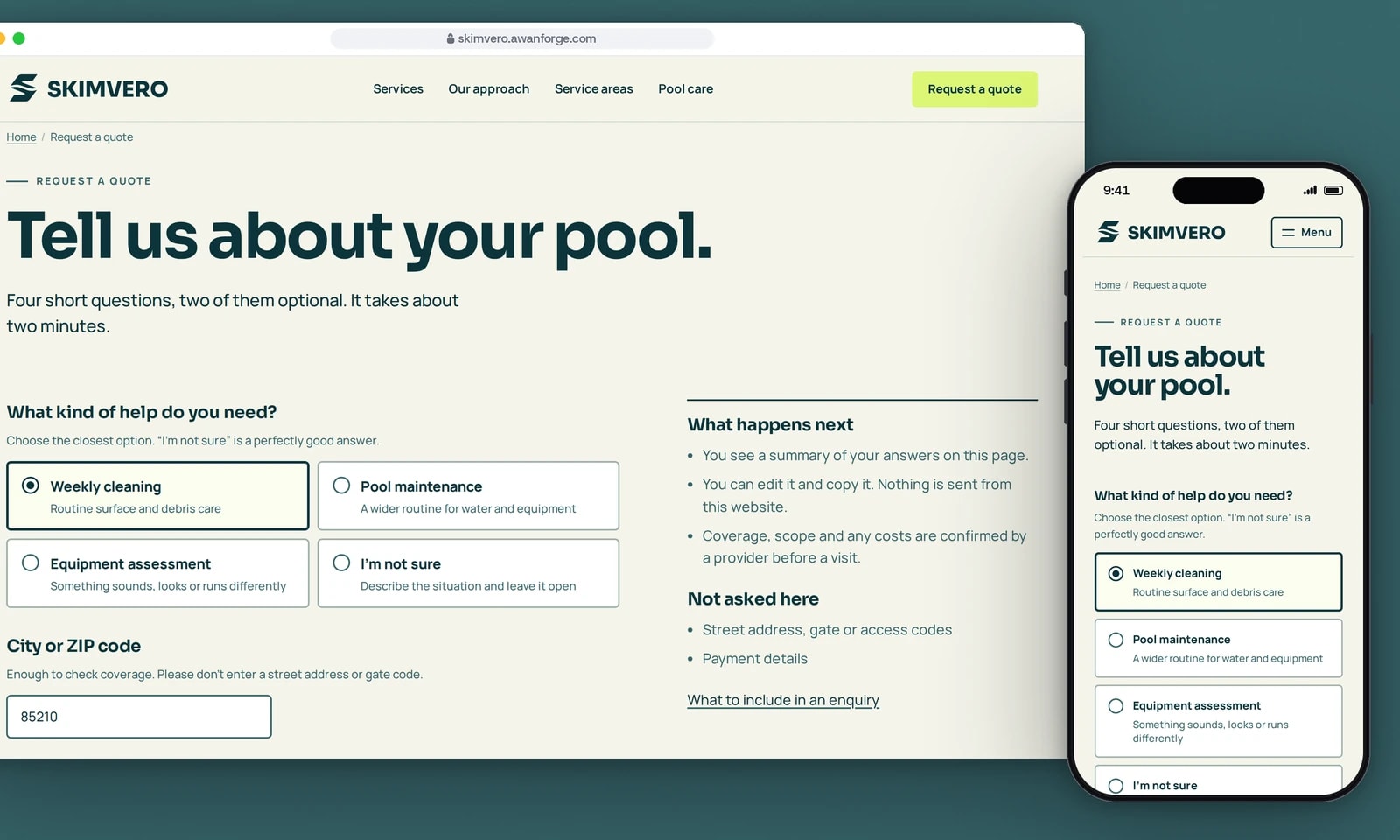
A quote form that arrives filled in
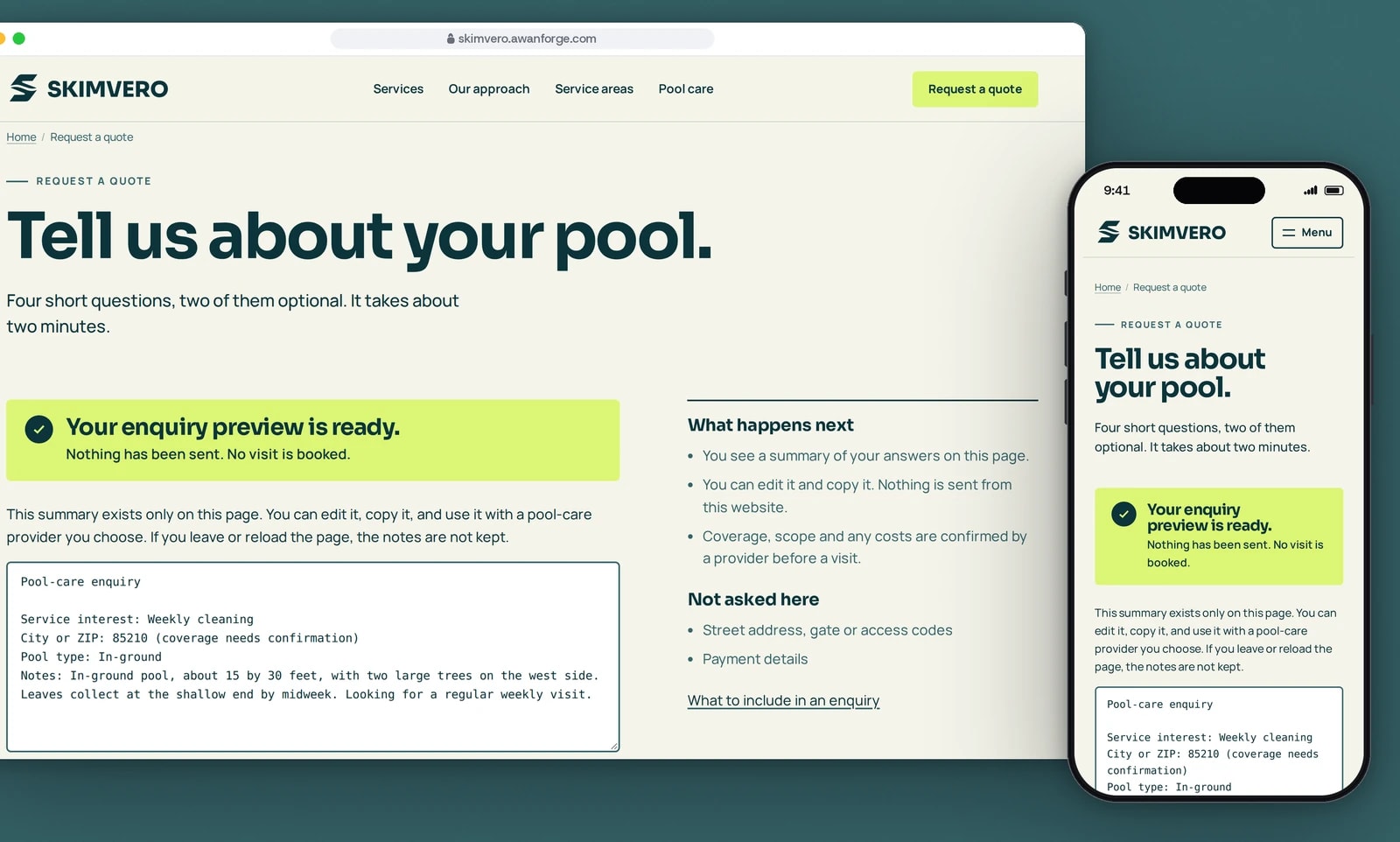
The service chosen earlier and the ZIP code from the area check are already filled in. The page also lists what it does not ask for.
A preview that says nothing was sent
Skimvero is a concept, so the form sends nothing. It builds a summary on the visitor’s device, says so in a banner, and can be copied.
Laid out for the phone
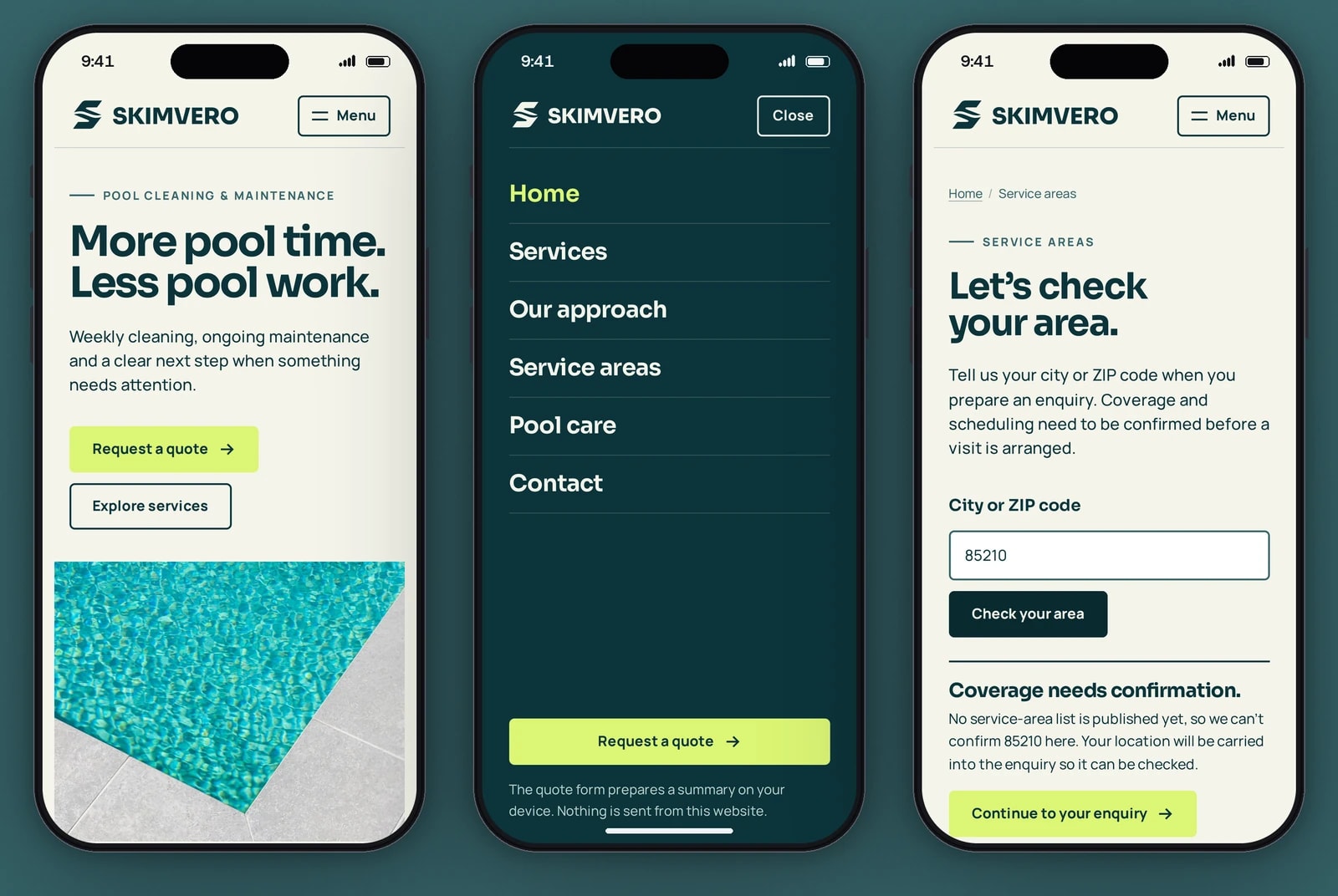
The quote action sits above the photo, the menu fills the screen, and the area check says when coverage still needs confirming.


Three services in one table
Who each service suits, its focus, where it starts, what is not automatically included and the next step, side by side for weekly cleaning, pool maintenance and equipment assessment. On a phone the table becomes a list grouped by question.
An area check that does not guess
Until a real list of covered areas is set, every city or ZIP code gets the same answer: coverage needs confirmation. The location is carried into the enquiry so it can be checked.
A quote form in four questions
The kind of help and a city or ZIP code are required; pool type and notes are optional. Problems are listed together above the form, each linked to its field. The form never asks for a street address, a gate code or payment details.
A preview in place of a send
With no receiving service connected, the form builds a summary on the visitor’s device. They can edit it, copy it, go back to their answers or start again, and a banner says that nothing has been sent and no visit is booked.
Real sending with one setting
Giving the build the address of a receiving service changes the button to Send enquiry and adds name and email fields. Success is shown only when the receiver answers that it accepted the enquiry; otherwise the answers stay in place and a failure message appears.
Very little is remembered
Only the chosen service and the city or ZIP code are kept, and only for the open tab. Notes are never stored, the site sets no cookies and it loads no analytics.
A quote bar on phones
Once a visitor has scrolled, a Request a quote bar stays at the bottom of the phone screen. It hides while the page’s own quote button or the footer is in view, and on the quote page itself.
Photographs marked as illustrative
Captions say the photographs are illustrative, and the credits page links each one to its creator and source. The equipment service has a text panel in place of a photograph, because none of the photographs honestly shows that work.
Technical choices
What the product is built with, and why.
- Next.js 16 as a static export, with React 19
- Every page is built ahead of time into plain HTML files, so the site needs no application server and loads its content before any script runs.
- One typed settings file for business facts
- Each fact is a small TypeScript type that is either configured with a value or unconfigured. A page has to check which before it can print one, so an empty setting cannot show up as a made-up number.
- A copy check on the built pages
- A script reads every built HTML page and fails on phone-like numbers, prices, star ratings and review counts, unverified credentials, coverage claims and a list of sales phrases. The release script runs it and stops before upload if it finds one.
- GSAP 3 with ScrollTrigger
- One animation library runs the entrance, the row reveals and the film scene, scoped to its component so it cleans up after itself. Media queries inside it choose the desktop, phone or reduced motion version.
- Self-hosted Sora and Manrope
- Two variable font files, reduced to the Latin characters and served from the site itself, both under the SIL Open Font License.
- AVIF, WebP and JPEG at several widths
- A build script cuts each photograph into several widths and formats, and the opening photograph has separate desktop and phone crops. The 12-second film is muted and loads only when it nears the screen.
- Playwright for behaviour checks
- 28 checks drive a real browser through every page, the quote flow, the phone menu, a visit with JavaScript off and a visit with reduced motion.
- nginx and Let’s Encrypt on our server
- Each release is uploaded to its own folder and switched in with one link. The script then requests six live addresses and one that should not exist, and puts the previous release back if any answer is wrong.
Outcomes
28 of 28 behaviour checks passing
The project’s browser test suite passed in full against the live site: all 15 pages loading and reloading without errors, the 404 page, no sideways scrolling at six widths from 360 to 1920 pixels, the quote flow, the phone menu, a visit with JavaScript off and a visit with reduced motion. Real iPhones and Android phones, screen readers and the connected sending mode were not part of these checks.
Evidence: tests/e2e.mjs, run with Playwright and Chromium against skimvero.awanforge.com on 11 November 2026, 28 passed and 0 failed. The project handover records the same result on 9 November 2026.
Lighthouse 100 for accessibility, best practices and SEO
The home page, the quote page and the weekly cleaning page each scored 100 for accessibility, best practices and SEO in every run, on desktop and on a simulated slow 4G phone. Performance, as the median of three runs per page, was 95 to 100 on desktop and 75 to 98 on the simulated phone, where the home page scored lowest. The largest element was on screen in 0.3 to 0.5 s on desktop and 1.0 to 1.8 s on the phone, layout shift stayed at 0.04 or below, and each page weighed 334 to 498 KiB.
Evidence: Lighthouse 13.5.0 lab runs against skimvero.awanforge.com on 11 November 2026, three runs per page on each profile. The test machine was running other work during the runs, which lowers the phone performance score. The project handover records performance of 100 on desktop and 92 to 96 on mobile from Lighthouse 12 on 9 November 2026. These are lab measurements, not data from real visitors.
No invented facts on any built page
The copy check read all 18 built HTML files and found no phone-like number, price, rating, review count, unverified credential or coverage claim.
Evidence: scripts/check-copy.mjs, run on the released build on 11 November 2026: 18 pages checked, 0 problems.
Skimvero Pool Care is an Awan Forge concept, not an operating company or a commissioned website. It publishes no phone number, prices, service area or customer reviews, and the quote form builds a preview on the visitor’s device and sends nothing. The photographs and the film are licensed stock from Pexels, credited one by one on the site’s credits page. The figures above come from lab tools and automated checks, not from real visitors.
Run a local service business?
We build service websites that say what a job covers, publish only facts that are confirmed and turn a visit into a clear enquiry. Tell us what your customers ask before they book.