my-tasksA personal task list, sorted by what is due
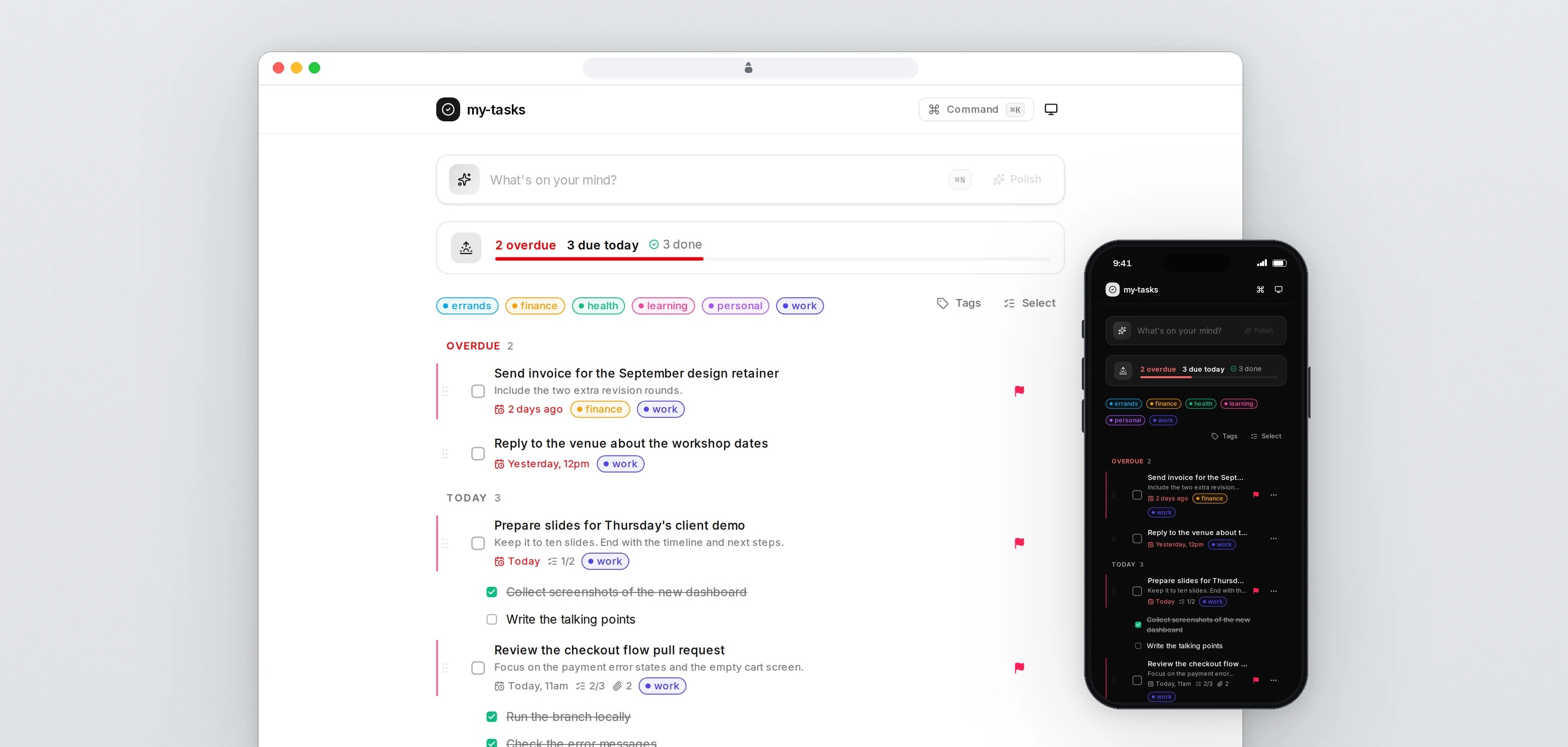
my-tasks is a dashboard for one person's working day: type a thought the way it comes, have it tidied into a proper task, and see everything grouped by when it is due. We designed and built it as a fast web app that can be run entirely from the keyboard.
- Client
- Own product
- Sector
- Productivity software
- Year
- 2026
- Platforms
- Web app, Mobile web
- Services
- Product and UX design, Web development
A dashboard for the day's work. Tasks go in as rough thoughts and come out with a title, notes, a due date and tags. They are grouped into Overdue, Today, Tomorrow, This week, Later and No due date, with the day's progress at the top.
Built for
- One person running their own working day, on a laptop and on a phone.
- People who work from the keyboard and want to add, find and finish tasks without the mouse.
The problem
Thoughts arrive half-formed, such as 'send the invoice thing tomorrow'. Turning that into a task with a clear title, a date and a category is a chore, and most task lists leave it to the user.
A list that only grows stops being read. What is overdue and what is due today have to be the first things on screen.
A personal tool is opened many times a day, so every action has to feel instant, and a slip such as deleting the wrong task has to be reversible.
Goals
- 01Turn a rough sentence into a clean task, shown for review before it is saved.
- 02Group tasks by when they are due, with overdue work first.
- 03Make adding, moving, finishing and finding tasks possible from the keyboard.
- 04Update the screen before the server answers, and make every delete undoable.
- 05Work as well on a phone as on a desktop, in light and dark themes.
Our role
We designed and built the whole app, from the database schema to the interface.
What we delivered
- Interface design for desktop and phone, in light and dark themes
- Next.js app with Server Actions, Prisma and PostgreSQL
- Quick-add with AI clean-up and date inference, reviewed before saving
- Due-date groups, drag to reorder and drag between days
- Colour-coded tags with a tag manager, priorities, sub-tasks, links and markdown notes
- Repeating tasks from daily to yearly
- Command palette, keyboard navigation and bulk select
- Soft delete with undo
How we worked
- 01
Start with the capture
The first version was the dashboard and the AI rewrite: raw input in, a structured task out, with the suggested date editable before saving.
- 02
Add the working parts
Priorities, sub-tasks, links, drag and drop, bulk actions and tag colours followed as one phase.
- 03
Take the noise out
Routine success messages were replaced with feedback where the action happened, such as an animated check and an edited time on the task. Toasts are kept for errors and for undoing a delete.
- 04
Fit it to the phone
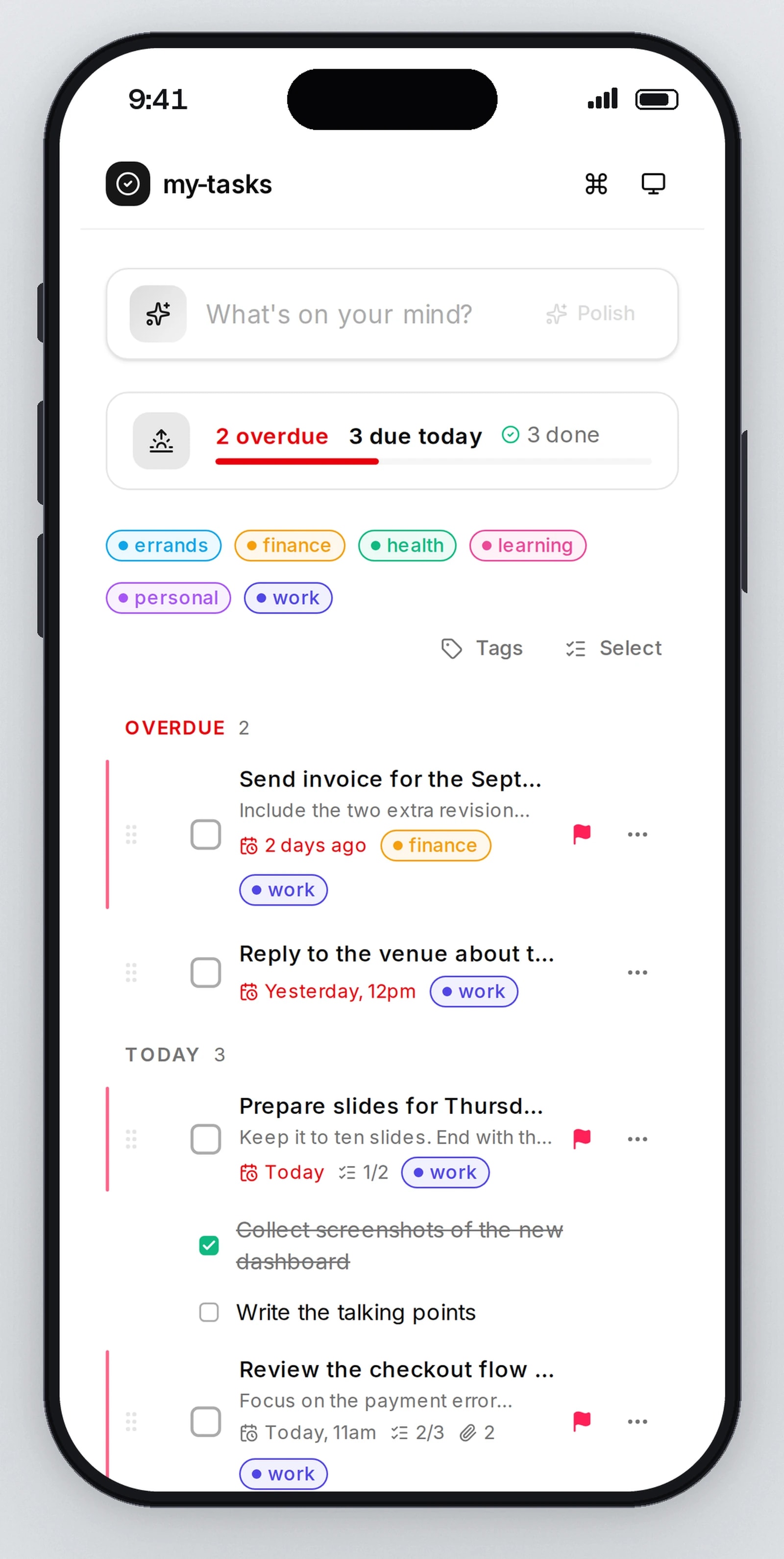
Task details open in a bottom sheet on a phone, dragging works by touch, tap targets are larger, and the bottom controls keep clear of the phone's home bar.
Screens and features
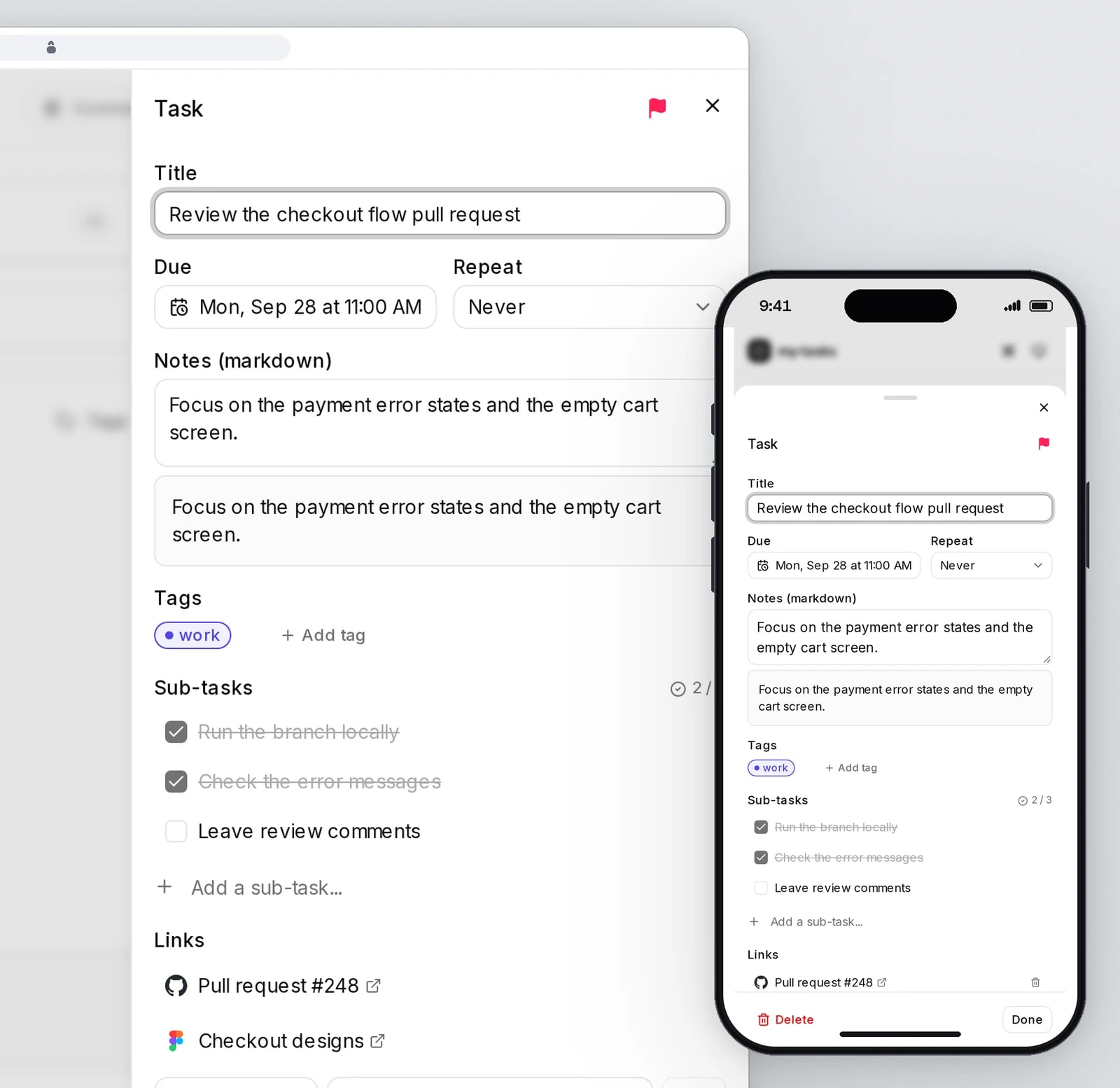
Notes, sub-tasks and links on every task
Markdown notes with a live preview, sub-tasks, links, and repeat rules that set the next due date.
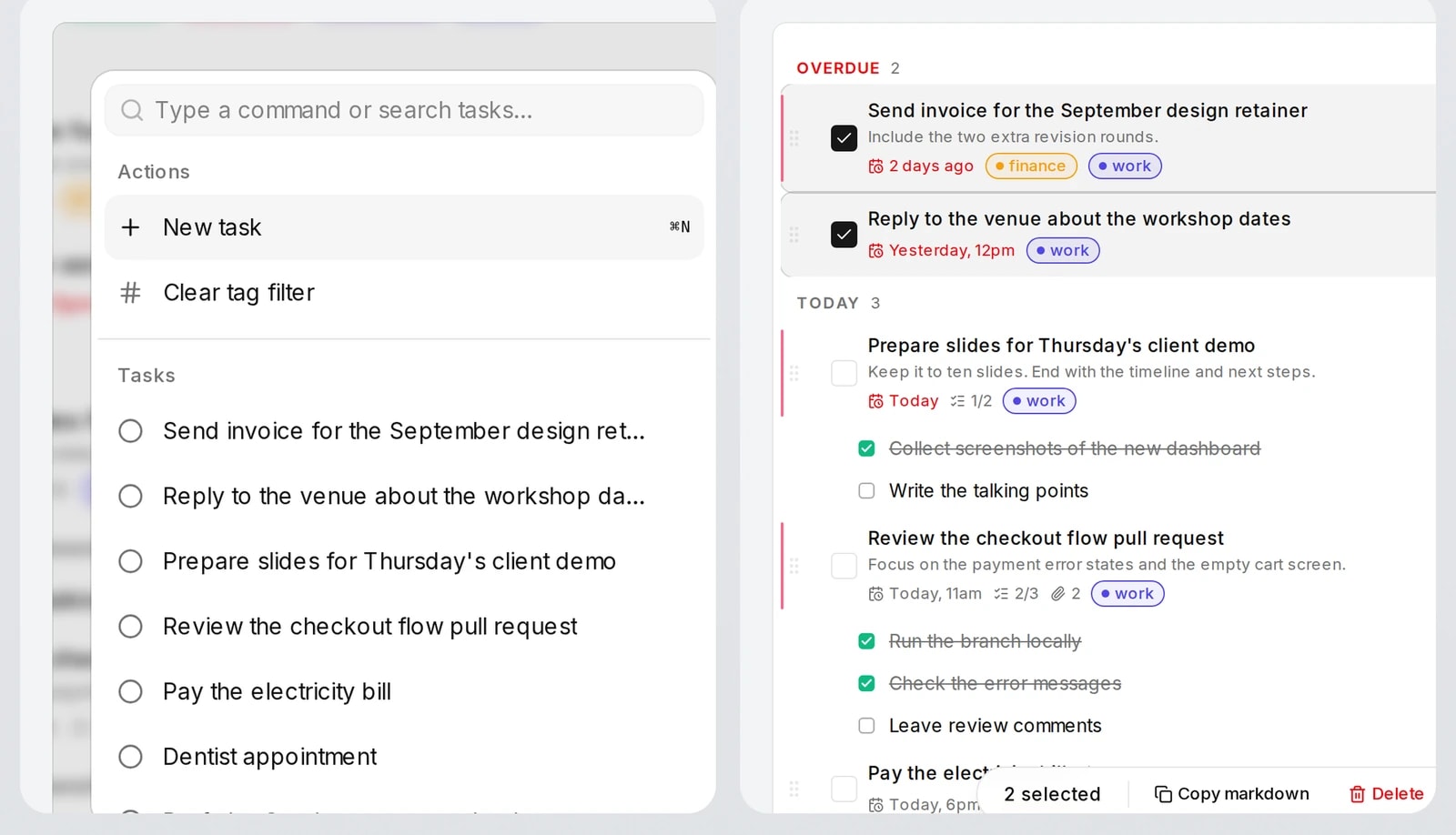
Quick to use without a mouse
A command palette for every action, and bulk select to copy tasks as markdown.
The same day on a phone
Overdue, today and upcoming groups, with a bottom sheet for each task, in light and dark themes.


Rough input, clean task
Type a thought and press Enter. The AI suggests a title, notes, a due date and tags, shown in a preview where the date can be changed before anything is saved. The original words are kept with the task.
Sorted by when it is due
Tasks fall into Overdue, Today, Tomorrow, This week, Later and No due date, with a progress bar for the day. Clearing Today ends with a short burst of confetti, skipped when reduced motion is on.
Everything a task needs
Priority flags, sub-tasks, links, colour-coded tags and markdown notes with a live preview, edited in a side sheet that saves as you type.
Repeating tasks
Daily, every weekday, weekly, monthly or yearly. Completing a repeating task creates the next one with the same tags and the next due date.
Drag to reorder or reschedule
Drag a task to change its place in a group, or onto another group to move its due date there, keeping the time of day. A task can also be snoozed by a day or a week from its menu.
Keyboard control
Cmd or Ctrl+K, or /, opens a command palette with actions, task search, tag filters and theme. Cmd or Ctrl+N jumps to quick-add, J and K or the arrow keys move between tasks, X or Space completes one and Enter opens it.
Bulk select and undo
Select several tasks to copy them as markdown or delete them. A delete can be undone from its toast, and brings back the task with its tags, links and sub-tasks.
Technical choices
What the product is built with, and why.
- Next.js 16 with Server Actions
- Every change to a task is a Server Action whose input is checked with Zod, so the app needs no separate API layer and the database is only reached from the server.
- Optimistic updates with TanStack Query
- Completing, deleting and reordering a task change the list the moment the action is taken, and the server confirms behind it, so none of them waits on a round trip.
- Soft delete in PostgreSQL
- Deleting a task sets a timestamp on it and its sub-tasks and leaves their tags and links in place, so undo restores everything exactly as it was.
- Ordering by midpoints
- A dragged task gets a sort position halfway between its new neighbours, so a reorder writes one row. Drag and drop runs on dnd-kit with pointer, touch and keyboard sensors.
- AI output checked like any other input
- The rewrite runs on gpt-4o-mini in JSON mode and is validated against a schema before the preview shows it. The prompt carries the local date, time and time zone, so relative dates are read against the user's own clock, and a date given without a time is shown as a date only.
- Recurrence rules with rrule.js
- Repeats are stored as iCalendar recurrence rules. Completing a repeating task and creating its next instance happen in one database transaction.
Building a tool people open every day?
Fast interfaces, keyboard control and careful use of AI are work we have done for our own tools. Tell us what yours needs to do.