Hairstyle IdeasA hairstyle site built around photos, with the words to say at the barber
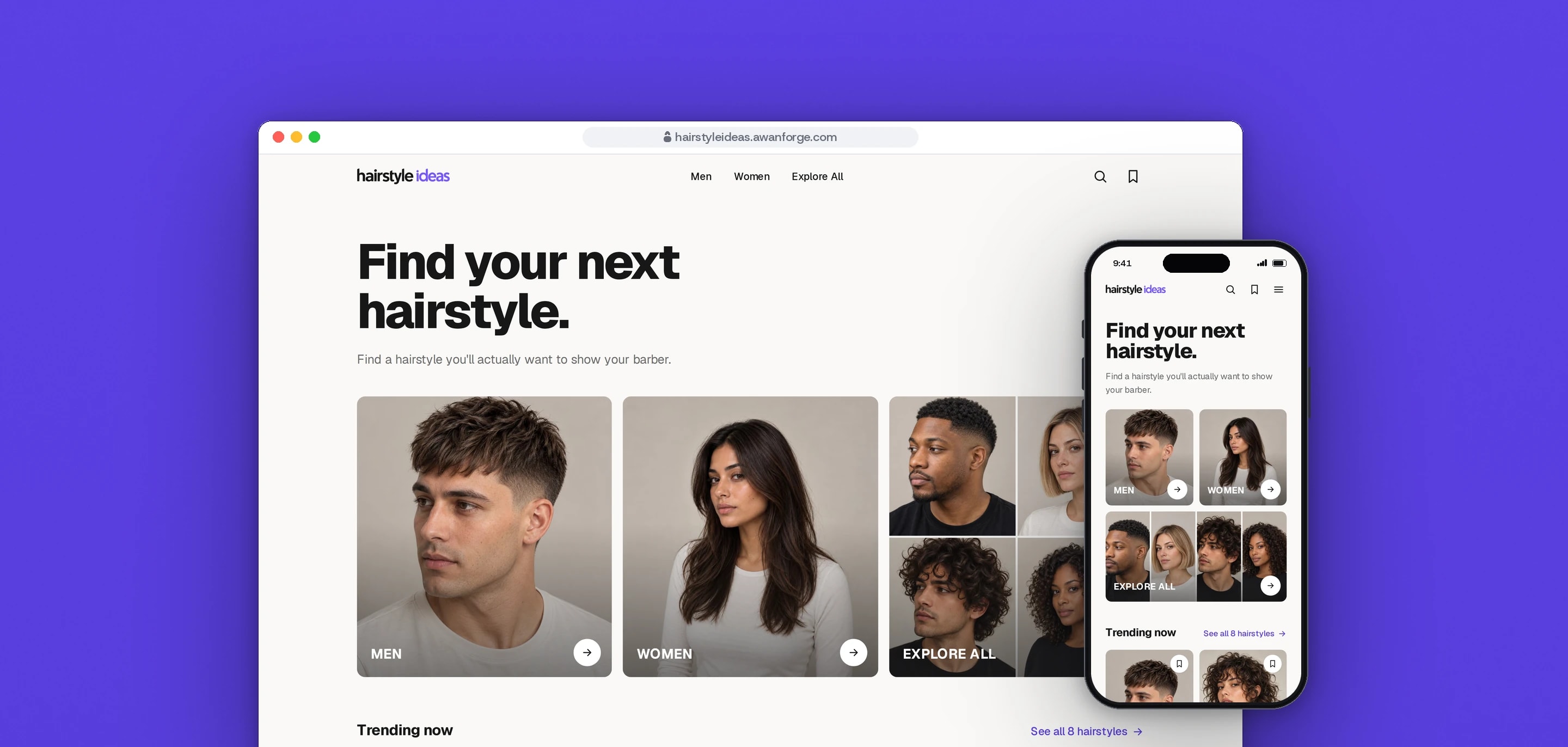
Hairstyle Ideas is our own hairstyle discovery site: men’s and women’s styles shown from every angle, filtered by length, texture and upkeep, each with a brief to show the barber. It is live as a preview at hairstyleideas.awanforge.com.
- Client
- Own project
- Sector
- Hair and beauty
- Year
- 2026
- Platforms
- Website
- Services
- Product and UX design, Web development, Brand and graphics
A website for choosing a haircut by looking at it. Every style is shown from the front, side, back and three-quarter, and every style comes with a short brief that says exactly what to ask for, so the choice survives the walk from the screen to the barber’s chair.
Built for
- Anyone planning their next haircut who wants to see a style from every side before committing to it.
- People who know the look they want but not the words a barber or stylist uses for it.
- Barbers and stylists, who receive a brief in their own terms instead of a single photo.
The problem
Hairstyle sites are mostly long articles with one front-facing photo per style. A haircut is judged from the side and the back as much as the front, and a single photo cannot be filtered by length, texture or how much upkeep it needs.
The hardest moment comes later, in the chair. People show a photo, the barber asks what number on the sides, and the answer is a guess.
A site made of photos is heavy by nature. It had to load fast on a phone, without content jumping as photos arrive.
Goals
- 01Show every style from at least four angles, one tap apart.
- 02Let people filter by length, texture and upkeep, and keep the filter in the address so a link opens the same view.
- 03Give every style a brief in the barber’s terms: top, sides, fringe, styling and how it grows out.
- 04Put two or three styles side by side, with the differences marked.
- 05Keep the largest photo on screen in under 2.5 seconds on a phone, with no layout shift.
- 06Keep the preview out of search, so it never competes with the site’s own domain.
Our role
We designed and built the product from the first prototype to the live preview: the catalogue, the photo standard, the brand files and the deployment.
What we delivered
- A clickable prototype, approved before any production code was written
- Home, men’s, women’s and all-styles pages with filters, plus curated pages such as short or low-maintenance styles
- Style pages with an angle viewer, full-screen view, saving and comparing
- A barber brief for every style, with copy, print and a keep-screen-on option
- Search that also finds a style by its other names
- A photo standard for every angle, and review rounds on each delivered photo
- Vector logo files, app icons and a once-per-visit logo entrance
- Search metadata, structured data and a sitemap, and deployment to our server
How we worked
- 01
Prototype first
The look and the main journey, from choosing men or women to the barber brief, were settled in a clickable prototype. The production site was built from that approved version, page by page.
- 02
Photos set the rules
Every style follows one photo standard: the same backdrop, the same framing and a fixed set of angles. Each delivered photo was checked at full size before it went in, and photos that missed the standard went back.
- 03
Brief before decoration
Each style’s content starts from what a barber needs to hear: one sentence to say, then the top, sides, fringe, styling and grow-out. The page around it is built to get the visitor to that brief.
- 04
Every state designed
Hover, focus and press states were drawn for every control, with a separate phone layout for each page and an action bar within thumb reach. Selection rings are checked edge by edge, so a sticky bar never hides one.
- 05
Measured on the live preview
Speed and accessibility were measured on the deployed site, not only on a laptop. Where a check failed, such as a photo counter with too little contrast, it was fixed and measured again.
Screens and features
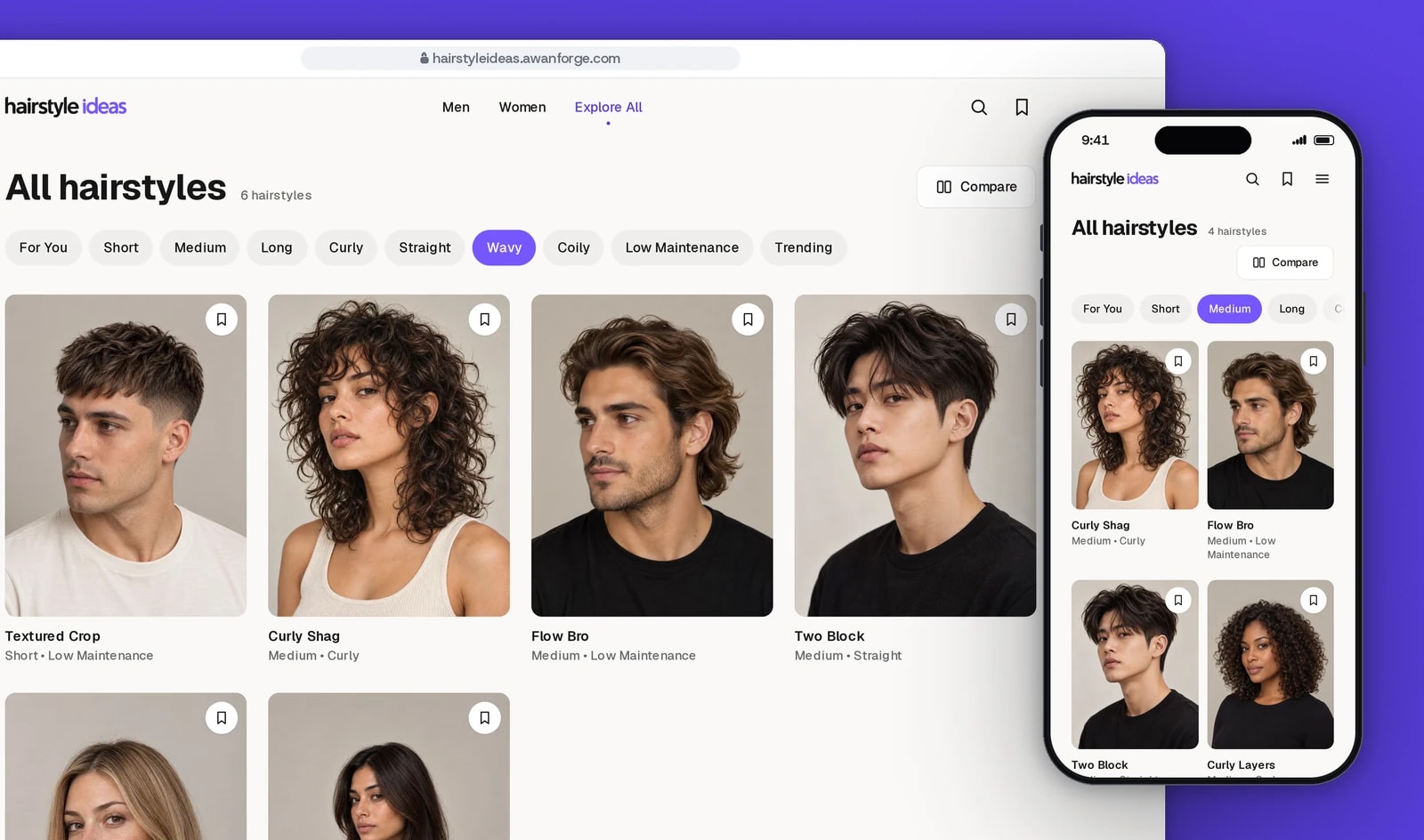
Filter by length, texture and upkeep
Every style leads with its photo. Chips narrow the list in place, and the address keeps the filter, so a shared link opens the same view.
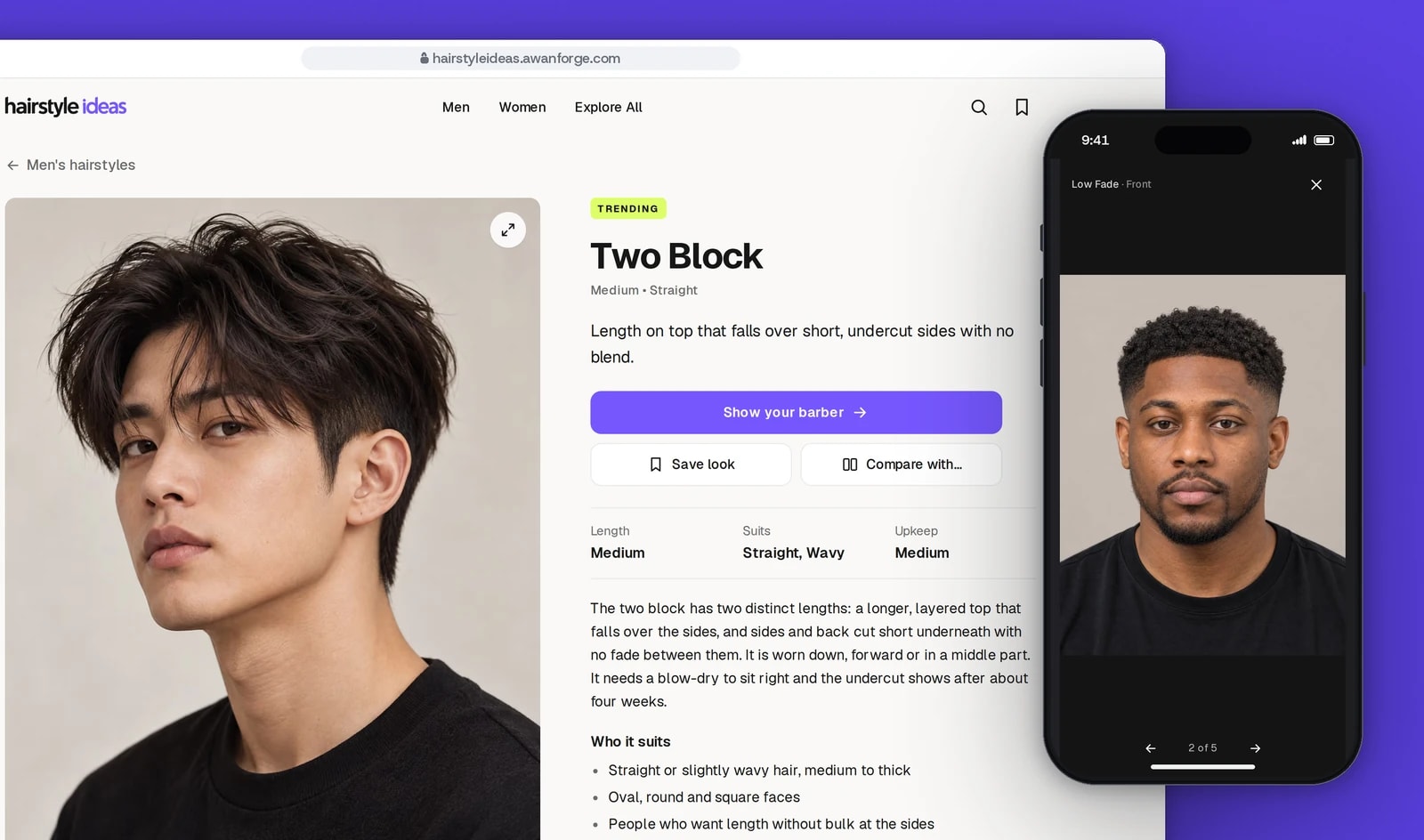
Every style from every side
Front, side, back, three-quarter and a close-up, one tap apart, with a full-screen view for a closer look.
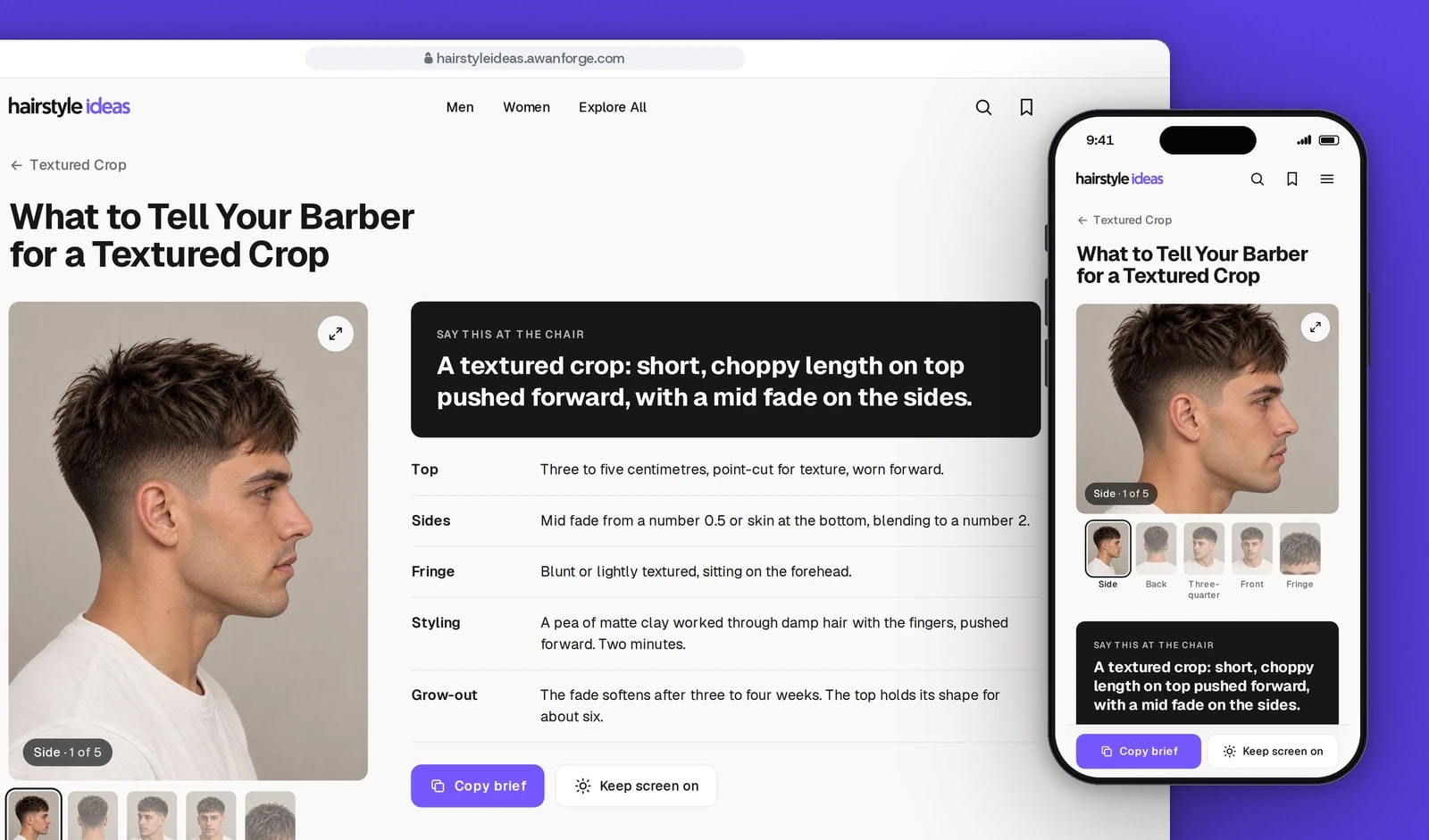
The words to say at the chair
Each style has a barber brief: one sentence to say, then the top, sides, fringe, styling and grow-out. It copies into a booking message.
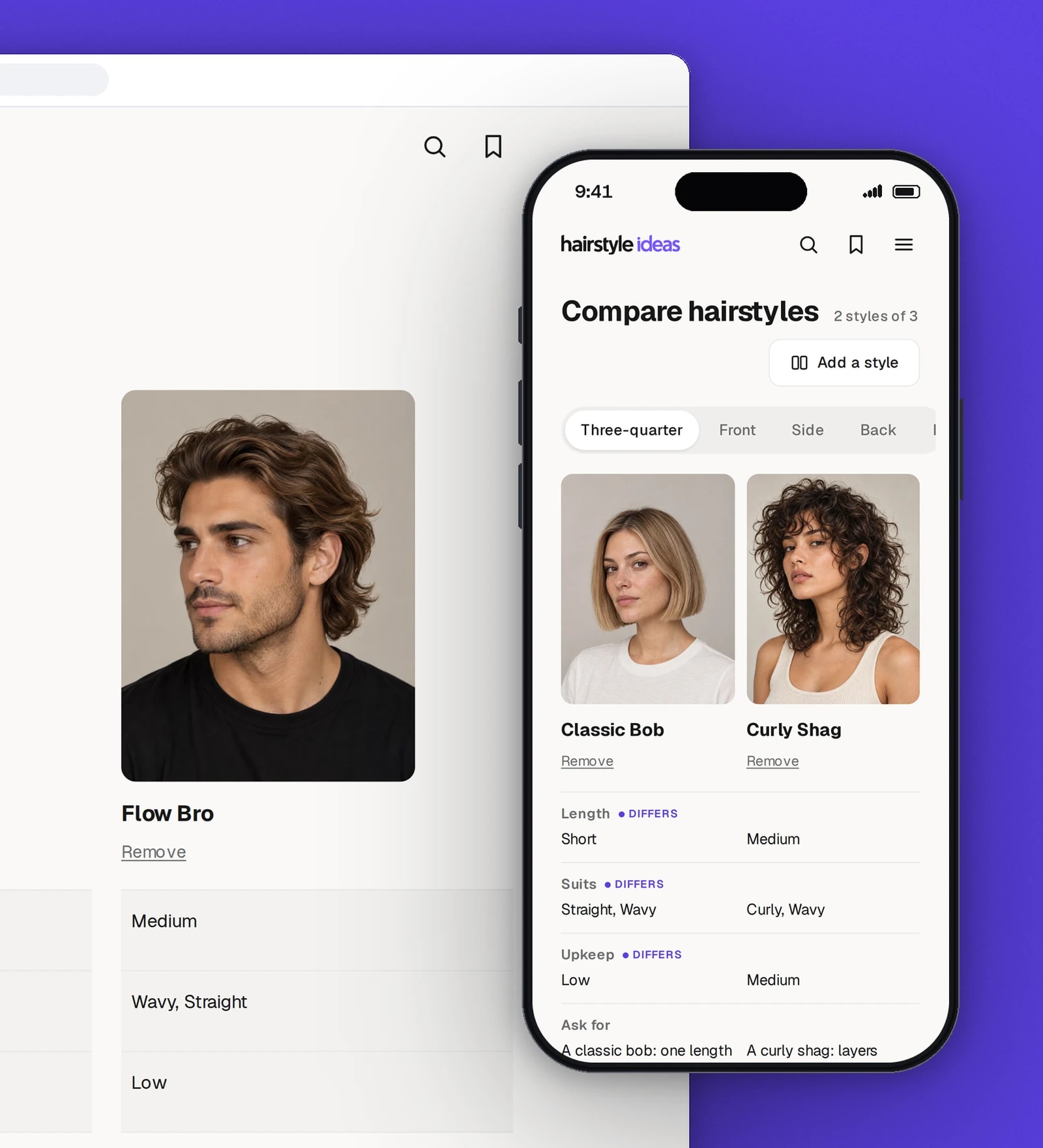
Two or three styles, side by side
One switch turns every photo to the same angle, and the facts that differ are marked.
Made for the phone in your hand
The home page, the trending list, and a style page with its actions in a bar at the bottom of the screen.
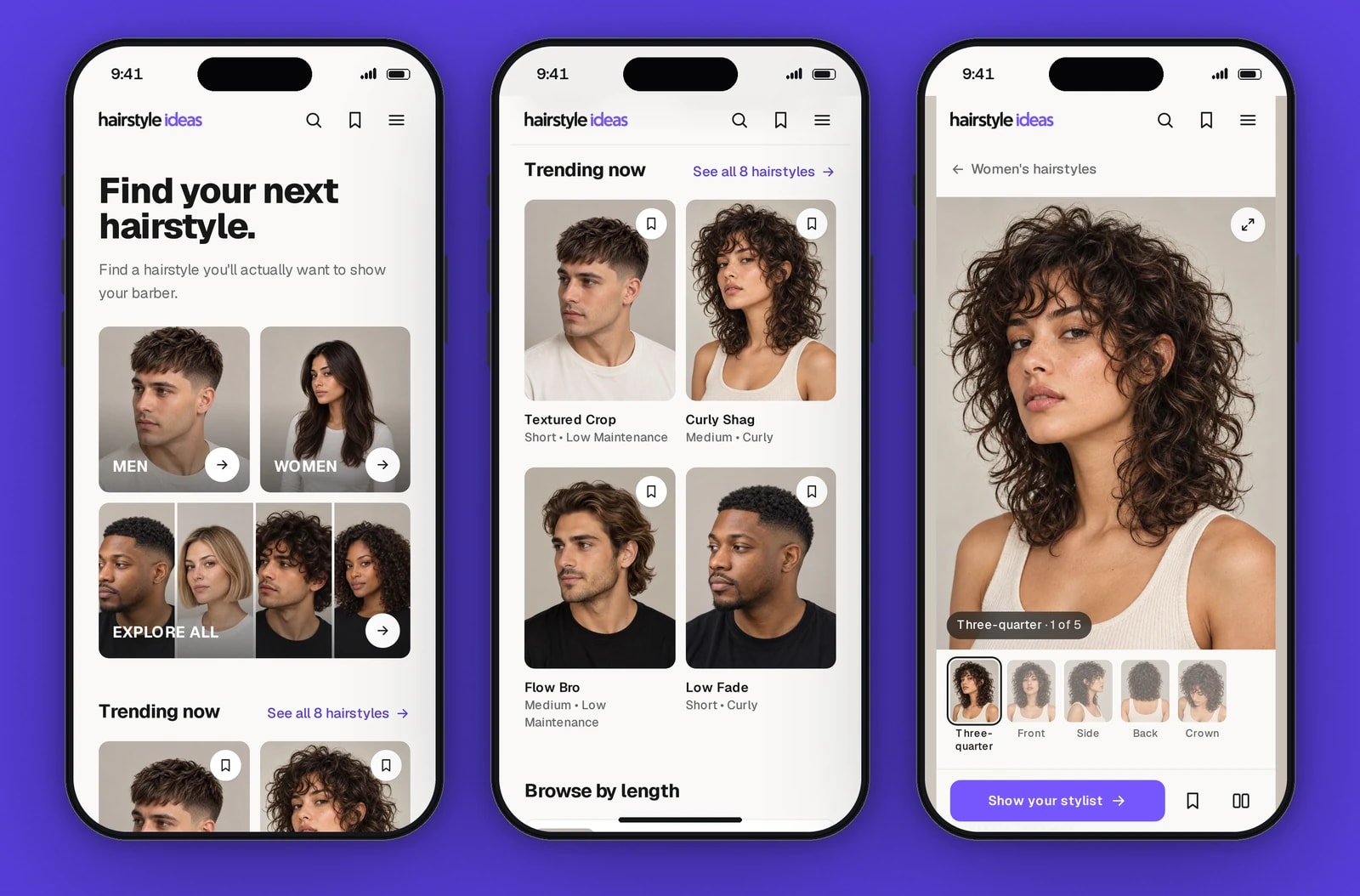


Photos from every angle
Each style has four or five photos: front, side, back, three-quarter and, where it matters, a close-up of the fringe or crown. Thumbnails, arrows, arrow keys and swipes all change the angle.
Filters that keep their place
Length, texture, upkeep and trending filter the list in place. The filter lives in the address, so a shared link opens the same selection, while search engines are kept away from every filtered copy.
A brief for the barber
One sentence to say at the chair, then the top, sides, fringe, styling and grow-out. Visitors copy it into a booking message, print it, or keep the screen awake while they show it.
Compare side by side
Up to three styles in columns. One angle switch turns every photo at once, and the facts that differ are marked with a label as well as a fill, never by colour alone.
Saved styles, no account
Saved styles and the compare list are kept in the visitor’s own browser and stay in step across open tabs. Nothing is sent to a server.
Search by other names
Searching for a French crop finds the Textured Crop. Each of the eight styles carries the other names people use for it, 24 in all.
Photos that arrive without a jump
Every photo’s box is reserved before it loads and filled first with a blurred copy, and the photo on a card carries on into the style page as it opens.
Technical choices
What the product is built with, and why.
- Next.js 16 with Cache Components and React 19
- Every page is prerendered, so the photos, names and briefs are in the HTML before any script runs. Only the filtered grid streams in, with a placeholder in its own space.
- One content file and generated image imports
- Styles, briefs, facets and photo angles live in one typed seed file. A script turns the photo folder into static imports, so every photo has its exact size and blurred placeholder at build time.
- next/image with AVIF and WebP
- Each photo is served at the width the layout needs, in AVIF where the browser supports it. Only the photos on the first screen load straight away.
- Tailwind CSS 4 and one typeface
- Colours, spacing and motion timings are tokens from the design system. Geist, in weights from 400 to 800, sets every word, so the page loads one font file.
- CSS and React view transitions for motion
- Press states, entrances and the logo sequence are plain CSS on transform and opacity, and the photo carried from card to page uses React’s view transitions. No animation library is loaded, and reduced-motion settings are respected.
- Playwright for every check
- 34 tests cover the content rules and the main journeys in a production build: filtering, saving across a reload, comparing, search by other names and edges hidden by sticky bars.
- nginx and Let’s Encrypt on our server
- Each release is built in its own folder and switched in only after it answers over HTTPS; a failed check puts the previous release back. The preview is marked noindex in its pages, its headers and robots.txt.
Outcomes
Lighthouse 100 on mobile and desktop
On a simulated slow 4G phone, the home page, the men’s page, a style page and its barber brief each scored 100 for performance, accessibility and best practices, with a largest contentful paint of 1.4 to 1.5 s, no layout shift and 334 to 383 KiB in total. On desktop they scored 100, with a largest contentful paint of 0.3 to 0.4 s.
Evidence: Lighthouse 12.8.2 lab runs against the live preview, saved with the project. These are lab measurements, not data from real visitors. Search scored 69 only because the preview is set to noindex.
34 of 34 tests passing
12 tests check the content itself, such as unique names, valid links between styles and every photo’s size, and 22 run the main journeys in a browser against a production build.
Evidence: the project’s Playwright suite, run with no failures.
No accessibility violations found
An automated audit of five live pages, from the home page to a barber brief, found no violations. Safari, real phones and screen readers have not been tested yet.
Evidence: accesslint audits of the live preview.
Hairstyle Ideas is our own product. This preview is set to noindex; the site’s own domain is hairstyleideas.co. The figures above come from lab tools and automated checks, not from real visitors.
Do your customers choose by looking?
We build catalogue sites where people filter by what matters to them, compare side by side and leave knowing what to ask for. Tell us what your customers are choosing between.