CatatHisabExpense tracking that fills itself in from bank alerts
CatatHisab reads the push notifications and emails BCA sends for every payment and turns them into one spending timeline, with nothing typed in. We designed and built the Android and web app and the API behind it.
- Client
- Own product
- Sector
- Personal finance
- Year
- 2026
- Platforms
- Android app, Web app
- Services
- Product and UX design, Web development, Mobile apps
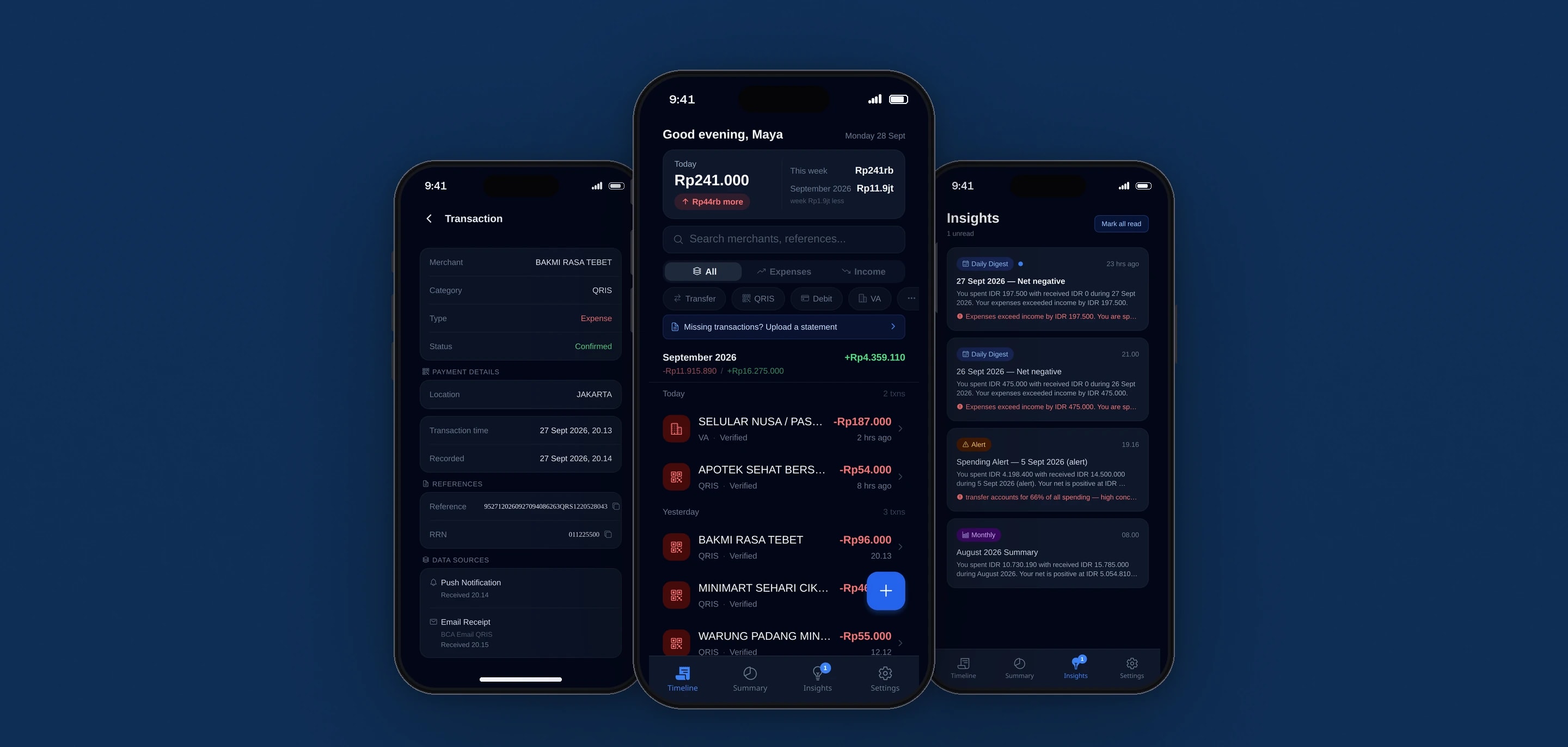
An expense tracker that fills itself in. It captures BCA's payment notifications on the phone, reads BCA's transaction emails from the user's mailbox, and merges the two into a single record for each payment, with a monthly summary and plain-language insights on top.
Built for
- BCA customers who pay by QRIS, transfer, virtual account and debit card every day.
- People who want to know where the month went without keeping a spreadsheet.
The problem
Expense apps ask people to type in every purchase. The bank already reports every purchase, usually twice: a push notification from the myBCA app within seconds, and an email receipt a little later.
Neither message is complete on its own. Notifications mask the other party's name, the emails come in several formats depending on how the payment was made, and some payments produce neither.
Counting has to be exact in both directions. The same payment reported twice must become one record, and two genuine payments of the same amount at the same shop must stay two.
Goals
- 01Record spending from BCA without manual entry.
- 02Count each payment once, whichever channels report it.
- 03Fill in masked names from the fuller data in the emails.
- 04Import a monthly statement to fill the gaps without creating duplicates.
- 05Summarise spending in plain language, in the app, by push and by email.
Our role
We designed and built the app and the API, and run the platform in production.
What we delivered
- Interface design for a phone-first app, also served on the web
- Expo and React Native app for Android and the web
- Kotlin notification listener with an offline queue
- Bun and Hono API with Drizzle and PostgreSQL
- Six BCA parsers: notifications, four email formats and the statement PDF
- Deduplication, merging and masked-name resolution
- Encrypted mailbox connection and background email polling
- Insights with AI wording and a template fallback, delivered in the app, by push and by email
- Deployment pipeline with a type-check gate, health check and automatic rollback
How we worked
- 01
Start from real bank text
Every parser was written against sample BCA notifications and emails kept in the repository, and the tests use those samples inline, so a change in the bank's wording shows up as a failing test.
- 02
Capture on the phone, read mail on the server
A native service on the phone picks up myBCA notifications as they arrive. The server polls the user's mailbox for BCA emails in a background job, with the mailbox credentials encrypted at rest.
- 03
Merge before anything is shown
Every incoming signal is parsed, then matched against existing records by reference number, then RRN, then two levels of fingerprint. A match is merged into the existing payment, and anything else becomes a new one.
- 04
Fill the gaps from the statement
A monthly statement PDF can be uploaded to add whatever never arrived by notification or email. The import adds only the payments the timeline is missing.
- 05
Ship through a gate
A push to the main branch deploys through a webhook that type-checks, migrates the database, reloads the processes and checks health, and rolls back when the type check or the health check fails.
Screens and features
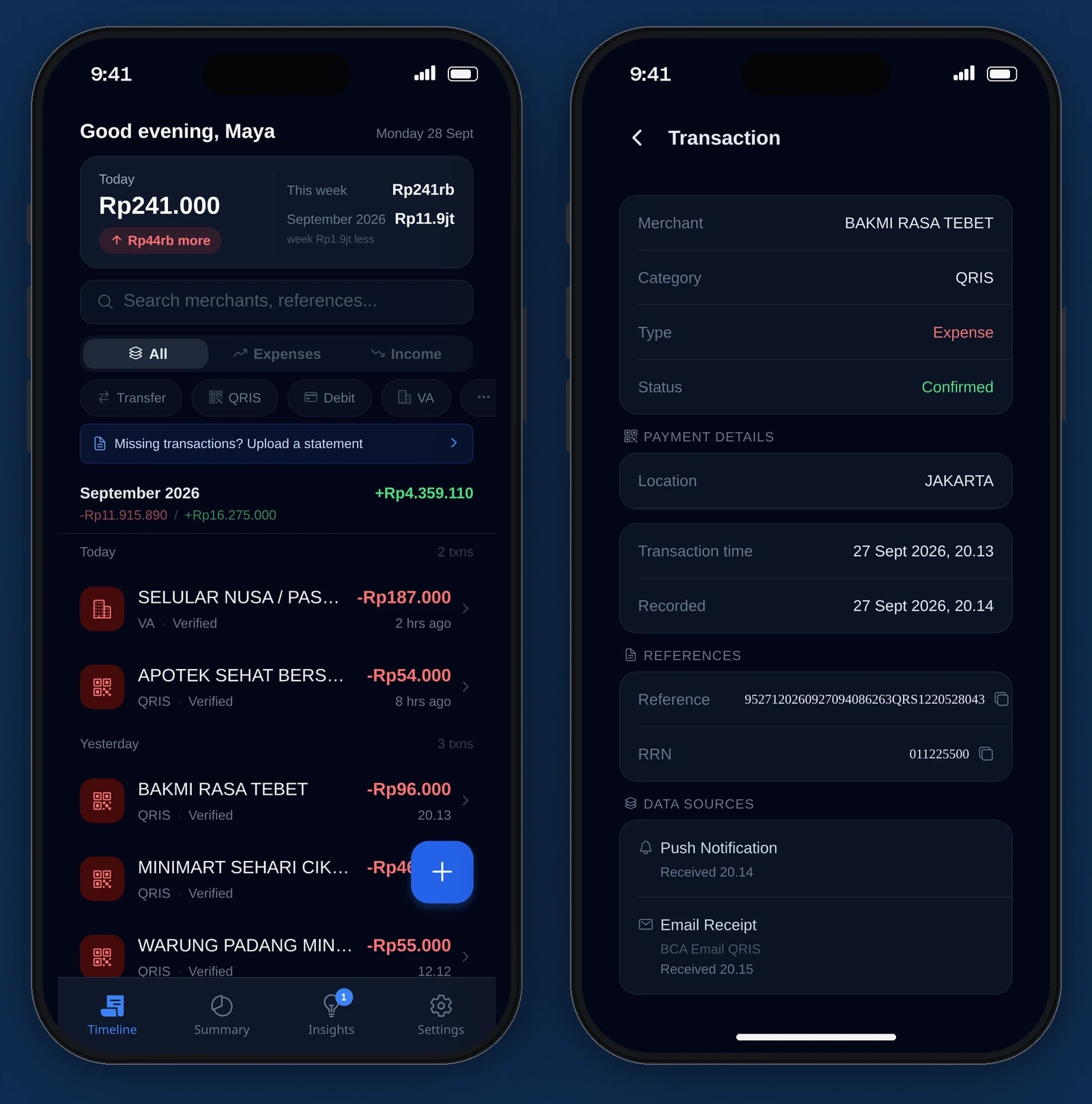
Every payment, from alert to record
A push notification and an email receipt for the same payment become one record, with the merchant, the channel and both sources shown.
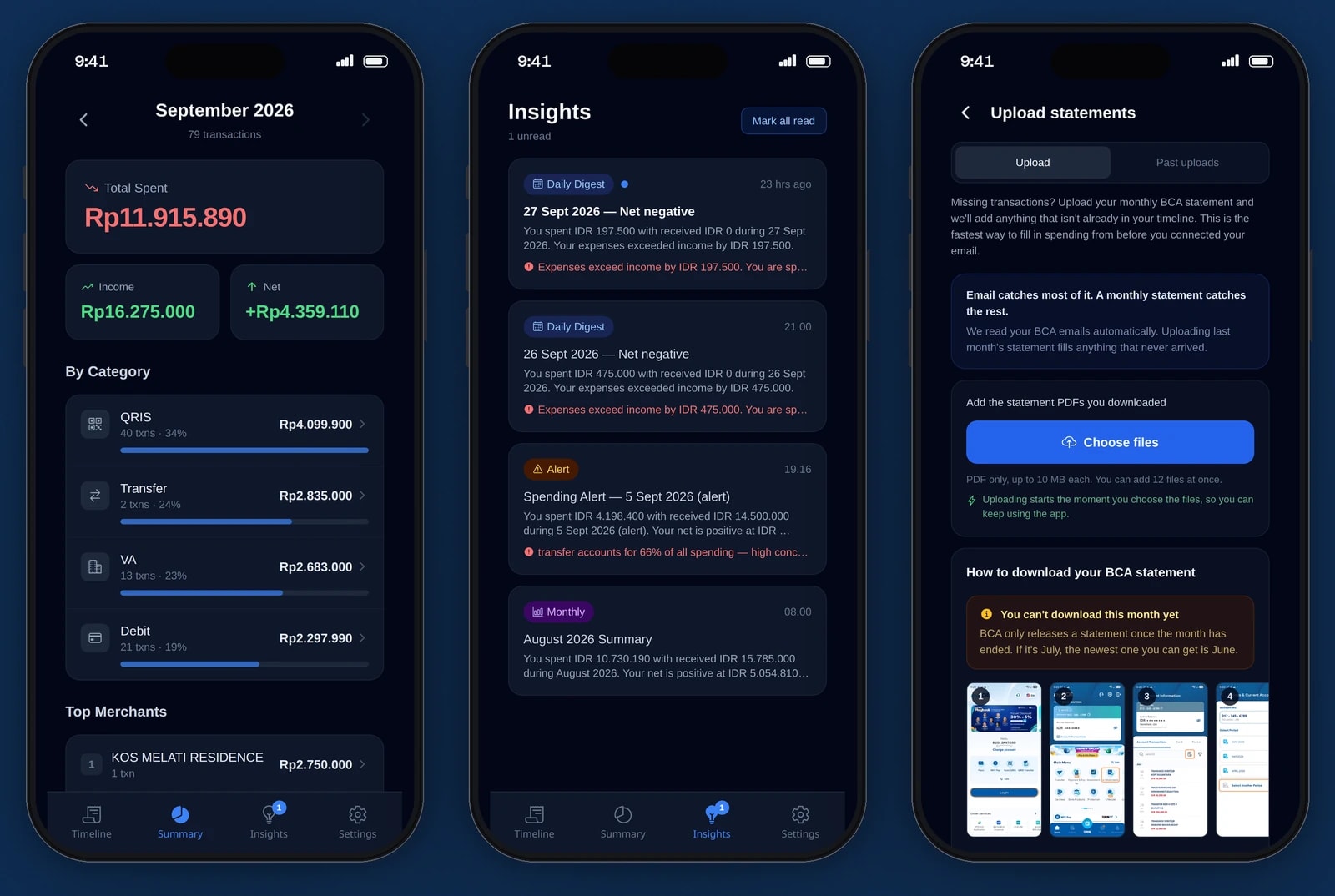
Monthly summaries, insights and statements
Spending by channel and merchant, daily and monthly digests, and bank statement upload for anything the alerts missed.


Nothing to type
Payments arrive from the phone's notifications and from the user's email. Manual entry covers anything the bank never reports.
One record per payment
When a notification and an email describe the same payment, the two are merged and the record shows both sources with the time each one arrived.
Masked names filled in
Notifications hide most of the other party's name. The app compares the visible letters with full names from email data and fills the name in when the match is strong enough.
A statement import that cannot double count
A statement is identified by the hash of its bytes, so the same file is never imported twice. A corrected statement for the same month still imports, and only the payments missing from the timeline are added.
Insights by app, push and email
Daily digests, a monthly summary and spending alerts, each delivered on the channels the user has switched on.
Search and filters
The timeline searches merchants and references, and filters by expense or income and by payment channel.
Technical choices
What the product is built with, and why.
- A native Android notification listener
- Only a native service can read another app's notifications. It is written in Kotlin on the Expo Modules API and saves each capture to the phone's storage first, so nothing is lost if the app is closed before it syncs.
- An offline queue in two tiers
- The native store survives the app being killed, and a JavaScript queue sends captures to the API in batches every 30 seconds, so a phone without signal catches up later.
- Drizzle with postgres.js on Bun
- Prisma's command line tools had bugs under Bun, and Bun's built-in SQL client had a connection hang, so the API uses Drizzle over the postgres.js driver.
- Background jobs on BullMQ and Redis
- Mail polling, parsing, insights and statement imports run in a separate worker process, each queue with its own concurrency, so a slow mailbox does not hold up the API.
- Deduplication that prefers a duplicate to a gap
- When a match is uncertain, both records are kept. A duplicate shows up on the timeline, while a payment merged away by mistake would simply be missing.
- Figures computed before any AI is involved
- Insight figures are built from the transactions with no AI call. A model only writes the sentences, and when AI is off or failing, a circuit breaker switches to template wording.
Turning messy messages into clean records?
Parsing, deduplication and background jobs are work we enjoy. Tell us where your data comes from.