Banksia & BurrowAn Australian pet store work sample with delivery rules by product, suburb and postcode
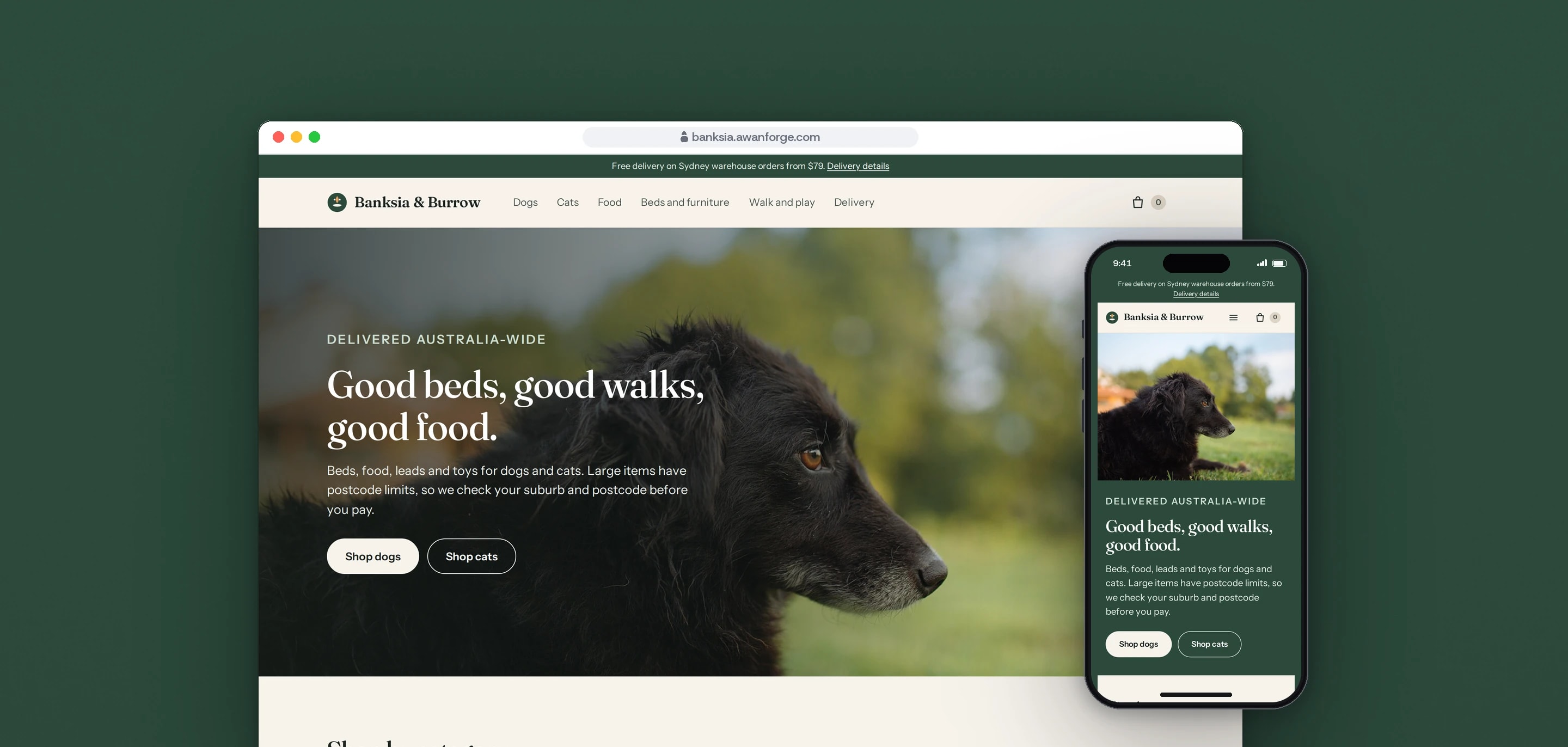
Banksia & Burrow is our own work sample: a fictional Australian pet store written as a Shopify Online Store 2.0 theme, with delivery rules by product, suburb and postcode, a cart split across two warehouses and a staff console for supplier orders. It runs on our own small server with sample data and a test checkout that takes no payment, and the theme has not been installed on a Shopify store.
- Client
- Own project
- Sector
- Pet supplies
- Year
- 2026
- Platforms
- Website
- Services
- Product and UX design, Web development
An online pet store where some products cannot be sent everywhere. A cat tree goes to metro postcodes only and a dog bed is not sent to remote areas, so the store answers the delivery question on the product page, checks it again in the cart and refuses the order at checkout if the address is still restricted. We built it to show that one job from end to end, from the product page to the screen where staff record supplier orders.
Built for
- Shoppers who want to know whether a bulky item reaches their suburb before they enter card details.
- Shop owners who sell from more than one supplier and need each supplier’s delivery limits applied the same way on every page.
- Store staff who place supplier orders by hand and record references, tracking numbers and refunds.
The problem
A store that sells from dropship suppliers takes on their delivery limits. One supplier will not send a bulky item outside metro areas, another will not send to offshore islands, and two suburbs can share a postcode with different answers. In our sample rules Broken Hill and Silverton share 2880, and only Broken Hill can receive the dog bed.
A postcode checker on the product page is advice the shopper can skip. An express wallet button sends its own saved address and never shows the cart page, so the rule has to be applied again at the moment of payment.
The same rule then has to live in several places: the product page, the cart, the checkout and the code written for Shopify’s own checkout. If two copies disagree, the shopper is told yes on one page and no on the next.
One customer order can need two supplier orders from two warehouses, each with its own shipping price, supplier reference and tracking number.
Goals
- 01Answer the delivery question on the product page, with the reason and what to do next.
- 02Check every cart line against the address and name only the items that cannot be delivered.
- 03Refuse a restricted address at checkout on every way in: the checkout form, the express wallet and a request sent straight to the server.
- 04Keep one rule engine for all of them, with a test that fails when a copy changes.
- 05Split a mixed cart by warehouse, price shipping for each and show the GST included.
- 06Give staff one screen for supplier orders, tracking, refunds and cancellations.
- 07State on the store itself what is sample data and what is simulated.
Our role
We designed and built the whole sample: the storefront theme, the delivery rule engine, the checkout stand-in, the staff console, the catalogue audit and the tests. The brand, the catalogue and the two supplier feeds are sample data we wrote for it.
What we delivered
- A storefront in Shopify’s Online Store 2.0 theme format, with 13 sections and 7 page templates
- Home, collection, product, cart, delivery and terms pages for 12 products and 29 variants
- A delivery rule engine for metro-only items, excluded postcodes and suburbs, unknown postcodes and suburbs that do not match their postcode
- A delivery check on every product page and an address check for the whole cart
- A cart drawer and cart page that group items by warehouse, with shipping for each group and the GST included
- The source of a Shopify cart and checkout validation Function that uses the same rule engine
- A test-mode checkout with three test cards, and a test wallet that sends its own saved address
- A staff console behind a sign-in: a purchase order per supplier, supplier reference, acceptance or rejection, tracking, refunds and cancellation
- A catalogue audit against two supplier feeds, and a product import file in Shopify’s CSV format
- Unit tests, browser tests, and written guides for delivery enforcement and store operations
How we worked
- 01
Start from the platform’s rules
We read Shopify’s documentation on where an order can be stopped and built around the answer. A check on the product page or in the cart can only advise, so the refusal sits at checkout and the earlier checks are help for the shopper.
- 02
One rule engine for every check
The delivery rules live in one small file that reads only the rules and the address it is given. The product page check, the cart, the checkout and the Shopify Function all call it. The Function keeps its own copy so it can be built alone, and a unit test compares the two files and fails if they differ.
- 03
When in doubt, hold the item
A product whose rule name is not recognised is refused, so a typing mistake in the settings cannot ship an item to a place the supplier will not serve. A suburb that does not belong to its postcode holds the cart and offers the real suburbs for that postcode as one-tap fixes.
- 04
Try to get past the checkout
We tested the checkout the way a hurried shopper or a script would reach it: a restricted address typed into the checkout form, the express wallet set to a remote address, and a request sent straight to the server. Each was refused and nothing was charged.
- 05
Say what is real
The store’s terms page states that the brand is fictional, the data is sample data and the checkout takes no payment. The checkout, the order page and the staff console each open with a test-mode notice.
Screens and features
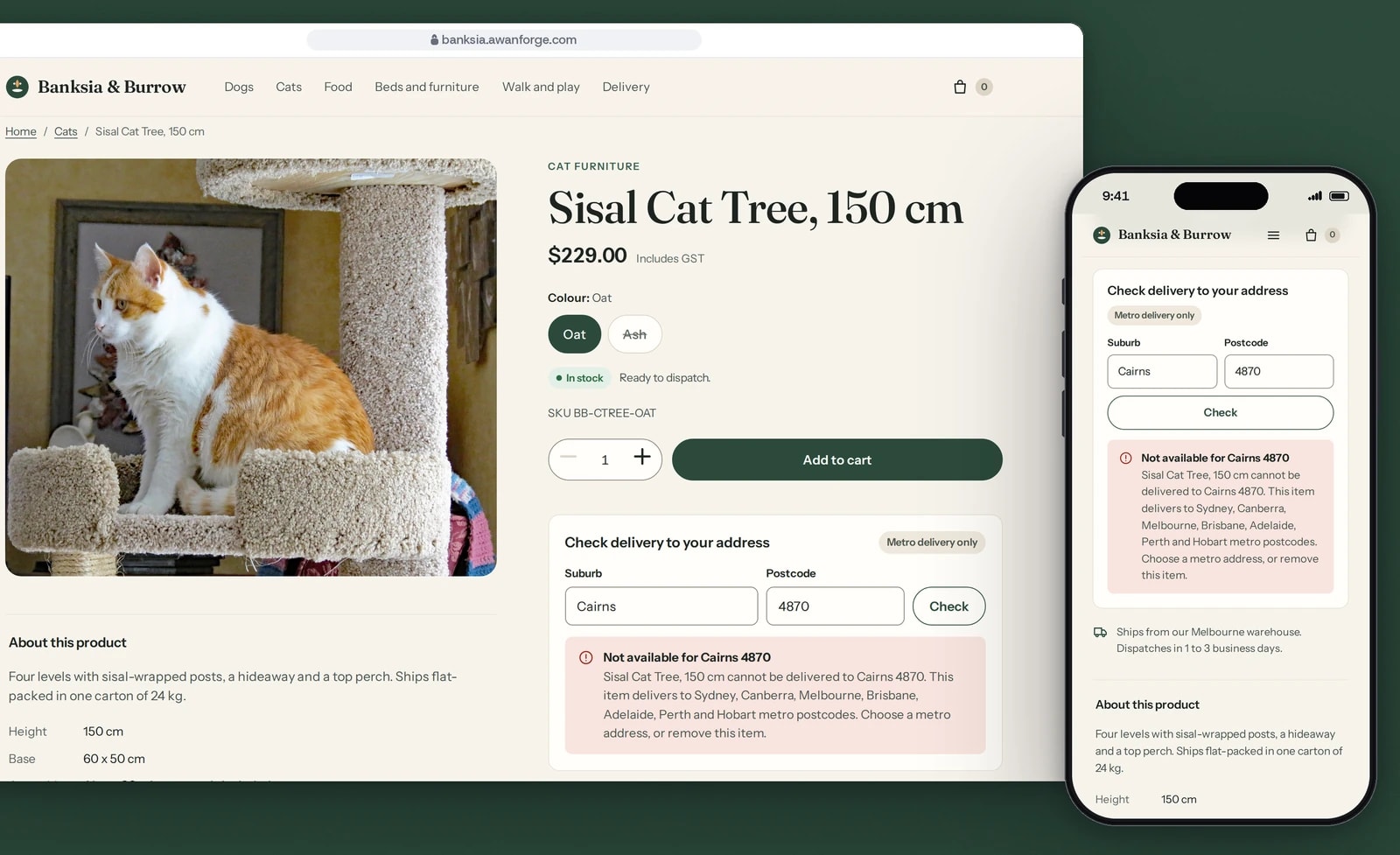
A delivery check on the product page
The cat tree delivers to metro postcodes only. Type a suburb and postcode and the page says whether it delivers, why, and what to do next.
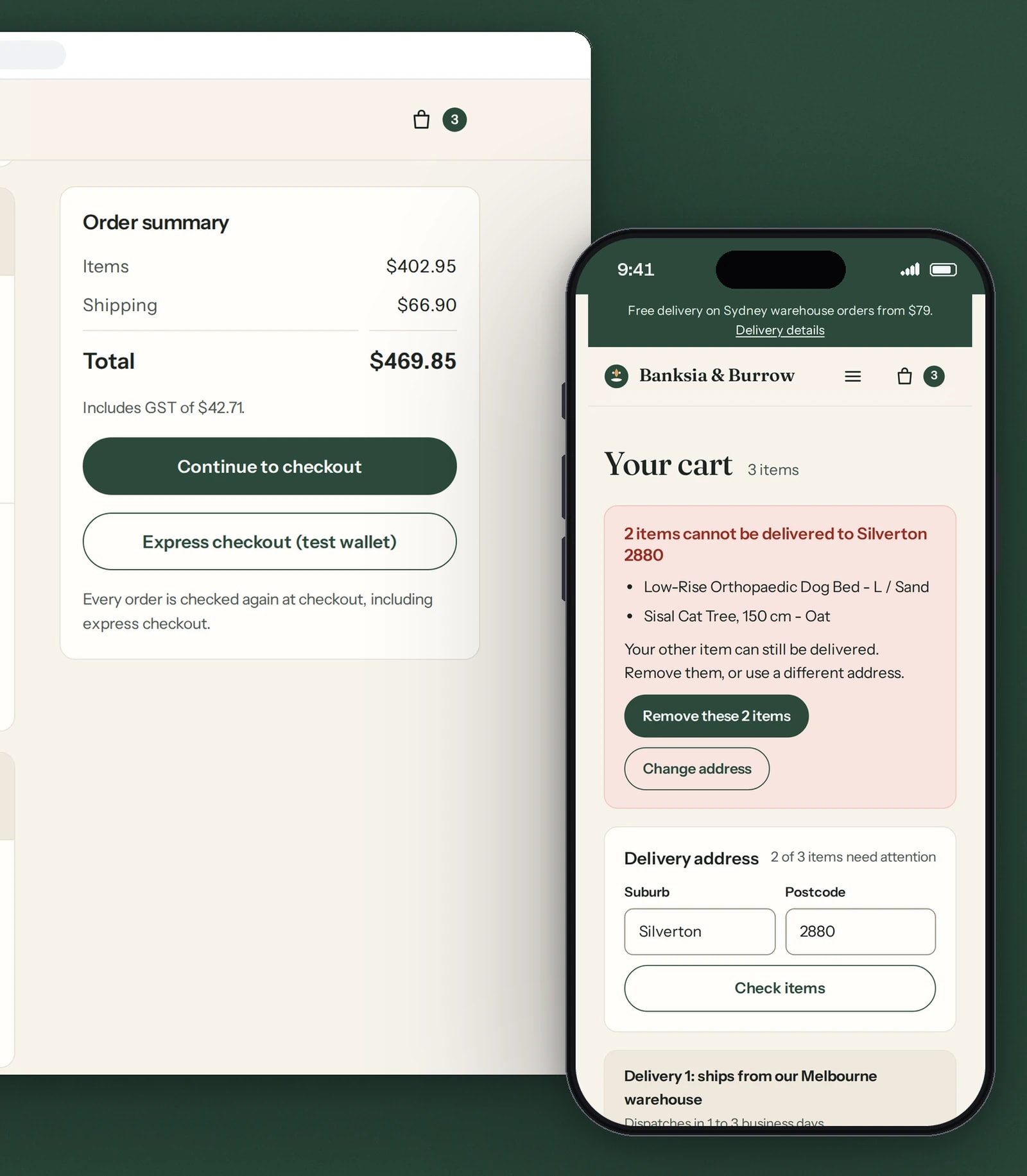
One cart, two warehouses
The cart splits the order by warehouse and prices each delivery. If an item cannot reach the address, the cart names it and holds checkout.
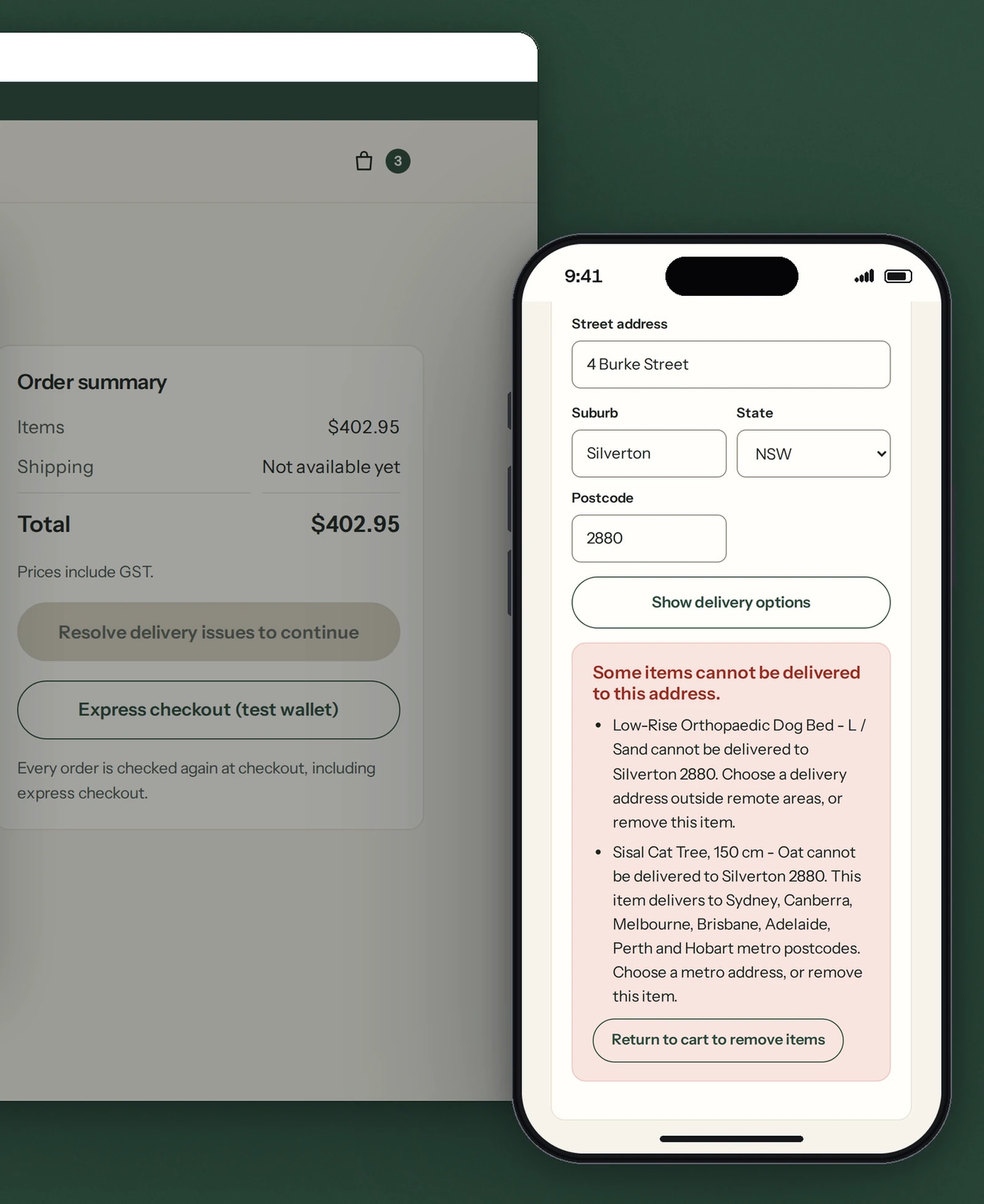
Checkout checks the address again
A test-mode stand-in that takes no payment. It checks every item against the address again, so an express wallet cannot skip the rule.
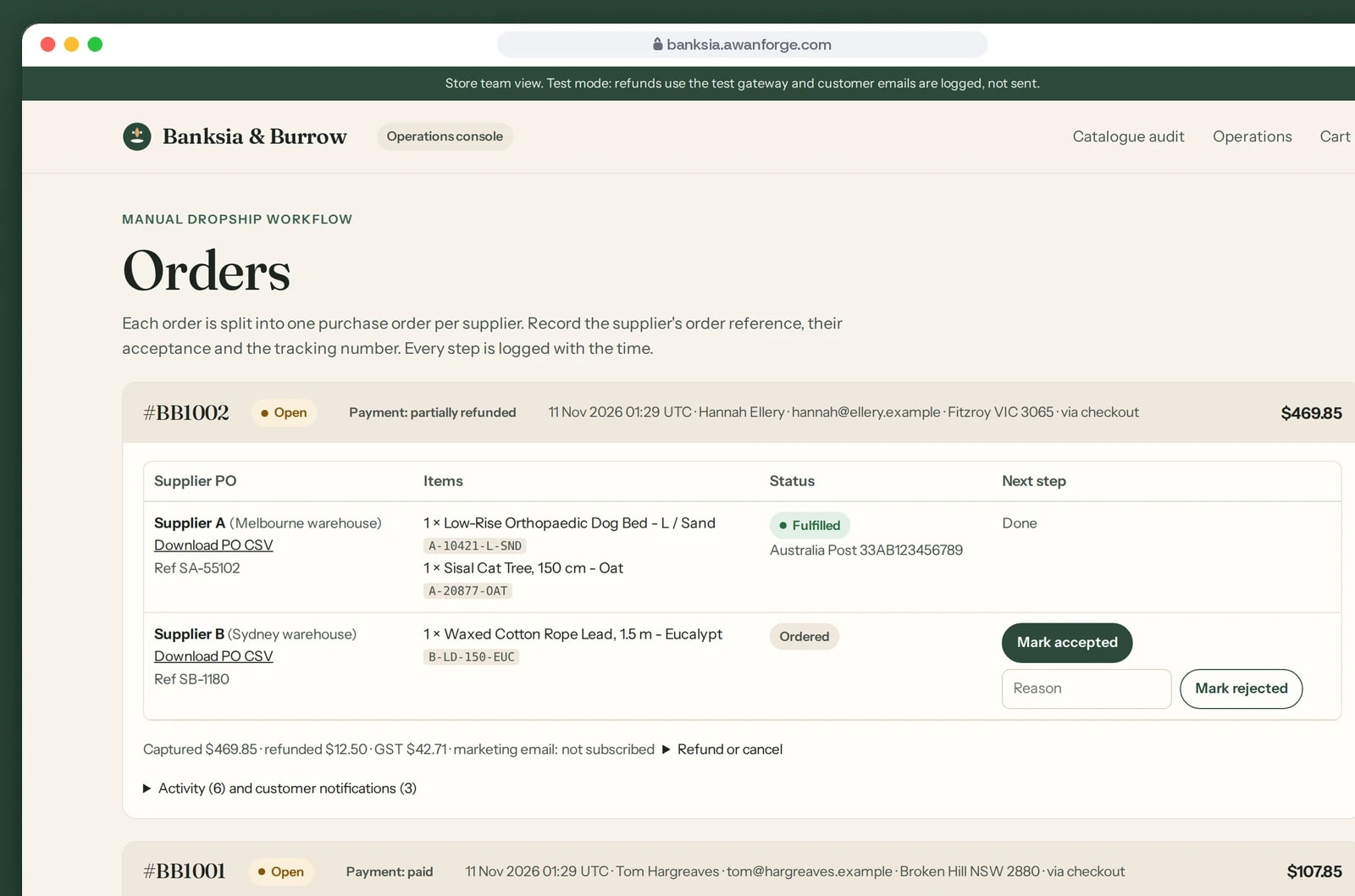
Supplier orders, tracking and refunds
One purchase order per supplier. Staff record the supplier’s reference, its acceptance and the tracking number, and can issue a test refund.
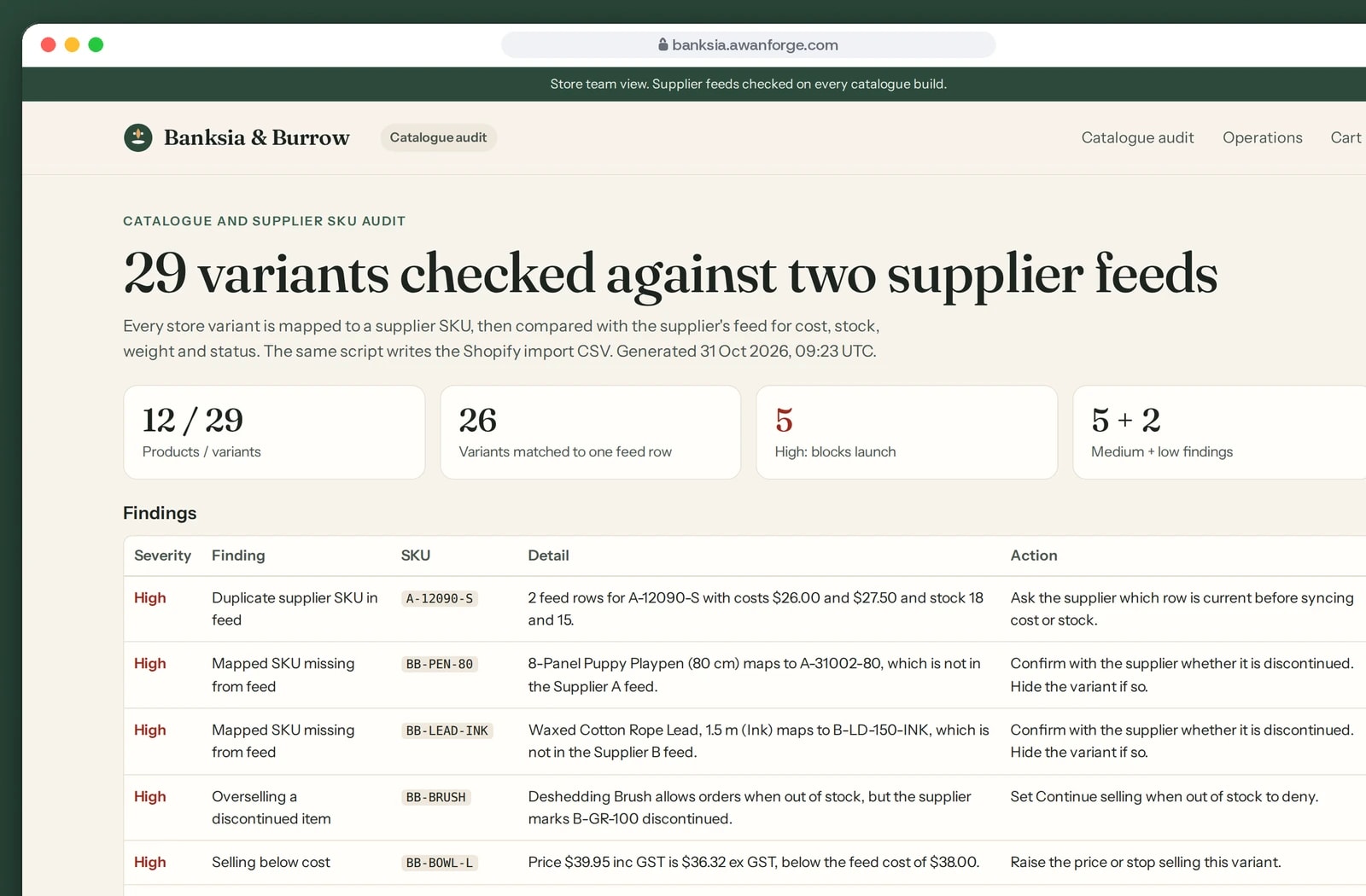
The catalogue checked against supplier feeds
A script compares all 29 variants with two sample supplier feeds and lists faults by severity, from a duplicate code to a price below cost.


A delivery answer before the cart
Every restricted product carries its limit as a label, such as Metro delivery only. The shopper types a suburb and postcode and gets a yes, or a no with the reason and the way out.
Sizes, stock and sold-out options
Choosing a size and cover updates the price, the stock line and the SKU, and writes the choice into the address so a refresh opens the same option. Low stock shows from three left, the quantity buttons stop at the stock available, and a sold-out option says so and disables the button.
A cart that names the problem
For Silverton 2880 the cart lists the two items that cannot be delivered, keeps the third, and offers two buttons: remove those items or change the address. The checkout button is held until one of them is done.
Two warehouses, one order
Items are grouped by the warehouse they ship from. Each group has its own dispatch time and shipping price, and the summary shows the GST included in the total.
A checkout that cannot be skipped
The checkout reads the cart again on the server, checks the stock and every delivery rule against the address submitted, and only then takes the test payment. Changing the address after shipping is shown hides payment until delivery is checked again.
One order from repeated taps
Each checkout attempt carries its own key. Pressing Pay twice on a slow connection returns the first order and never creates a second.
Supplier orders in a fixed sequence
Every order becomes one purchase order per supplier, downloadable as a CSV. Staff record the supplier’s reference, then its acceptance or rejection, then the tracking number, and each step is logged with the time.
Refunds and cancellations
Staff can refund part or all of a test payment, or cancel an order before anything ships, which refunds it and returns the stock. Customer emails are written to a log and are not sent.
An audit of the catalogue
One script compares the store’s variants with both supplier feeds and reports duplicate supplier codes, items missing from a feed, changed costs and prices below cost. The same script writes the product import file.
Technical choices
What the product is built with, and why.
- Shopify Online Store 2.0 theme format
- The storefront is written as Liquid sections, JSON templates and metafields, and its cart is written for Shopify’s Ajax Cart API and Section Rendering. Shopify’s Theme Check reports no offenses on its 33 Liquid and JSON files. It has not been installed on a Shopify store.
- A small Node server with LiquidJS
- The server renders the theme files as they are and stands in for the Shopify filters and cart endpoints the theme calls. That let us run and test the whole store, cart and checkout included, on our own machine and server.
- One delivery rule module in plain JavaScript
- The rules are pure functions with no network or file access, so the same file runs on the server and is written to be bundled into a Shopify Function.
- Shopify cart and checkout validation Function, as source
- It is written against Shopify’s documented input and output, checks each delivery group against its own address and is unit-tested with input shaped like Shopify’s. It has not been built or run inside Shopify.
- Motion for interface animation
- Motion’s animate function is bundled as one module of about 25 kB compressed and used where a change needs explaining: the cart drawer, the cart count and the delivery result. The theme reads the reduced-motion setting itself and shows the finished state.
- Two typefaces served by the theme
- Fraunces sets the headings and Instrument Sans the interface text. Each is one variable font file under the SIL Open Font License, so no font is fetched from another site.
- Node’s test runner and Playwright
- Unit tests cover the rule engine, the Function and the checkout gate. A Playwright script drives the store in a browser at desktop and phone sizes, including the attempts to get past the delivery rules.
- nginx and Let’s Encrypt on our server
- The live copy runs behind nginx over HTTPS, with a limit of 10 requests a minute on checkout and staff sign-in. It is served with a noindex header because the store is fictional.
Outcomes
31 of 31 unit tests passing
The tests cover the delivery rules, including a metro-only item, two suburbs on one postcode and addresses that cannot be confirmed, the Shopify Function on sample input in Shopify’s format, and the checkout refusing a restricted address sent straight to the server. One test fails if the Function’s copy of the rule engine differs from the original.
Evidence: npm test in the project, rerun on 11 November 2026 with no failures. The first recorded run is evidence/unit-results.txt.
50 of 50 browser checks passing
A scripted browser walked the store at 1440 by 900, at 390 by 844 with touch, and with reduced motion: variants and stock, the delivery checks, the mixed cart, the test payments, the staff console and the audit. A restricted address typed into the checkout, an express wallet set to Alice Springs 0870 and a request sent straight to the server were each refused. Real iPhone and Android devices were not tested.
Evidence: evidence/test-report.md in the project, last run on 31 October 2026 and not rerun for this page.
Theme Check: 33 files, no offenses
Shopify’s own checker for theme code inspected the theme’s 33 Liquid and JSON files and reported no offenses. It checks the code against Shopify’s rules. The theme has not been loaded on a Shopify store.
Evidence: the Shopify Theme Check result recorded in evidence/test-report.md, 31 October 2026.
Banksia & Burrow is an Awan Forge work sample and a fictional brand. It is not a trading business and no orders are fulfilled. The products, prices, stock, supplier costs, supplier feeds, delivery rules and the 37 localities are sample data. The checkout is a test-mode stand-in that takes no payment and sends no email. The theme files and the Shopify Function source have not been installed or run on a Shopify store. The product photographs come from Wikimedia Commons under CC0, public domain or CC BY licences and are credited on the store’s terms page.
Selling products that cannot ship everywhere?
We build online stores that apply delivery limits, stock and supplier orders before the customer pays. Tell us what you sell and where it can go.