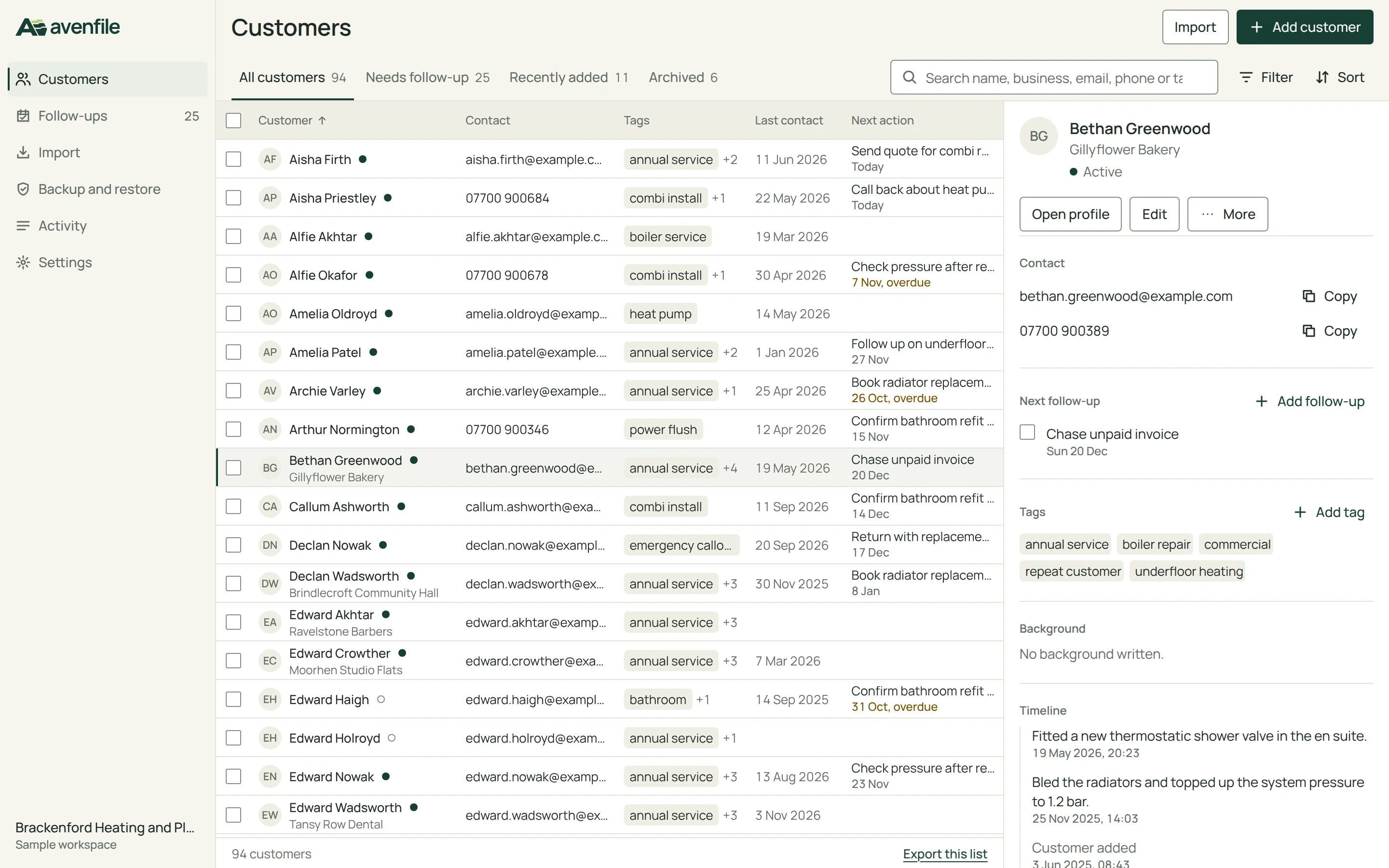
AvenfileA customer-records workspace for independent service businesses, on the desktop and in the browser.
Avenfile is where the owner of a small service business finds a customer, reads what happened last and records the next step. It runs as a native desktop app with an encrypted database on the computer, and in the browser as a private sample workspace.
Avenfile is an Awan Forge product, designed and built by Awan Forge. The desktop app is downloaded from its product page, and the browser app opens a sample workspace for trying it.
A private workspace with sample customers. No account.
Browser
- Type
- Awan Forge product
- Platforms
- Linux desktop, web app
- Our work
- Research, interface design, shared C# core, desktop app, web app and API, testing, packaging, deployment
- Built with
- .NET 10, Avalonia, SQLite, ASP.NET Core, React
- Date
- November 2026
Find a customer, read what happened last, record the next step
An independent service business keeps its own customer records: who the customer is, how to reach them, what was done and what is due next. Avenfile is built around that loop for one person, and the design serves it and nothing else.
We wrote the essential requirements first, then the four things that make the product worth choosing.
Essential
- Easy navigation
- Secure customer storage
- Search and filtering
- Add, edit and delete customers
- Backup and restore
What Avenfile adds
- Fast retrieval
- One search field across name, business, every email address, every phone number and tags.
- Customer timelines
- The application writes an entry when something happens. Nothing is generated to fill it.
- Follow-ups
- Due today, overdue and upcoming, with counts computed from the records each time they show.
- Recovery that can be trusted
- A restore shows what will change, saves a recovery copy first and replaces the data in one transaction.
The first layout, drawn before any interface code
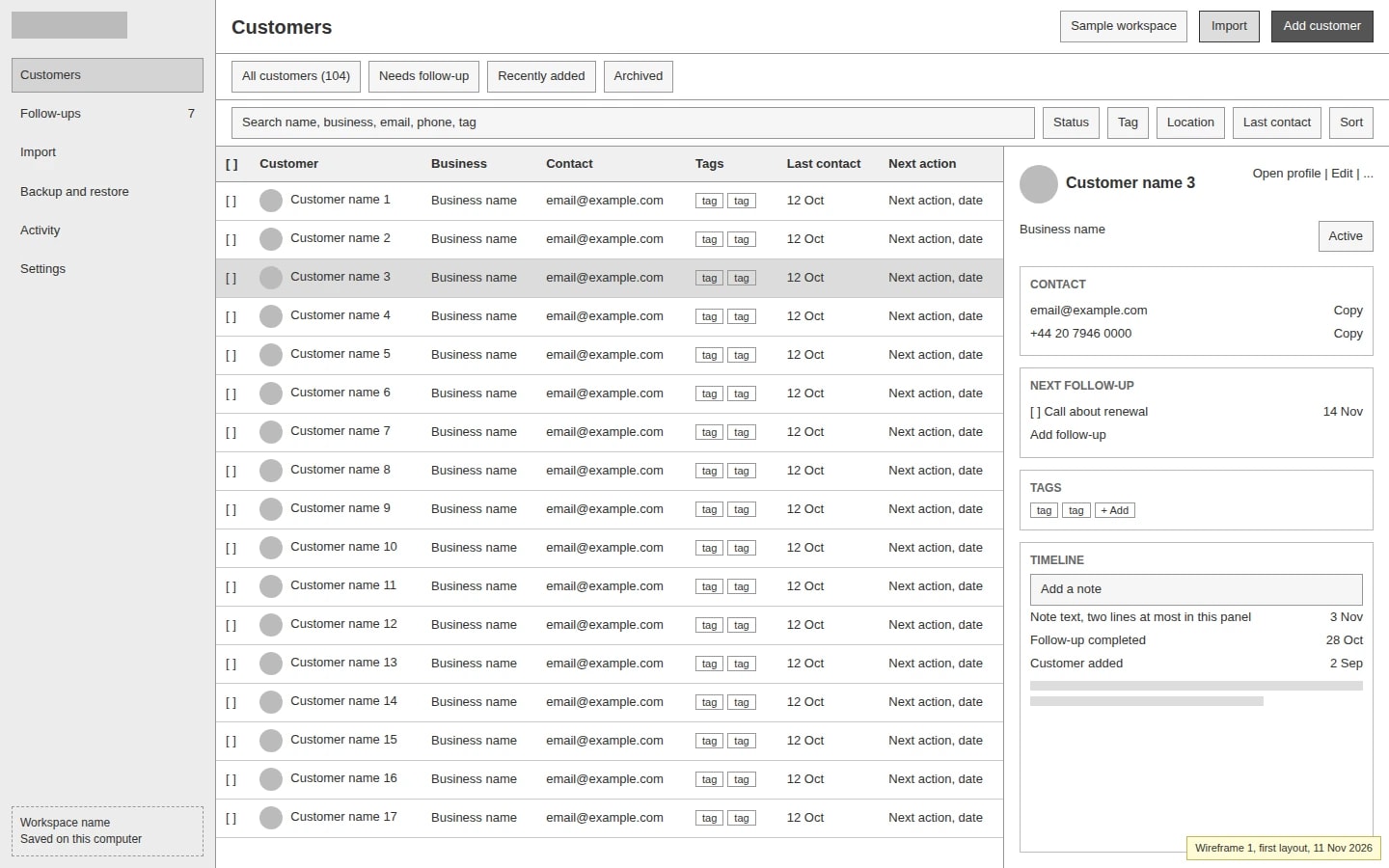
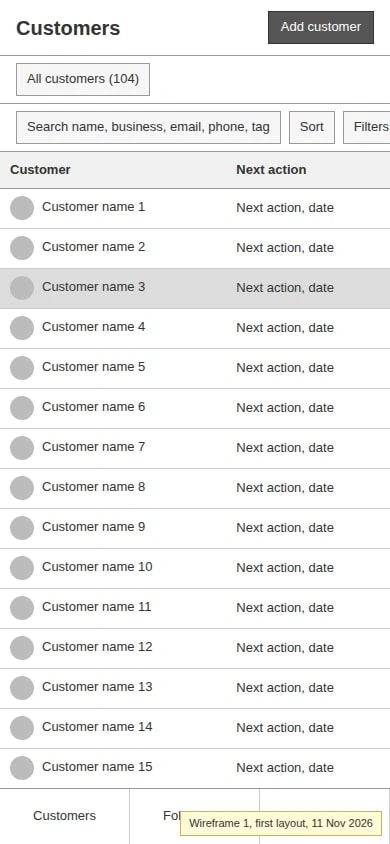
On 11 November 2026 at about 07:53, before the design rules, the tokens or any application code existed, we drew the five main screens as grey boxes in plain HTML and captured them at 1440 and 390 px wide. The files are kept read-only as the record of where the design started. The names in them are placeholders.
The first layout already settled the structure: a sidebar, a list with the current customer in a panel beside it, a separate full profile, and import and restore as steps with a review before anything is written.
First wireframe
Desktop app, Ubuntu
What the first wireframe got wrong
Two toolbar rows became one
Saved views sat on one row, and search with four filter dropdowns on another, all visible at all times. The final design puts them in one 48 px row with the filters behind Filter, which gives the list one more row.
The inspector lost its boxes
Every inspector section had its own outline, so the panel looked heavier than the list it serves. Sections are now separated by space and a single line.
Where the data lives moved to the sidebar
Sample workspace sat in the header beside the actions. The sidebar foot now always names where the data is: Saved on this computer, or Sample workspace.
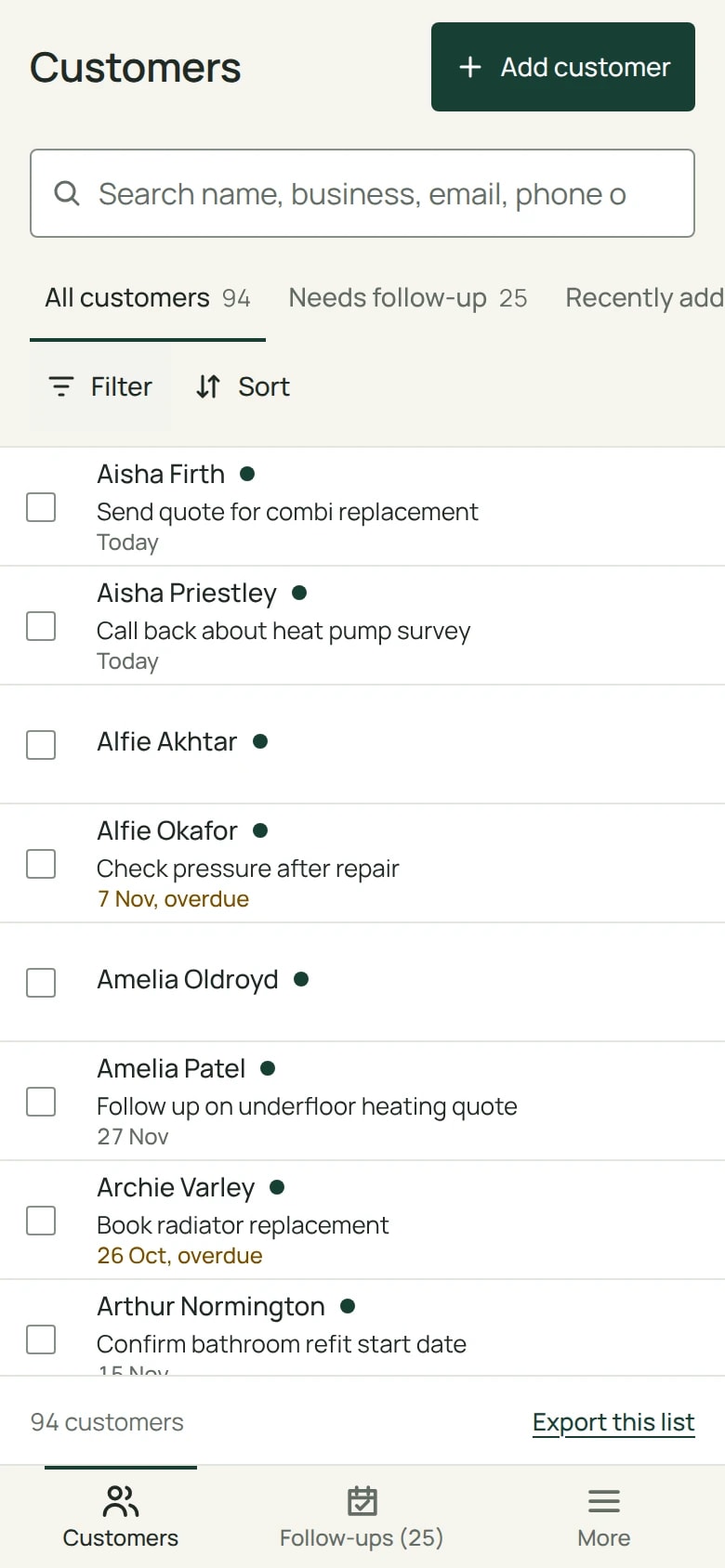
The phone layout stopped clipping
At 390 px the Filters button was cut off at the right edge, and the bottom bar's middle item was covered. The narrow layout gives Filter and Sort a row of their own.
Failures appear where they happen
The backup page listed failure cases in a static box. In the final design each message appears beside the step that failed.
Follow-ups open on what is late
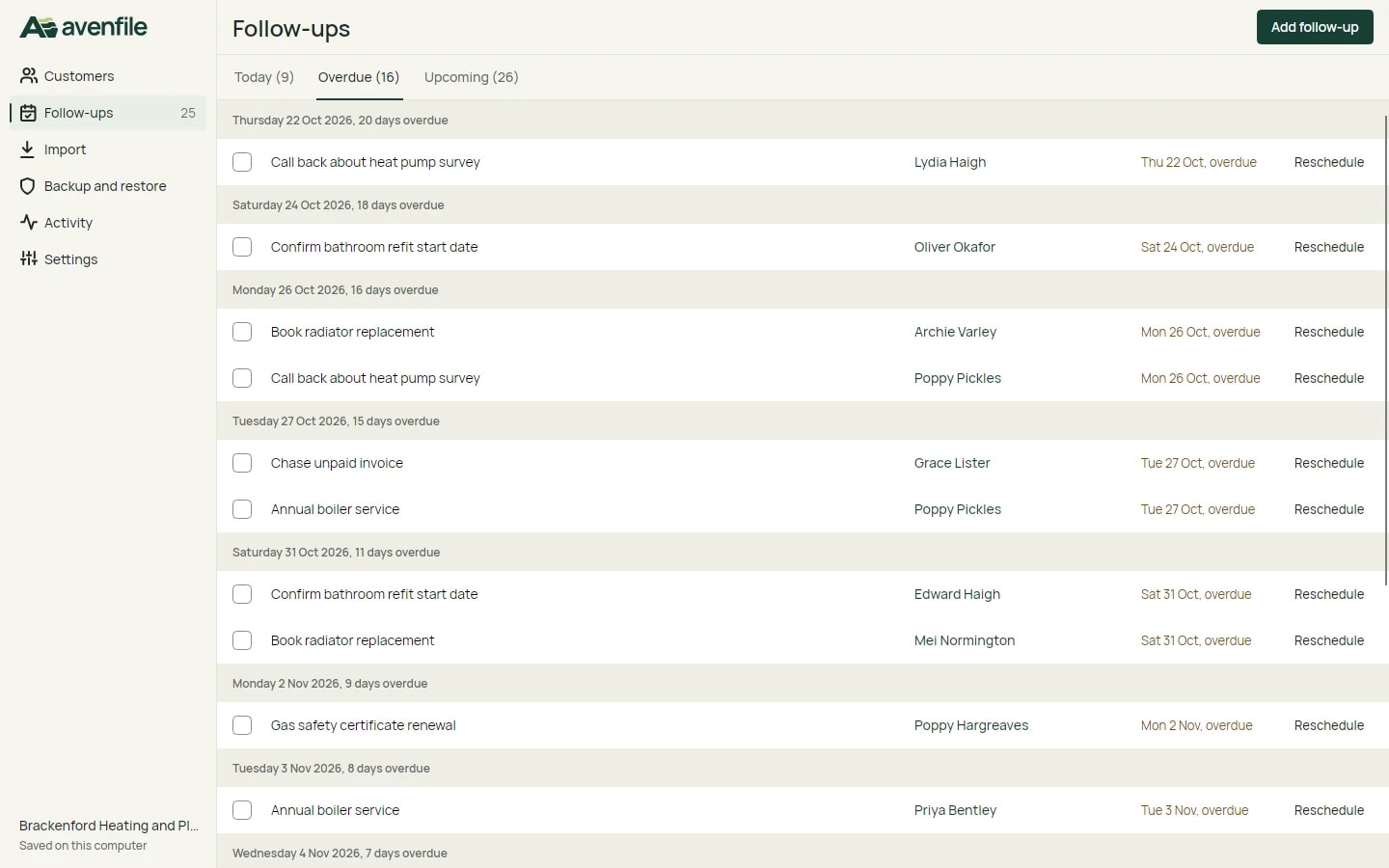
The tabs showed counts without saying which opens first. The screen opens on Overdue whenever it has any.
First wireframe
Browser
Six design rules, each with a source and a check
Before implementation we wrote six principles, each from a source we read, turned into rules for this product and into a check a tester can run. One check per principle is shown here.
| Principle | Source | One of its checks |
|---|---|---|
| One quiet frame, content first | Saarinen and Gillet, “How we redesigned the Linear UI (part II)”, Linear, 2024 | On Customers at 1440 x 900 with one row current, exactly three elements use the accent as a fill: Add customer, the navigation marker and the row marker. |
| Show the common things, disclose the rest on request | Jakob Nielsen, “Progressive Disclosure”, Nielsen Norman Group, 2006 | With no filter set, the toolbar holds exactly three controls besides the saved views. |
| The system always says what state it is in | Nielsen's heuristic 1, Visibility of System Status | Import a file of N rows: imported, skipped and with problems add up to N. |
| Recognise, do not recall | Nielsen's heuristic 6, Recognition Rather than Recall | Search, set two filters, sort, open the 30th row's profile and go back: all of it is unchanged and the row is in view. |
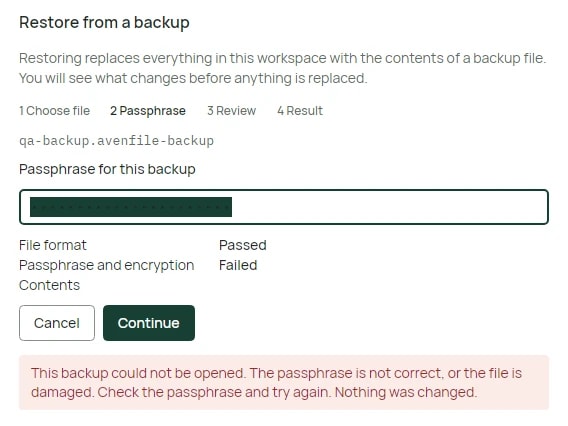
| Prevent the mistake, and make the rest reversible | Nielsen's heuristic 5, Error Prevention | A restore with a wrong passphrase leaves the customer count identical, and the message ends with “Nothing was changed.” |
| Everything works from the keyboard and is readable | W3C, WCAG 2.2 | Muted text measures at least 4.5:1 on canvas, surface, row hover and the current row (computed 5.00, 5.45, 4.93 and 4.66). |
A change made after looking at the real screen
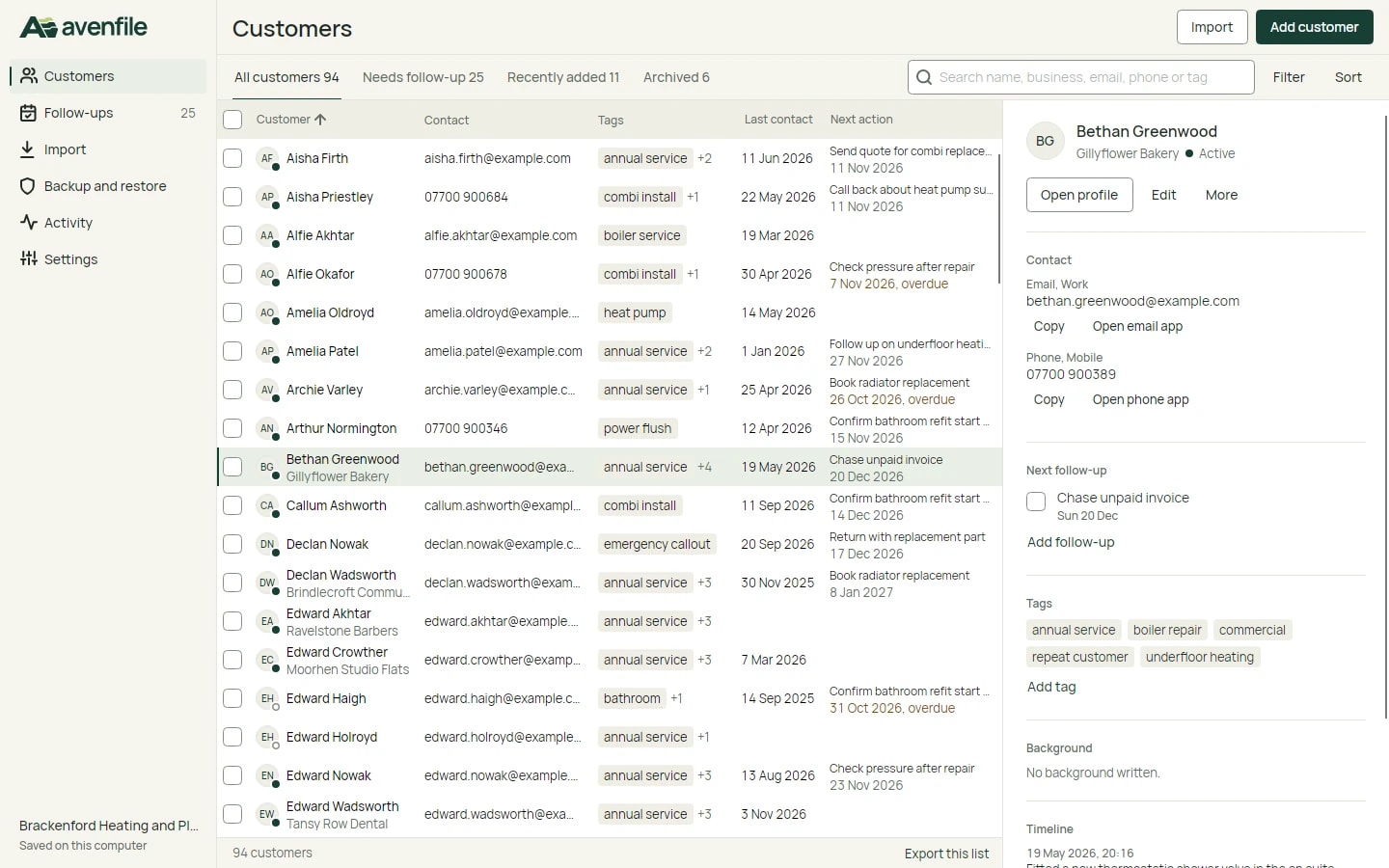
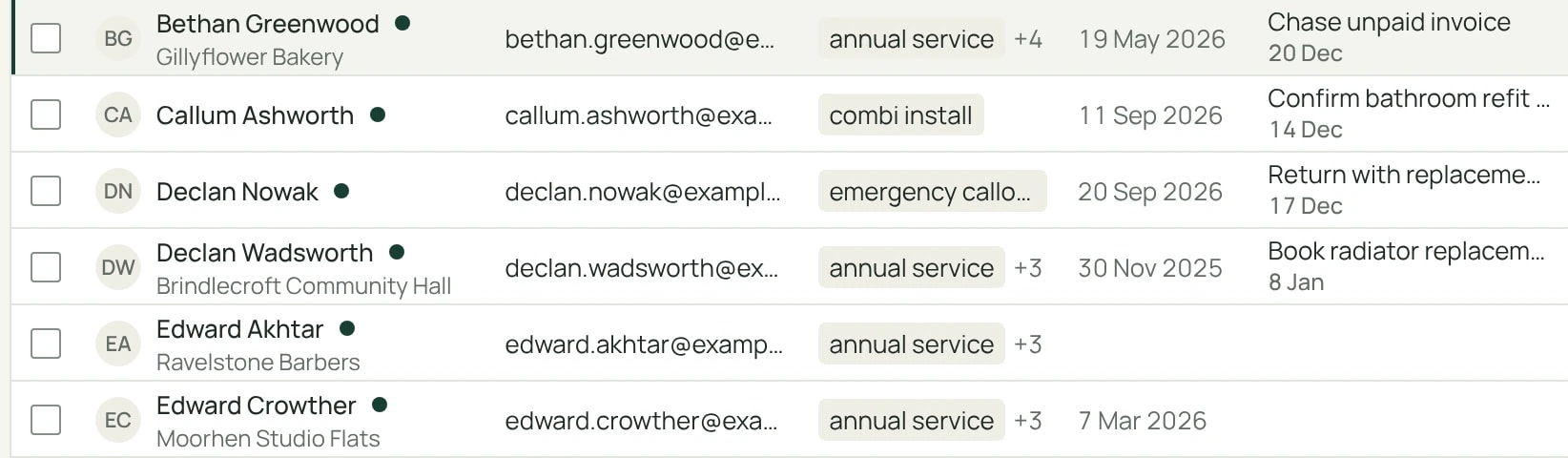
At 1440 px with the inspector open, the list is about 816 px wide. With six columns, customer names and tags were cut short. Below 900 px of list width, the business now moves under the customer name, in both apps, and the Business column is not drawn.
816 px
list width at 1440 px with the inspector open
900 px
list width below which the business moves under the name
Browser
What we borrowed, and what we left
We opened three interface references and two motion references in a real browser window, and wrote down for each what Avenfile takes as an idea and what it leaves alone.
| Reference | Borrowed | Left out |
|---|---|---|
| Behance, “CRM Client Management & Billing Dashboard” by Monil Soni | The list comes first; search and filters share one toolbar row; status is a dot plus a word; the list says how many customers it shows. | Pagination, which would lose the current row and scroll position; an eight-step create flow for a small record; billing columns. |
| Attio, public product, help and changelog pages | A record opens beside the list and a full page is one step further, with one structure for both; saved views at the top left; history as a timeline of things that happened. | Configurable objects and columns, enrichment, generated summaries, email and calendar sync. |
| Linear, “How we redesigned the Linear UI (part II)” | The sidebar and header as one quiet frame; every sidebar icon, label and count on one grid; the accent kept out of large surfaces. | Header tabs, a custom theme generator, and the density of a tool for all-day keyboard users. |
| HoneyQuote, motion study | The browser's own scrolling, content readable at once, control feedback no longer than 200 to 270 ms. | Transitions on every property, and a slow-start curve for feedback. |
| Clinia, motion study | One product walkthrough with numbered, labelled steps, and a reduced-motion path that removes entrance animation. | A script that remaps the wheel and pins the page, a first second and a half with nothing to read, endless decoration. |
Motion with three jobs
Motion confirms that input was received, shows where something came from, and marks a change of step. Feedback lasts 120 to 220 ms and starts fast. The only movement is 8 px, when the inspector first appears; moving between rows changes its content with a short fade. With reduced motion requested, every view swaps at once, and the interface works the same with all motion switched off.
Not inspected
- The signed-in Attio and Linear applications. Everything about them comes from public pages.
- Awwwards galleries, used only to find sites. A listing there is not treated as proof of anything.
- w3.org in the scripted browser, which returned status 403. The WCAG text was read through a fetch and the criterion source files.
- Behance projects module by module. Each was viewed as a first screen and four or five scrolled frames, two at reduced size.
- Hover animations on the motion references. Declared styles were read; no hover change was seen.
Finding a customer, and keeping your place
From the keyboard, a customer that three letters identify is found and opened in six key presses: the slash key, three letters, Down and Enter. Going back to the list shows it exactly as it was left.
- Search
- One field matches name, business, every email address, every phone number and tags. Phone matching ignores spaces and punctuation, so 0207946 finds 020 7946 0018. An older answer never overwrites a newer one.
- Saved views
- Four fixed tabs, always visible, each with its count: All customers, Needs follow-up, Recently added and Archived.
- Filters
- Status, tag, location and last contact, behind Filter. Each filter that is set becomes a chip that names its value and can be removed.
- Inspector and profile
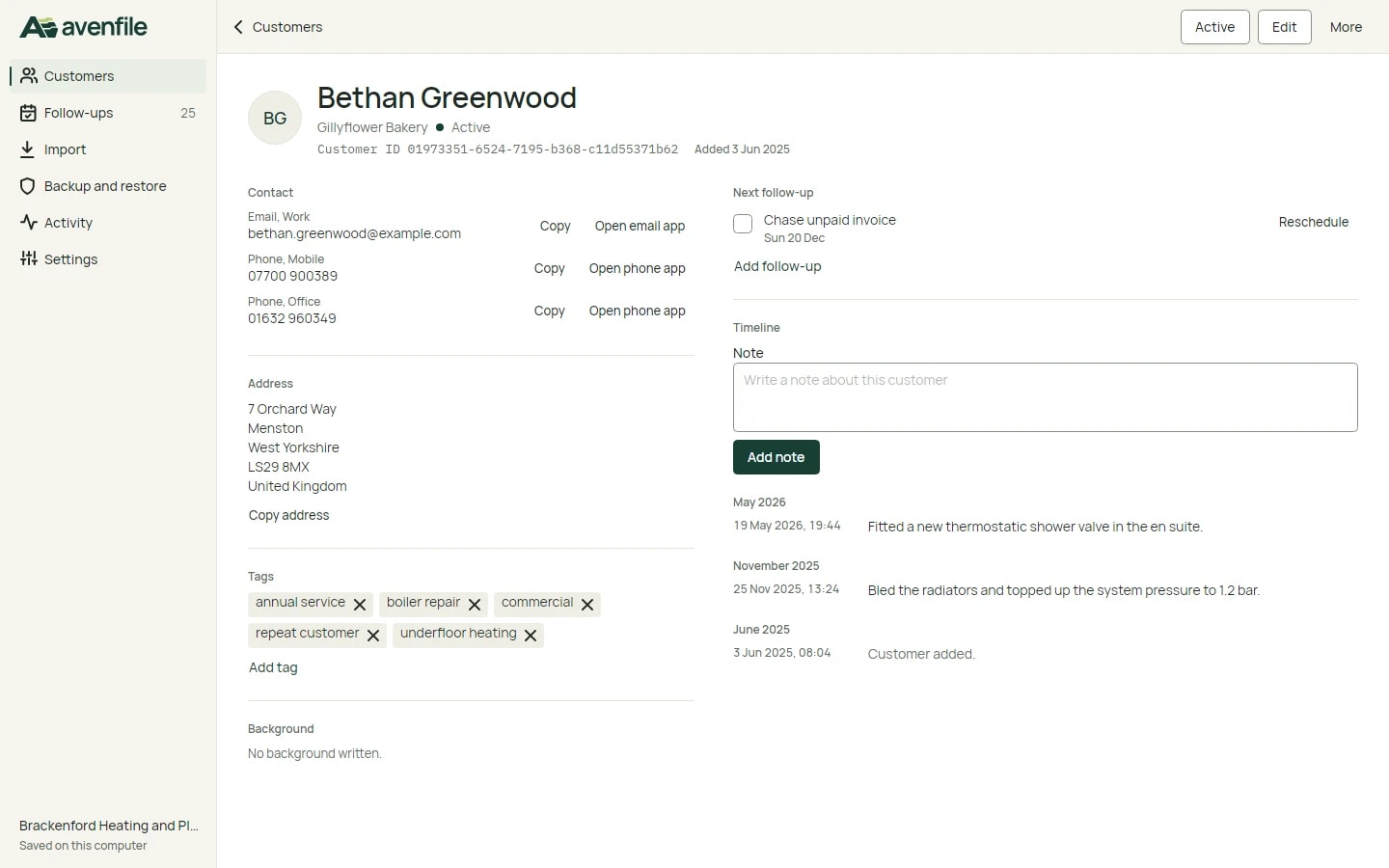
- A click or an arrow key makes a row current and shows it beside the list. Enter opens the full profile with every stored field.
- Timeline
- Notes, edits, imports, archiving and completed follow-ups, written when they happen, with their date and time.
- Follow-ups
- Today, Overdue and Upcoming. Completing one writes a timeline entry, sets last contact to today and offers Undo for 8 seconds.
| State | Browser | Desktop |
|---|---|---|
| Saved view, search, filters, sort, current customer | In the URL, so refresh, Back, Forward and shared links restore them | Kept for the session; saved view and sort also survive a restart |
| Scroll position of the list | Session storage, restored after a refresh and on return from a profile | Restored on return from a profile |
Desktop app, Ubuntu
Desktop app, Ubuntu
One C# core, and one SQLite file per workspace
Domain rules, use cases and storage live in a shared C# core. The Avalonia desktop app and the ASP.NET Core API both reference it and never each other, so validation, search, import, backup and restore are the same code in both apps.
A workspace is a single SQLite file with one schema. No table carries a tenant column, so no query can reach another workspace by forgetting a filter, and deleting a workspace deletes one file. We rejected one shared database with a workspace column on every table: every query would need a filter, and expiry would be a delete across many tables.
Shared C# core
- Domain
- Application
- Infrastructure
Validation, search, duplicates, CSV import, backup, restore, follow-up counts
Avenfile.Desktop, Avalonia
workspace.db on this computer, encrypted
Avenfile.Api, ASP.NET Core
One .db file per sample workspace
React app in the browser calls the API with a same-origin session cookie
Encrypted .avenfile-backup file, written and read by the same code, moves both ways
On the desktop
The workspace file is encrypted with SQLite3 Multiple Ciphers under a random 256-bit key. On Linux the key is held by the system keyring, or in a key file only its owner can read when no keyring answers. The Windows build protects it with Windows DPAPI.
In the browser
Opening the app gives each visitor a private workspace file, found from an HttpOnly session cookie. The server keeps only a hash of the token. No endpoint accepts a workspace id: the workspace is resolved from the session for every request, including export, backup and restore. There is no sync between the two.
Import, backup and restore: review first, then write
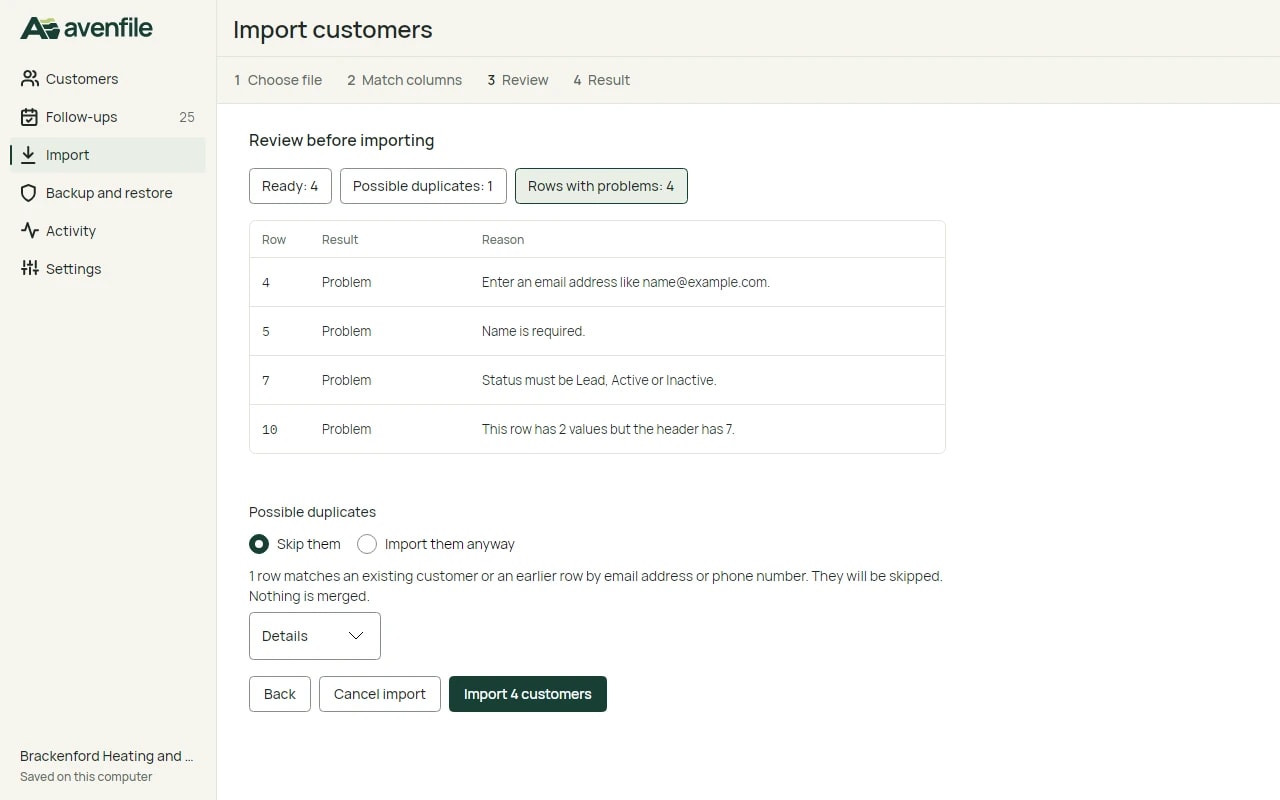
Import never merges customers. Its review step lists the rows that are ready, possible duplicates by email address or phone number, and rows with problems, before anything is written.
Desktop app, Ubuntu
The backup file
A backup is one file: the word AVENFILE, a format version, a header and the ciphertext. The key comes from the person's passphrase, at least 12 characters, through PBKDF2-HMAC-SHA256 at 600,000 iterations with a random salt, and the data is sealed with AES-256-GCM. The passphrase is never stored.
Inside is a logical export of the customers, contact methods, tags, timeline and follow-ups. It carries no session token, workspace id or server path, so the same file restores on the desktop and in the browser. A new backup is decrypted and checked again before it is written.
600,000
PBKDF2-HMAC-SHA256 iterations
256-bit
AES-GCM key
Desktop app, Ubuntu
Restore, staged
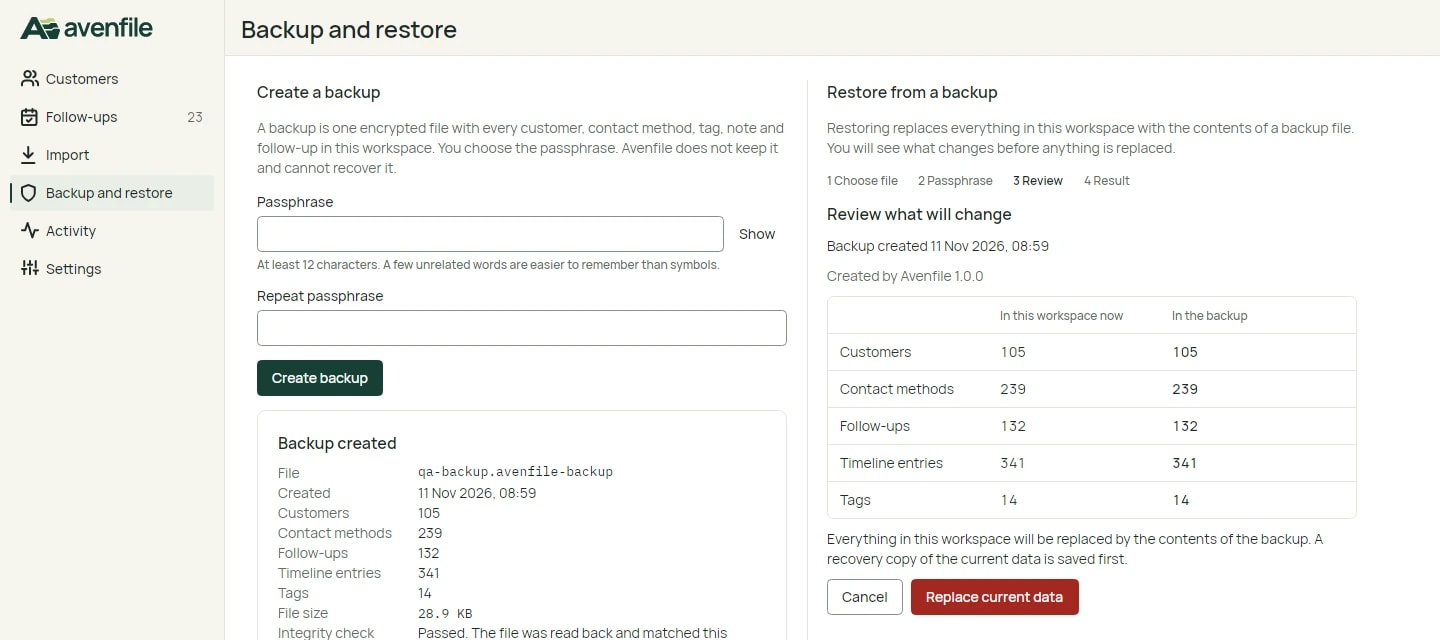
- Read the header, and refuse an unknown format or version.
- Derive the key and decrypt. A wrong passphrase or a damaged file fails the AES-GCM tag check.
- Decompress with a size cap, check the schema version and the hash of the data, and check every record with the same rules as typing it in.
- Show what will change: the backup's date and counts beside the current workspace.
- On confirmation, save a recovery copy with SQLite's online backup, then replace the data in one transaction.
When it fails
- Wrong passphrase, or a changed byte
- “The passphrase is incorrect or the file is damaged.” Nothing changes.
- A truncated file, or one that is not an Avenfile backup
- Refused. Nothing changes.
- A format version this build does not know
- Refused with a clear message. Nothing changes.
- The replacing transaction fails
- It rolls back, and the recovery copy remains.
Desktop app, Ubuntu
What we ran, on 11 November 2026
51/51
automated .NET tests passed
3.21 ms
per search, averaged over 50 warm runs (conditions below)
| Check | What it covered | Result |
|---|---|---|
| Automated .NET tests on Ubuntu 24.04 | 28 core, 19 API and 4 desktop headless tests on real SQLite files: CSV with malformed and duplicate rows, a backup round trip, a wrong passphrase, a flipped byte, a truncated file and a bad header each leaving the data unchanged, and two sessions kept apart across export, backup, restore and recovery copies. | 51 of 51 passed |
| Browser journey against the production build and a real API | Add, search, edit, archive and undo, export, back up, a wrong passphrase refused, restore, reload; and two visitors given separate workspaces. | 2 of 2 passed |
| Live site, checked from outside | Pages and security headers, and the same API journey in a throwaway sample workspace that was then deleted. | Passed |
| Desktop app in its real window, Ubuntu 24.04 on a virtual display | First run, search, add with validation, archive and delete with undo, completing a follow-up, CSV import with malformed and duplicate rows, a backup through the save dialog, a wrong passphrase refused, restore, and a restart with the data kept. | Passed |
| Linux packages | The packaged build was started from its archive. The .deb package was installed on Ubuntu 24.04 and the installed app started. | Passed |
| Accessibility, automated | axe-core with the WCAG 2.2 AA rules on 10 web screens in both themes. Contrast ratios for every text and background pair are computed in the design document. | No violations |
Search was measured once: 3.21 ms per query averaged over 50 warm runs on the 100-customer sample set, for a search plus a location filter plus a tag filter, in a Debug build.
Known limits
- The Windows package is cross-built on Linux and published; it has not been run on Windows yet, so the Windows key store, file dialogs and window are unverified there.
- Not tested on real phones, in Safari or Firefox, or with screen readers.
- The browser workspace is for sample data. It is deleted 7 days after its last use, and it is not encrypted at rest on the server: access is limited to the service account.
- The desktop packages are unsigned.
- The API runs on a single host, and SQLite allows one writer at a time per workspace file.
- With a locked system keyring, the desktop error names a missing key file, which is misleading.
How we work
Avenfile shows the order we work in: requirements and a first layout before any code, design rules that each come with a check, one core shared by both apps, and tests that run against real files. What we have not tested yet is written down beside what we have.
Sample customers in a private workspace, deleted 7 days after your last visit.